Dell Networking SONiC 기본 액세스 목록의 샘플 구성
Summary: 이 문서에서는 예를 들어 Dell Networking SONiC의 특정 서브넷에 대한 트래픽을 차단하도록 기본 ACL(Access Control List)을 구성하는 방법에 대해 설명합니다.
This article applies to
This article does not apply to
This article is not tied to any specific product.
Not all product versions are identified in this article.
Instructions
필수 구성 요소개념을 설명하기 위해 표준 인터페이스 이름 지정을 사용하고 있습니다. Dell Networking S-Series: 문서를 참조하십시오. 기본 인터페이스 구성 - SONiC 4.0 을 참조하십시오. 인터페이스 이름 지정에 관한 자세한 내용 |
인덱스
목적
이 기사에서는 액세스 목록의 기본 응용 프로그램을 보여줍니다. Green과 RED라는 두 개의 서버 팜이 있다고 가정해 보겠습니다.
10.0.0.0/24 서브넷에서 Eth 1/1 인터페이스로 들어오는 트래픽이 RED(50.0.0.0/24)에 대한 액세스를 거부하도록 허용해야 합니다. 다른 모든 트래픽이 허용되어야 합니다.
위상수학
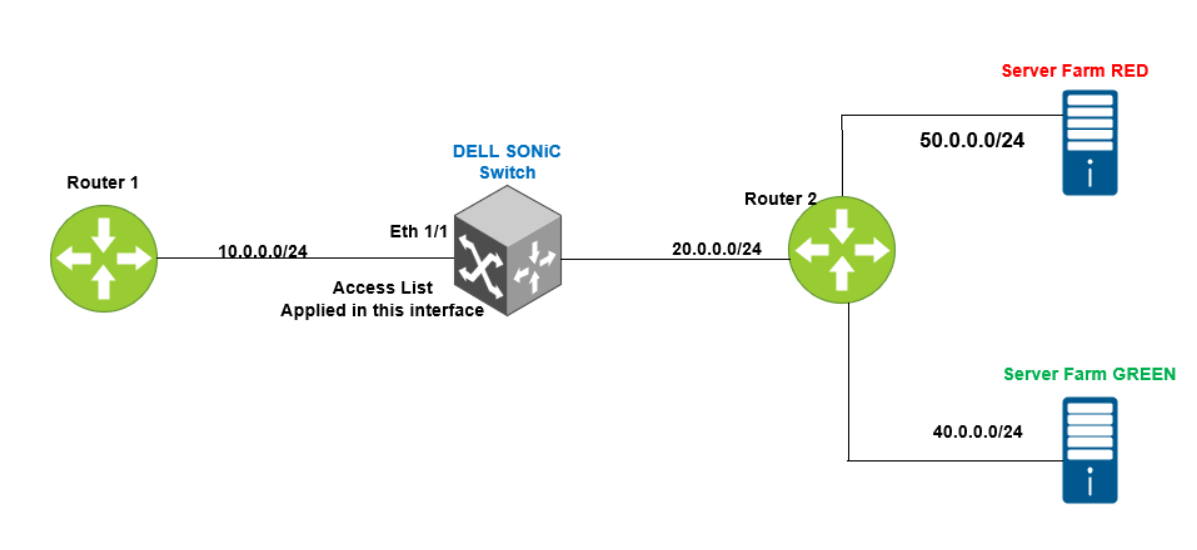
명령 구문
IPv4 액세스 목록 구성 구문
admin@DELLSONiC:~$ sonic-cli
DELLSONiC# configure
DELLSONiC(config)# ip access-list {access-list-name}
DELLSONiC(conf-ipv4-acl)# seq {1-65535} {permit | deny | discard |transit | remark description } {ip | ip-protocol} {any | host source-ip-address [/source-ip-prefix-len]} {any | host dest-ip-address [/dest-ip-prefix-len]} [remark description] |
패킷이 L3 IPv4 액세스 목록의 명령문과 일치하면 다음 작업 중 하나가 수행됩니다.
- 허용 — 패킷이 데이터 플레인에서 전달됩니다. 패킷이 계산됩니다.
- Deny — 패킷이 데이터 플레인에서 삭제됩니다. 패킷이 계산됩니다.
- 전송 — 패킷이 데이터 플레인에서 전달됩니다. 패킷은 계산되지 않습니다.
- Discard — 패킷이 데이터 플레인에서 삭제됩니다. 패킷은 계산되지 않습니다.
인터페이스에서 액세스 목록 적용
admin@DELLSONiC:~$ sonic-cli
DELLSONiC# configure
DELLSONiC(config)# interface {interface}
DELLSONiC(config-if-XXXX# ip access-group {access-lsit} {in/out} |
참고:
액세스 목록을 구성하는 동안 기억해야 할 몇 가지 핵심 사항입니다. 간결하게 하기 위해 ACL 용어를 Access List의 약식으로 사용합니다.
- 비고는 액세스 목록에 설명을 넣는 것입니다. 트래픽에 영향을 미치지 않습니다.
- 액세스 목록은 루프백 IP 주소, 인터페이스 IP 주소, VLAN IP 주소와 같이 스위치로 향하는 트래픽을 필터링하지 않습니다.
- 전역 ACL(특정 인터페이스 또는 인터페이스에 할당되지 않은 ACL)은 스위치 인터페이스에서 브리징되거나 라우팅되는 모든 트래픽을 필터링합니다. 글로벌 ACL은 MAC, IPv4 및 IPv6 규칙을 지원합니다.
- 이더넷 또는 포트 채널 인터페이스에 적용되는 ACL은 L2 및 L3 패킷을 처리하여 ACL의 허용 또는 거부 기준에 따라 패킷을 전달할지 또는 삭제할지를 결정합니다.
- VLAN에 적용된 ACL은 동일한 VLAN 내에서 브리지되거나 VLAN 내부 또는 VLAN에서 라우팅되는 모든 트래픽을 필터링합니다. 브리징된 트래픽과 라우팅된 트래픽 모두에 VLAN ACL을 적용합니다. VLAN ACL은 MAC, IPv4 및 IPv6 ACL을 지원합니다.
- ACL은 번호가 매겨진 첫 항목부터 마지막 항목까지 순차적으로 처리됩니다. 일치하는 항목이 발견되면 더 이상 ACL 처리가 수행되지 않습니다.
- 기본적으로 모든 L2 MAC, IPv4 및 IPv6 ACL의 끝에 deny any 규칙이 포함되어 있습니다. deny any 규칙은 ACL의 이전 허용 또는 거부 항목과 일치하지 않는 모든 트래픽을 삭제합니다.
- ACL의 끝에 permit any 규칙을 추가하여 다른 기준에 의해 거부되지 않은 모든 패킷을 허용합니다.
다음 명령을 사용하여 액세스 목록 구성을 확인합니다.
Show details of all access list in switch DELLSONiC# show ip access-lists |
Show details of specific access list in switch DELLSONiC# show ip access-lists <access-list-name> |
Show details of access list and applied interface DELLSONiC# show ip access-group |
구성
액세스 목록을 구성해 보겠습니다. 비고는 액세스 목록에 설명을 넣는 것입니다. 트래픽에 영향을 미치지 않습니다.
admin@DELLSONiC:~$ sonic-cli DELLSONiC# configure DELLSONiC(config)# ip access-list DENY-RED DELLSONiC(config-ipv4-acl)# remark "DENY IP of RED" DELLSONiC(config-ipv4-acl)# seq 1 deny ip 10.0.0.0/24 50.0.0.0/24 remark "DENY RED" DELLSONiC(config-ipv4-acl)# seq 10 permit ip any any remark "Permit Everything else" DELLSONiC(config-ipv4-acl)# end DELLSONiC# |
이제 인터페이스 Eth 1/1 아래에 액세스 목록을 적용해 보겠습니다.
admin@DELLSONiC:~$ sonic-cli DELLSONiC# configure DELLSONiC(config)# interface Eth 1/1 DELLSONiC(config-if-Eth1/1)# ip access-group DENY-RED in DELLSONiC(config-if-Eth1/1)# end DELLSONiC# |
확인
다음 명령을 사용하여 액세스 목록 구성을 확인합니다.
DELLSONiC# show ip access-lists
ip access-list DENY-RED
  remark "DENY IP of RED"
    seq 1 deny ip 10.0.0.0/24 50.0.0.0/24 (332 packets) [33864 bytes]
      remark "DENY RED"
    seq 10 permit ip any any (0 packets) [0 bytes]
      remark "Permit Everything else"
DELLSONiC#

We can see the packets/bytes is counted when a condition is matched when deny is configured. If we had configured discard, the counters will not increment.
|
DELLSONiC# show ip access-group Ingress IP access-list DENY-RED on Eth1/1 DELLSONiC# |
Affected Products
Enterprise SONiC Distribution, Dell EMC Networking N3200-ON, PowerSwitch S5212F-ON, PowerSwitch S5224F-ON, PowerSwitch S5232F-ON, PowerSwitch S5248F-ON, PowerSwitch S5296F-ON, PowerSwitch Z9100-ON, PowerSwitch Z9264F-ON, PowerSwitch Z9332F-ON
, PowerSwitch Z9432F-ON
...
Article Properties
Article Number: 000222478
Article Type: How To
Last Modified: 17 Jul 2025
Version: 3
Find answers to your questions from other Dell users
Support Services
Check if your device is covered by Support Services.