Dell Unity:Unity NASでのEicarマルウェア テストでネットワーク エラーが発生する
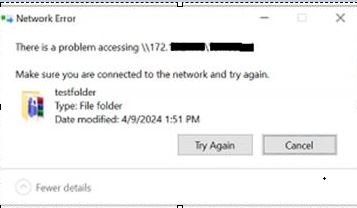
Summary: Unity NASサーバーでEicarマルウェア テストを使用したユーザー テストでは、ネットワーク エラー「\\172.xx.xx.xx\abc (NasIP \testfolder)へのアクセスに問題があります」が表示されています。このエラーはユーザーが修正できます。
This article applies to
This article does not apply to
This article is not tied to any specific product.
Not all product versions are identified in this article.
Symptoms
EICARアンチウイルステストファイルまたはEICARテストファイルは、コンピュータアンチウイルス(AV)プログラムの応答をテストするために、欧州コンピュータアンチウイルス研究所(EICAR)およびコンピュータアンチウイルス研究機構(CARO)によって開発されたコンピュータファイルです
ユーザーは、Sophos Central Intercept X というサードパーティ製の AV エンジンです。
ユーザーは、Sophos Central Intercept X というサードパーティ製の AV エンジンです。
There is a problem accessing \\172.xx.xx.xx\abc  (NasIP \testfolder )
You have received this message because an event that has occurred on your Unity system requires your attention. The alert is:
"The virus checker server 172.xx.xx.xx has encountered an error and is no longer operational.(Error: OFFLINE, httpStatus: 1006 Connection Disconnected)"
The virus checker server 172.xx.xx.xx has encountered an error and is no longer operational.(Error: ERROR_AVINTERFACE)"
"No virus checker server is available."
Cause
このエラーは、サード パーティーのAVソフトウェアとCavaエージェントを実行しているWindows Serverが、アラートの期間中にサービスを提供できなかったことを明確に示しています。Unityアプライアンスが正常に動作している場合、問題はネットワーク停止関連、Windowsサーバーの問題、AVサービス関連の問題である可能性があります。ユーザーまたはWindows管理者は、「Windowsアラート ログ」を調べて明確な根本原因を確認する必要があります。
Resolution
Unityからのトラブルシューティング手順:
- Unityログの場所を検索します。
EMCSystemBackup.log  - cd /EMC/C4core/log/
grep -i infect EMCSystemBackup.log
grep -i blocked EMCSystemBackup.log

c4_safe_ktrace.log – cd /EMC/C4core/log/
grep -i "virus checker" c4_safe_ktrace.log
zgrep -i "virus checker" /EMC/C4core/log/c4_safe_ktrace.log*
Uemcli svc_cava NASサーバー名のサービス スクリプトは、CAVAバージョンとウイルス対策エンジンの名前を提供します。
Nas server name/IP : OV-xx-x-xxx-xx-001/ 172.xx.xx.xx
AV server IP address: 172.xx.xx.xx
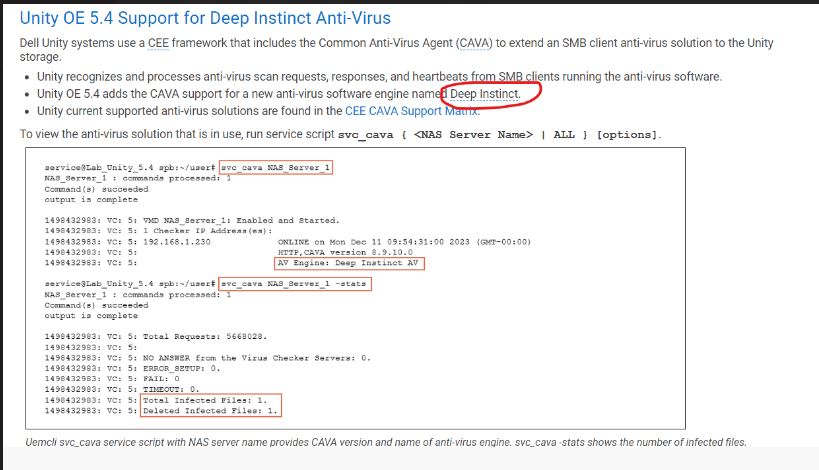
コマンドのリスト:
Command Usage: svc_cava
svc_cava { <NAS_Server_Name> | ALL }
 [-h | --help]
 | <no option>
 | -stats
 | [ -set accesstime={ now | none | [[[[yy]mm]dd]hh]mm[.ss] }]
 | [ -fsscan [<fs_mountpath> { -list | -create | -delete } ]
Example : svc_cava -stats
svc_cava nas1 -stats
svc_cava nas1
コマンドの使用方法:
08:38:39 root@DE4142343780xx spa:/EMC/C4Core/log# svc_cava OV-xxx-x-xxx-xx-001 -stats
OV-xxx-x-xxx-xx-001 : commands processed: 1
command(s) succeeded
output is complete
1712653384: VC: 5: Total Requests: 0.
1712653384: VC: 5:
1712653384: VC: 5: NO ANSWER from the Virus Checker Servers: 0.
1712653384: VC: 5: ERROR_SETUP: 0.
1712653384: VC: 5: FAIL: 0.
1712653384: VC: 5: TIMEOUT: 0.
1712653384: VC: 5:
1712653384: VC: 5: 0 files in the collector queue.
1712653384: VC: 5: 0 files processed by the AV threads.
Command succeeded
- viruschecker.configファイルをダウンロードし、「shutdown=no」または「shutdown=viruschecking」が表示されているかどうかを確認します。
ストレージ>NASサーバー>UnityのUIを開きます > セキュリティ>ウイルス対策>現在の構成の取得(ファイルの表示)
- viruschecker.confの値を更新し(新しい構成のアップロード)、変更を適用します。
# Example: OV-xxx-x-xxx-xx-001
#
masks=*.EXE:*.COM:*.DOC:*.DOT:*.XL?:*.MD?:*.VXD:*.386:*.SYS:*.BIN:*.ppt:*docx:*.rar:*.zip:*.txt
excl=pagefile.sys:*.tmp
# masks=*.RTF:*.OBD:*.DLL:*.SCR:*.OBT:*.PP?:*.POT:*.OLE:*.SHS:*.MPP
# masks=*.MPT:*.XTP:*.XLB:*.CMD:*.OVL:*.DEV
# masks=*.ZIP:*.TAR:*.ARJ:*.ARC:*.Z
addr=172.xx.xx.xx >> AV Server IP address
shutdown=no (update the value to shutdown=viruschecking and upload the viruschecker.conf file to unity GUI)
# Stops SMB/CIFS if no AV machine available.(No Windows clients can access any Unity share)
08:18:51 root@DE414234378xxx spa:/cores/service/user# svc_cava OV-xxx-x-xxx-xx-001
OV-xxx-x-xxx-xx-001: commands processed: 1
command(s) succeeded
output is complete
1712650760: VC: 5: OV-xxx-x-xxx-xx-001: Enabled and Started.
1712650760: VC: 5: 1 Checker IP Address(es):
1712650760: VC: 5: 172.xx.xx.xx                                   ONLINE at Tue Apr  9 08:19:14 2024 (GMT-00:00)
1712650760: VC: 5:                                                HTTP, CAVA version: 8.9.10.0
1712650760: VC: 5:                                                AV Engine: Microsoft Antivirus ( Third party AV Engine )
1712650760: VC: 5:                                                Remediation Window: 30 seconds
1712650760: VC: 5:                                                Server Name: 172.xx.xx.xx
1712650760: VC: 5:                                                Last time signature updated: Tue Apr  9 05:29:36 2024 (GMT-00:00)
1712650760: VC: 5:
1712650760: VC: 5: 15 File Mask(s):
1712650760: VC: 5: *.EXE *.COM *.DOC *.DOT *.XL? *.MD? *.VXD *.386 *.SYS *.BIN *.PPT *DOCX *.RAR
1712650760: VC: 5: *.ZIP *.TXT
1712650760: VC: 5: 2 Excluded File(s):
1712650760: VC: 5: PAGEFILE.SYS *.TMP
1712650760: VC: 5: Share \\ov-yml-p-ser-fs-001.yoma.com.mm\CHECK$.
1712650760: VC: 5: RPC request timeout=25000 milliseconds.
1712650760: VC: 5: RPC retry timeout=5000 milliseconds.
1712650760: VC: 5: High water mark=200.
1712650760: VC: 5: Low water mark=50.
1712650760: VC: 5: Scan all virus checkers every 10 seconds.
1712650760: VC: 5: When all virus checkers are offline:
1712650760: VC: 5: Continue to work with Virus Checking and CIFS.
1712650760: VC: 5: Scan on read disable.
1712650760: VC: 5: MS-RPC User: OV-xxx-x-xxx-xx-001-FS$
1712650760: VC: 5: MS-RPC ClientName: ov-xxx-x-xxx-xx-001.abc
 Command succeeded
この問題は解決され、ネットワークIPを変更した後、CAVAが正常に動作するようになりました。
推奨事項のトラブルシューティング:
- viruschecker.confの設定を確認します。(シャットダウン=ウイルスチェック)
- CAVAサービスがAVユーザー アカウントで実行されていることを確認します。
- インストールされているウイルス対策(Sophos、TrendMicro、McAfeeなど)サービスがローカル システム アカウントで実行されていることを確認します。
-
AVユーザーが各AVサーバーのローカル管理者グループのメンバーであることを確認します。
-
ウイルス対策ソフトウェアとCEEが正しい順序で、最初にCEE、次にウイルス対策ソフトウェアを使用してインストールされていることを確認します
-
CAVAサービスを再起動します
-
AVサーバーを一度再起動します
-
CAVAサーバーにネットワーク インターフェイスが1つだけあることを確認します。
-
クライアント コンピューターにNASサーバーの同じネットワークIPが割り当てられているか、または異なるIPが割り当てられているかをユーザーに確認します(常に同じネットワーク内に配置することをお勧めします)
1712650760: VC: 5:                                                HTTP, CAVA version: 8.9.10.0
1712650760: VC: 5:                                                AV Engine: Microsoft Antivirus ( Third party AV Engine )
ベスト プラクティス:
- ポリシーVirusChecking=Noを設定しないでください。これは、スレッドのブロックにつながる可能性があり、ベスト プラクティスとは見なされません。
- 単一のAVサーバーの使用は推奨されないため、使用しないでください。
- 複数のプラットフォームで単一のAVサーバーを使用しないでください。これは推奨されておらず、サポートされていないと見なす必要があります。
それでも問題が解決しない場合は、サード パーティーのウイルス対策ベンダーのサポートにサポートを依頼する必要があります。
Additional Information
詳細については、次のドキュメントを参照してください。

Affected Products
Dell EMC Unity Family |Dell EMC Unity All Flash, Dell EMC Unity FamilyArticle Properties
Article Number: 000224432
Article Type: Solution
Last Modified: 16 Oct 2025
Version: 3
Find answers to your questions from other Dell users
Support Services
Check if your device is covered by Support Services.