Dell Unity:Unity NAS 上的 Eicar 惡意軟體測試發生網路錯誤
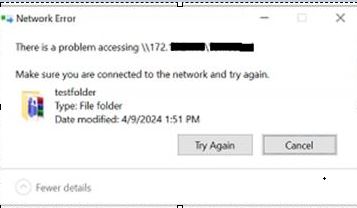
Summary: 使用者在 Unity NAS 伺服器中經過 Eicar 惡意軟體測試,顯示網路錯誤「存取 \\172.xx.xx.xx\abc (NasIP \testfolder) 時發生問題」。此錯誤可由使用者更正。
This article applies to
This article does not apply to
This article is not tied to any specific product.
Not all product versions are identified in this article.
Symptoms
EICAR反病毒測試檔或EICAR測試檔是由歐洲計算機反病毒研究所(EICAR)和計算機反病毒研究組織(CARO)開發的計算機檔,用於測試計算機防病毒(AV)程序的回應。
使用者是 Sophos Central Intercept X 的 AV 第三方引擎。
使用者是 Sophos Central Intercept X 的 AV 第三方引擎。
There is a problem accessing \\172.xx.xx.xx\abc  (NasIP \testfolder )
You have received this message because an event that has occurred on your Unity system requires your attention. The alert is:
"The virus checker server 172.xx.xx.xx has encountered an error and is no longer operational.(Error: OFFLINE, httpStatus: 1006 Connection Disconnected)"
The virus checker server 172.xx.xx.xx has encountered an error and is no longer operational.(Error: ERROR_AVINTERFACE)"
"No virus checker server is available."
Cause
此錯誤清楚地表明,在警報時間範圍內,運行第三方AV軟體和Cava Agent的Windows Server無法提供服務。如果 Unity 裝置在其他方面狀況良好,則問題可能與網路中斷有關或與 Windows Server 相關,或可能與 AV 服務有關。使用者或 Windows 系統管理員必須檢查「Windows 警示記錄」,以找出明確的根本原因。
Resolution
Unity 的故障診斷步驟:
- 在 Unity 記錄位置中搜尋:
EMCSystemBackup.log  - cd /EMC/C4core/log/
grep -i infect EMCSystemBackup.log
grep -i blocked EMCSystemBackup.log

c4_safe_ktrace.log – cd /EMC/C4core/log/
grep -i "virus checker" c4_safe_ktrace.log
zgrep -i "virus checker" /EMC/C4core/log/c4_safe_ktrace.log*
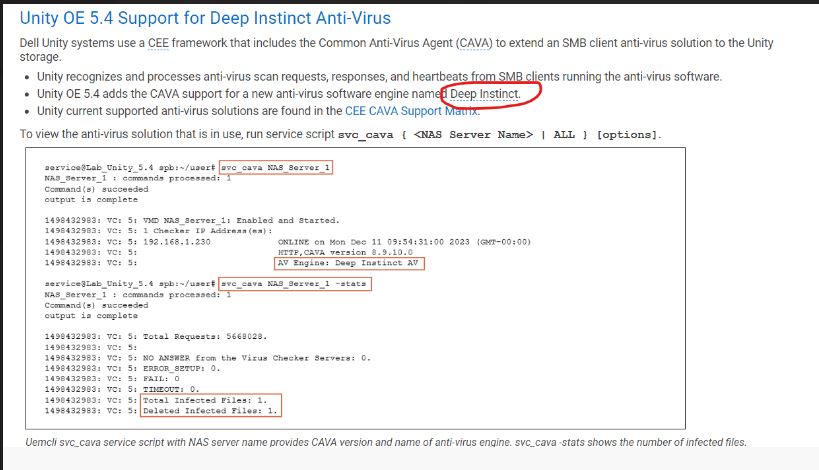
Uemcli svc_cava 含 NAS 伺服器名稱的服務指令檔會提供 CAVA 版本和防毒引擎名稱。
Nas server name/IP : OV-xx-x-xxx-xx-001/ 172.xx.xx.xx
AV server IP address: 172.xx.xx.xx
命令清單:
Command Usage: svc_cava
svc_cava { <NAS_Server_Name> | ALL }
 [-h | --help]
 | <no option>
 | -stats
 | [ -set accesstime={ now | none | [[[[yy]mm]dd]hh]mm[.ss] }]
 | [ -fsscan [<fs_mountpath> { -list | -create | -delete } ]
Example : svc_cava -stats
svc_cava nas1 -stats
svc_cava nas1
命令用法:
08:38:39 root@DE4142343780xx spa:/EMC/C4Core/log# svc_cava OV-xxx-x-xxx-xx-001 -stats
OV-xxx-x-xxx-xx-001 : commands processed: 1
command(s) succeeded
output is complete
1712653384: VC: 5: Total Requests: 0.
1712653384: VC: 5:
1712653384: VC: 5: NO ANSWER from the Virus Checker Servers: 0.
1712653384: VC: 5: ERROR_SETUP: 0.
1712653384: VC: 5: FAIL: 0.
1712653384: VC: 5: TIMEOUT: 0.
1712653384: VC: 5:
1712653384: VC: 5: 0 files in the collector queue.
1712653384: VC: 5: 0 files processed by the AV threads.
Command succeeded
- 下載 viruschecker.config 檔案,並確認是否顯示 shutdown=no 或 shutdown=viruscheck:
開啟 Unity UI>儲存 > 裝置 NAS 伺服器 >安全性>防毒 >軟體 擷取目前組態 (檢視檔案)
- 更新 viruschecker.conf 值 (上傳新組態),並套用變更:
# Example: OV-xxx-x-xxx-xx-001
#
masks=*.EXE:*.COM:*.DOC:*.DOT:*.XL?:*.MD?:*.VXD:*.386:*.SYS:*.BIN:*.ppt:*docx:*.rar:*.zip:*.txt
excl=pagefile.sys:*.tmp
# masks=*.RTF:*.OBD:*.DLL:*.SCR:*.OBT:*.PP?:*.POT:*.OLE:*.SHS:*.MPP
# masks=*.MPT:*.XTP:*.XLB:*.CMD:*.OVL:*.DEV
# masks=*.ZIP:*.TAR:*.ARJ:*.ARC:*.Z
addr=172.xx.xx.xx >> AV Server IP address
shutdown=no (update the value to shutdown=viruschecking and upload the viruschecker.conf file to unity GUI)
# Stops SMB/CIFS if no AV machine available.(No Windows clients can access any Unity share)
08:18:51 root@DE414234378xxx spa:/cores/service/user# svc_cava OV-xxx-x-xxx-xx-001
OV-xxx-x-xxx-xx-001: commands processed: 1
command(s) succeeded
output is complete
1712650760: VC: 5: OV-xxx-x-xxx-xx-001: Enabled and Started.
1712650760: VC: 5: 1 Checker IP Address(es):
1712650760: VC: 5: 172.xx.xx.xx                                   ONLINE at Tue Apr  9 08:19:14 2024 (GMT-00:00)
1712650760: VC: 5:                                                HTTP, CAVA version: 8.9.10.0
1712650760: VC: 5:                                                AV Engine: Microsoft Antivirus ( Third party AV Engine )
1712650760: VC: 5:                                                Remediation Window: 30 seconds
1712650760: VC: 5:                                                Server Name: 172.xx.xx.xx
1712650760: VC: 5:                                                Last time signature updated: Tue Apr  9 05:29:36 2024 (GMT-00:00)
1712650760: VC: 5:
1712650760: VC: 5: 15 File Mask(s):
1712650760: VC: 5: *.EXE *.COM *.DOC *.DOT *.XL? *.MD? *.VXD *.386 *.SYS *.BIN *.PPT *DOCX *.RAR
1712650760: VC: 5: *.ZIP *.TXT
1712650760: VC: 5: 2 Excluded File(s):
1712650760: VC: 5: PAGEFILE.SYS *.TMP
1712650760: VC: 5: Share \\ov-yml-p-ser-fs-001.yoma.com.mm\CHECK$.
1712650760: VC: 5: RPC request timeout=25000 milliseconds.
1712650760: VC: 5: RPC retry timeout=5000 milliseconds.
1712650760: VC: 5: High water mark=200.
1712650760: VC: 5: Low water mark=50.
1712650760: VC: 5: Scan all virus checkers every 10 seconds.
1712650760: VC: 5: When all virus checkers are offline:
1712650760: VC: 5: Continue to work with Virus Checking and CIFS.
1712650760: VC: 5: Scan on read disable.
1712650760: VC: 5: MS-RPC User: OV-xxx-x-xxx-xx-001-FS$
1712650760: VC: 5: MS-RPC ClientName: ov-xxx-x-xxx-xx-001.abc
 Command succeeded
問題已解決,CAVA 在變更網路 IP 後也開始正常運作。
建議故障診斷:
- 確認 viruschecker.conf 設定。(關閉 = 病毒檢查)
- 確認 CAVA 服務正在使用 AV 使用者帳戶執行。
- 確認已安裝的防毒軟體 (Sophos、TrendMicro、McAfee 等) 服務正在使用本機系統帳戶執行。
-
確認 AV 使用者是每個 AV 伺服器上本地管理員組的成員。
-
確認防毒軟體和 CEE 的安裝順序正確,先是 CEE,然後安裝防毒
-
將 CAVA 服務重新開機
-
重新啟動 AV 伺服器一次
-
確認 CAVA 伺服器只有一個網路介面。
-
向使用者確認是否為用戶端電腦分配了相同或不同的 NAS 伺服器網路 IP(始終建議它位於同一網路中)
1712650760: VC: 5:                                                HTTP, CAVA version: 8.9.10.0
1712650760: VC: 5:                                                AV Engine: Microsoft Antivirus ( Third party AV Engine )
最佳實務:
- 請勿設定原則 VirusChecking=No,因為這可能會導致封鎖的執行緒,且不被視為最佳實務。
- 請勿使用單個 AV 伺服器,因為不建議這樣做。
- 請勿將單個 AV 伺服器用於多個平臺,因為不建議這樣做,應將其視為不受支援。
如果問題仍然存在,使用者必須聯絡第三方防毒廠商支援,以取得進一步協助。
Additional Information
請參閱以下文件,以獲得更多資訊:

Affected Products
Dell EMC Unity Family |Dell EMC Unity All Flash, Dell EMC Unity FamilyArticle Properties
Article Number: 000224432
Article Type: Solution
Last Modified: 16 Oct 2025
Version: 3
Find answers to your questions from other Dell users
Support Services
Check if your device is covered by Support Services.