開啟「伺服器管理員」: 未自動清除健全狀況彙總狀態
Summary: 修正錯誤或警告狀況後,Dell Open Server Manager (OSM) 健全狀況匯總仍為嚴重狀態。
This article applies to
This article does not apply to
This article is not tied to any specific product.
Not all product versions are identified in this article.
Symptoms
每當事件記錄警告或嚴重事件時,Dell Open Server Manager (OSM) 健全狀況彙總狀態就會變更為「嚴重」。在最終使用者從 BMC 記錄中刪除完整的事件記錄之前,狀態仍然很嚴重。OSM 不支援刪除個別事件。有時,伺服器識別碼 LED 會保持故障 (琥珀色) 狀態,直到狀態恢復正常。
健全狀況彙總重要範例:
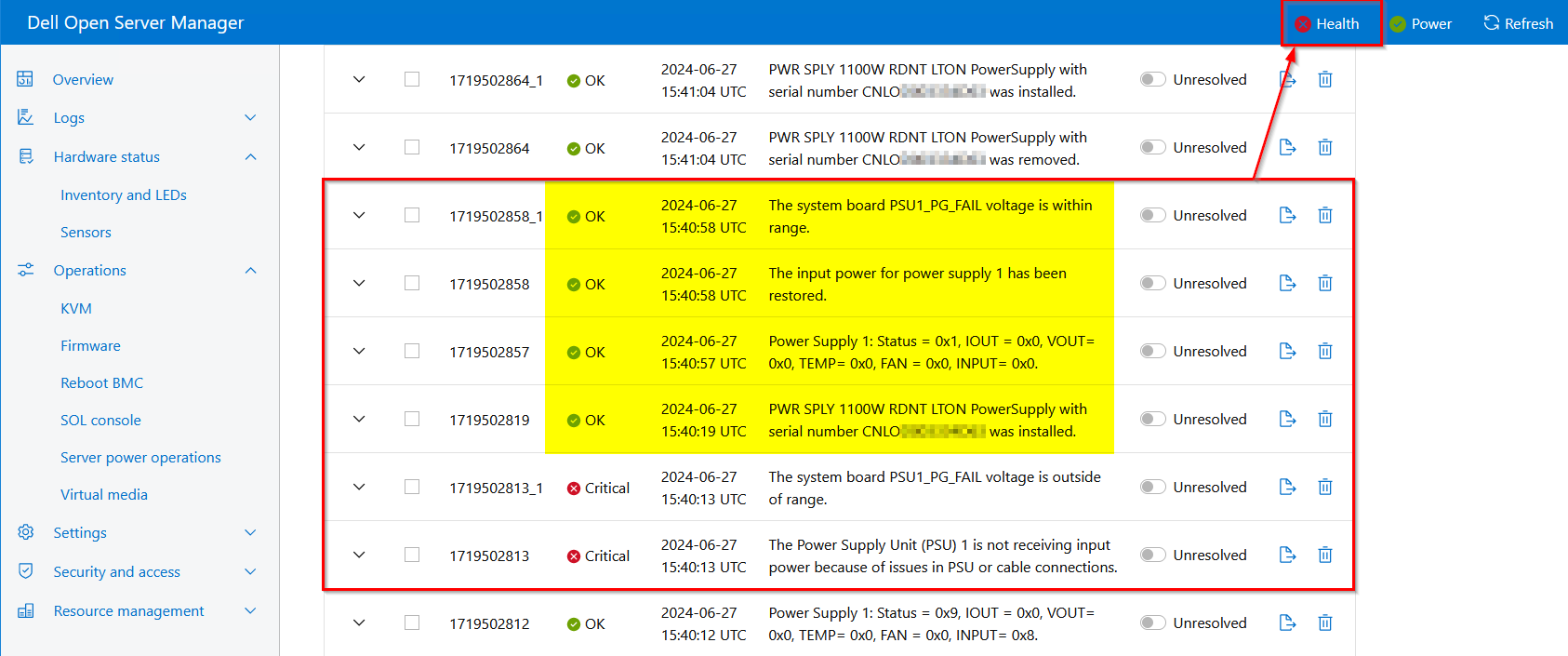
以上摘錄的範例顯示,AC 電源已中斷,並恢復至電源供應器 1。當事件記錄反映輸入電源已恢復時,伺服器運行狀況繼續在頂部功能區中反映嚴重錯誤。健全狀況匯總會持續報告嚴重狀態,直到刪除整個事件記錄為止。
健全狀況彙總重要範例:
以上摘錄的範例顯示,AC 電源已中斷,並恢復至電源供應器 1。當事件記錄反映輸入電源已恢復時,伺服器運行狀況繼續在頂部功能區中反映嚴重錯誤。健全狀況匯總會持續報告嚴重狀態,直到刪除整個事件記錄為止。
Cause
此行為在 OpenBMC 開放原始碼韌體堆疊中為預期動作。若要使伺服器健全狀況恢復正常,終端使用者必須確認錯誤狀況並刪除完整的事件記錄。
Resolution
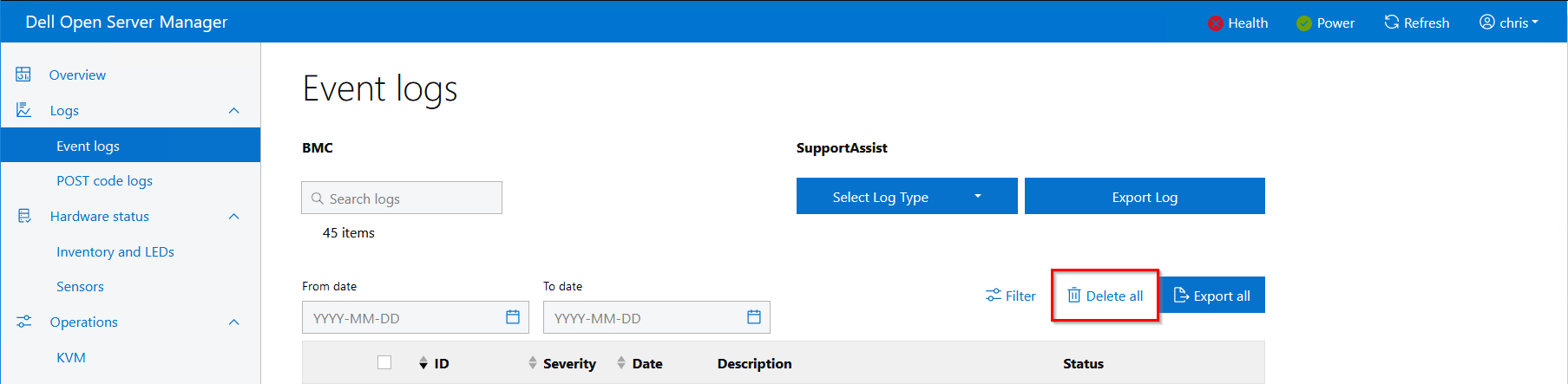
為了補救嚴重狀況,OSM 最終用戶必須刪除完整的 BMC 事件日誌。
便條:建議您在刪除事件記錄之前,先匯出 BMC 事件記錄或匯出技術支援報告 (TSR)。
OSM UI >> 記錄 >> 事件記錄範例:
REDFISH 範例:
便條:建議您在刪除事件記錄之前,先匯出 BMC 事件記錄或匯出技術支援報告 (TSR)。
OSM UI >> 記錄 >> 事件記錄範例:
REDFISH 範例:
POST …/redfish/v1/Systems/system/LogServices/EventLog/Actions/LogService.ClearLog

{
    "@Message.ExtendedInfo": [
        {
            "@odata.type": "#Message.v1_1_1.Message",
            "Message": "The request completed successfully.",
            "MessageArgs": [
            ],
            "MessageId": "Base.1.13.0.Success",
            "MessageSeverity": "OK",
            "Resolution": "None"
        }
    ]
}
Affected Products
Open Server ManagerProducts
PowerEdge R470, PowerEdge R670, PowerEdge R770, PowerEdge R7715, PowerEdge R7725Article Properties
Article Number: 000226514
Article Type: Solution
Last Modified: 28 Jan 2025
Version: 3
Find answers to your questions from other Dell users
Support Services
Check if your device is covered by Support Services.