Dell Networking OS9 如何設定手動 DHCP 繫結或靜態 DHCP 繫結
Summary: 本文說明如何在 Dell Networking OS9 中設定手動動態主機控制通訊協定 (DHCP) 繫結或靜態 DHCP 繫結。
This article applies to
This article does not apply to
This article is not tied to any specific product.
Not all product versions are identified in this article.
Instructions
索引
什麼是手動 DHCP 綁定或靜態 DHCP 綁定?
DHCP 伺服器會自動為用戶端分配一個可用的IP位址,然後在綁定表中創建一個條目。但是,管理員可以為客戶機手動創建條目。當您希望保證網路設備接收特定IP位址時,手動綁定非常有用。
組態
動態集區組態
|
命令 |
說明 |
|---|---|
DELL# configure |
進入組態模式 |
DELL(conf)# ip dhcp server |
進入 DHCP 模式 |
DELL(config-dhcp)# pool <POOL NAME> |
建立 DHCP 集區 |
DELL(config-dhcp-D-POOL)# network <Network/subnet mask> |
指定 IP 位址 |
DELL(config-dhcp-D-POOL)# default-router <Default Router IP> |
指定預設路由器 |
DELL(config-dhcp-D-POOL)# dns-server <DNS server IP> |
指定 DNS 伺服器 |
靜態集區組態
|
命令 |
說明 |
|---|---|
DELL# configure |
進入組態模式 |
DELL(conf)# ip dhcp server |
進入 DHCP 模式 |
DELL(config-dhcp)# pool <POOL NAME> |
建立 DHCP 集區 |
DELL(config-dhcp-S-POOL)# host-address <IP address> |
指定 IP 位址 |
DELL(config-dhcp-S-POOL)# hardware-address <Mac address> |
指定用戶端硬體位址 |
DELLconfig-dhcp-S-POOL)# default-router <Default Router IP> |
指定預設路由器 (選用) |
DELL(config-dhcp-S-POOL)# dns-server <DNS server IP> |
指定 DNS 伺服器 (選用) |
啟用 DHCP 伺服器
|
命令 |
說明 |
|---|---|
DELL# configure |
進入組態模式 |
DELL(conf)# ip dhcp server |
進入 DHCP 模式 |
DELL(config-dhcp)# no disable |
啟用 DHCP 伺服器 |
範例組態
請考慮以下示例,其中 mac 位址為 11:22:33:44:55:66 的用戶端必須從 DHCP 伺服器接收 IP 位址 10.0.0.100。
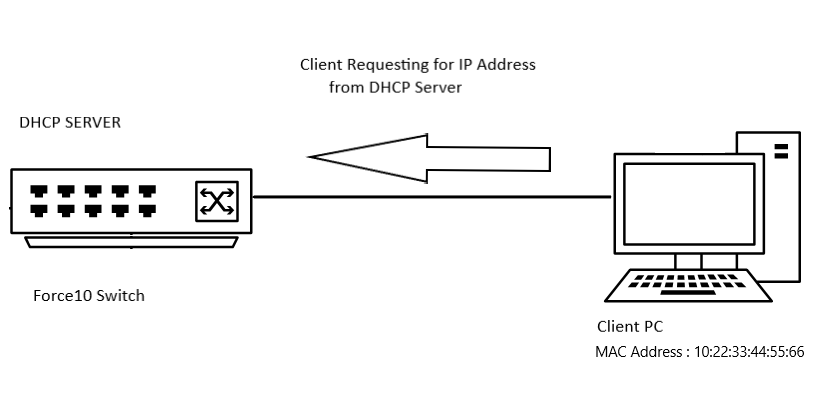
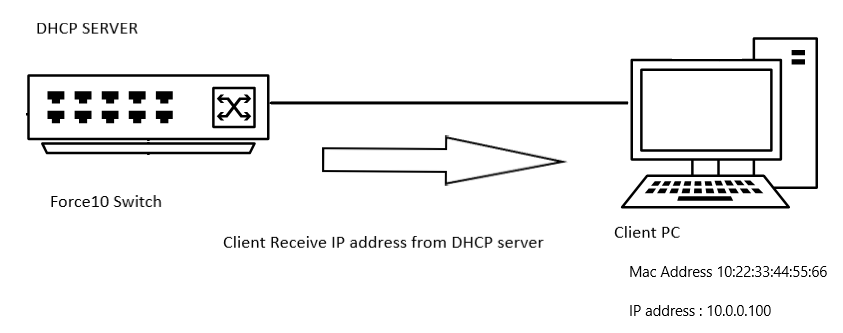
範例組態
DELL# configure
DELL(conf)# ip dhcp server
DELL(config-dhcp)# pool DYNAMICPOOL
DELL(config-dhcp-DYNAMICPOOL)# network 10.0.0.0/24
DELL(config-dhcp-DYNAMICPOOL)# default-router 10.0.0.1
DELL(config-dhcp-DYNAMICPOOL)# dns-server 8.8.8.8
DELL(config-dhcp-DYNAMICPOOL)# exit
DELL(config-dhcp)#

DELL(config-dhcp)# pool STATICPOOL
DELL(config-dhcp-STATICPOOL)# host-address 10.0.0.100
DELL(config-dhcp-STATICPOOL)# hardware-address 10:22:33:44:55:66
DELL(config-dhcp-DYNAMICPOOL)# exit
DELL(config-dhcp)#

DELL(config-dhcp)# no disable
確認
DHCP 組態
若要驗證 DHCP 伺服器組態和集區詳細資料,請使用以下命令:
DELL# show ip dhcp configuration pool
範例輸出
DELL# show ip dhcp configuration  pool

Pool Name            : DYNAMICPOOL
Pool Type            : Dynamic
Domain Name          :
Lease Time           : 1Day 0Hrs 0Mins
DNS Servers          : 8.8.8.8
Default Routers      : 10.0.0.1
Network              : 10.0.0.0 255.255.255.0

Pool Name            : STATICPOOL
Pool Type            : Manual
Domain Name          :
Lease Time           : 1Day 0Hrs 0Mins
DNS Servers          :
Default Routers      :
Hardware Address     : 10:22:33:44:55:66
Hardware Address Type: Ethernet
Host                 : 10.0.0.100 0.0.0.0
繫結
若要驗證 DHCP 伺服器提供的 IP 位址,請使用以下命令:
DELL# show ip dhcp binding

Sample output
DELLEMC#show ip dhcp binding
 IP address      Hardware address   Lease expiration     Type
10.0.0.100      10:22:33:44:55:66    infinite             Manual
Total number of entries in the table: 1
記憶要點
- 您必須在該網路中具有動態集區範圍,靜態集區才能正常工作
- 手動綁定可被視為單主機位址池。手動綁定的數量沒有限制,
- 我們只能為每個主機配置一個手動綁定。
- 請確認我們使用子網路範圍內的有效主機 IP 作為主機 IP。
Affected Products
OS9, PowerSwitch S3048-ON, PowerSwitch S4048-ON, PowerSwitch S4810P, PowerSwitch S4810-ON, PowerSwitch S4820T, PowerSwitch S5000, Dell Networking S3100 Series, PowerSwitch S4048T-ON, PowerSwitch S5048F-ONProducts
PowerSwitch S6000, PowerSwitch S6000 ON, PowerSwitch S6010-ON, PowerSwitch S6100-ON, PowerSwitch Z9100-ON, PowerSwitch Z9264F-ON, PowerSwitch Z9332F-ONArticle Properties
Article Number: 000312772
Article Type: How To
Last Modified: 25 Apr 2025
Version: 1
Find answers to your questions from other Dell users
Support Services
Check if your device is covered by Support Services.