如果计算机不支持动态显示开关,则无法调整 NVIDIA 控制面板显示设置
Summary: 本文提供有关在计算机不支持动态显示切换 (DDS) 的情况下无法调整 NVIDIA 控制面板中的显示设置的信息。
This article applies to
This article does not apply to
This article is not tied to any specific product.
Not all product versions are identified in this article.
Symptoms
受影响的平台:
- 戴尔 16 高端DA16250
NVIDIA 控制面板不支持 DDS,只有四个菜单。
- 配备 RTX 5050/RTX 5060 的戴尔 16 高端DA16250不支持 DDS

支持 DDS 的 NVIDIA 控制面板默认有五个菜单。
- 戴尔 16 Premium DA16250 RTX 5070 支持 DDS
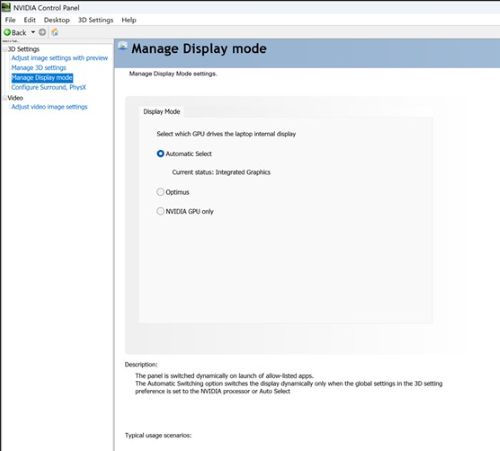
Cause
计算机必须支持 DDS 并仅切换到 NVIDIA GPU 才能支持显示设置。
Resolution
Dell 16 Premium DA16250 NV 5050/NV 5060 不支持 DDS。
提醒:用户可以在英特尔图形指挥中心应用程序中调整显示设置。

戴尔 16 Premium DA16250 NV 5070 支持 DDS。
切换到 NVIDIA GPU 只会 显示其他显示选项(例如,用户可以调整对比度和鲜艳度)。

Affected Products
Dell 16 Premium DA16250Article Properties
Article Number: 000358429
Article Type: Solution
Last Modified: 15 Sept 2025
Version: 2
Find answers to your questions from other Dell users
Support Services
Check if your device is covered by Support Services.