Isilon:将 Powershell 与 Platform API 结合使用 — 创建对象和 RAN
Summary: 本文介绍如何将 Powershell 与 OneFS 平台 API 配合使用,以创建对象和 RAN。
This article applies to
This article does not apply to
This article is not tied to any specific product.
Not all product versions are identified in this article.
Symptoms
不需要
Cause
不需要
Resolution
JSON 简介
PAPI 使用 JSON 作为数据交换格式。了解如何利用它来使用 PAPI 创建、修改或删除资源至关重要。有关 JSON 的其他信息,请访问 www.json.org
- 名称和值对的集合
- 值的有序列表
获取 API 对象的输出示例可能如下所示:
{
"<object>": {
     "<property>": <value>,
     ...
}
要知道哪些 JSON 文本输出可用,我们必须发出 POST 命令来创建对象;通过发送以下请求来查看 PAPI 自我文档:
GET /platform/1/quota/quotas?describe
下面是相关的 Powershell 代码:
#Get PAPI self documentation for quotas
$resource = "/platform/1/quota/quotas?describe"
$uri = $baseurl + $resource
$ISIObject = Invoke-RestMethod -Uri $uri -Headers $headers -Method Get
$ISIObject
下面的示例输出概述了创建新配额所必须执行的 POST 操作。请注意所需的属性,因为它们可能与相应的 isi 命令验证每个 SP 是处于正常模式还是修复模式。
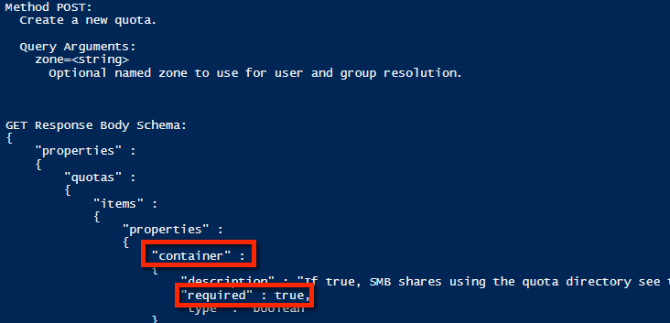
使用示例属性时,下面是可用于创建目录硬配额的示例 JSON 字符串:
$QuotaObject = @"
{"type":"directory","include_snapshots": false,"container": true, "path": /ifs/home/user1", "enforced": true, "thresholds": {"hard":10000000},"thresholds_include_overhead": false}
"@
完成 JSON 字符串后,剩下的就是构建 Invoke-RestMethod 参数并提交。在下面的示例代码中,JSON 字符串是 POST 的正文,内容类型为 application/json:
$headers = @{"Authorization"="Basic $($EncodedPassword)"}
$uri = $baseurl + $resource
$ISIObject = Invoke-RestMethod -Uri $uri -Headers $headers -Body $QuotaObject -ContentType "application/json; charset=utf-8" -Method POST
Write-Host "   Resulting Quota ID: "  $ISIObject.id
概括总结
举个例子,假设您的环境在单个父目录下有许多用户的主目录(例如: /ifs/home),并且您想要为每个主目录设置目录配额。使用 Isilon RESTful 访问命名空间 (RAN) API 获取每个用户主目录的路径。以下代码获取指定路径的子目录,然后在每个子目录上设置目录配额:
# Get subdirectories of path specified
$resource = '/namespace/' + $path
$uri = $baseurl + $resource
$ISIObject = Invoke-RestMethod -Uri $uri -Headers $headers -Method Get
#Loop through each directory and set the quota
ForEach($folder in $ISIObject.children) {
#Create quota
$resource ="/platform/1/quota/quotas"
Write-Host "Setting a $quotasize byte quota on $quotapath"
$QuotaObject = @"
{"type":"directory","include_snapshots": false,"container": true, "path": "$quotapath", "enforced": true, "thresholds": {"hard":$quotasize},"thresholds_include_overhead": false}
"@
$headers = @{"Authorization"="Basic $($EncodedPassword)"}
$uri = $baseurl + $resource
$ISIObject2 = Invoke-RestMethod -Uri $uri -Headers $headers -Body $QuotaObject -ContentType "application/json; charset=utf-8" -Method POST
Write-Host "   Resulting Quota ID: "  $ISIObject2.id
}
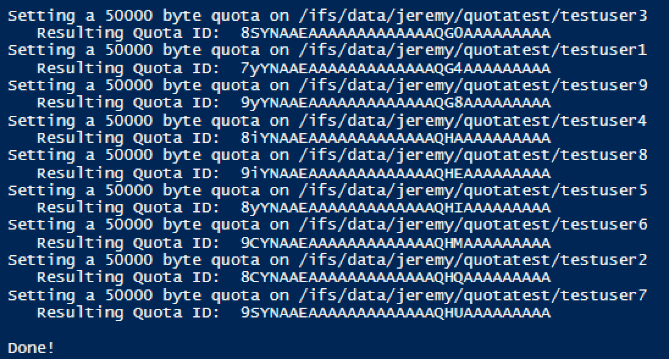
以下是运行本文所附脚本的输出:

Affected Products
Isilon, PowerScale OneFS, Isilon Platform APIArticle Properties
Article Number: 000132770
Article Type: Solution
Last Modified: 02 Apr 2026
Version: 7
Find answers to your questions from other Dell users
Support Services
Check if your device is covered by Support Services.