Dell Unity: 모든 기능을 사용하여 FTP 및 SFTP를 구성하는 방법
Summary: 이 문서에서는 Dell Unity 어레이에서 NAS 서버용 FTP(File Transfer Protocol) 및 SFTP(Secure File Transfer Protocol)를 구성하는 방법에 대해 설명합니다.
This article applies to
This article does not apply to
This article is not tied to any specific product.
Not all product versions are identified in this article.
Instructions
Unisphere(UI)에서 FTP를 활성화하고 구성하려면 다음을 수행합니다.
Unisphere > FileNAS > ServersEdit >> Sharing ProtocolsFTP로 이동합니다.> 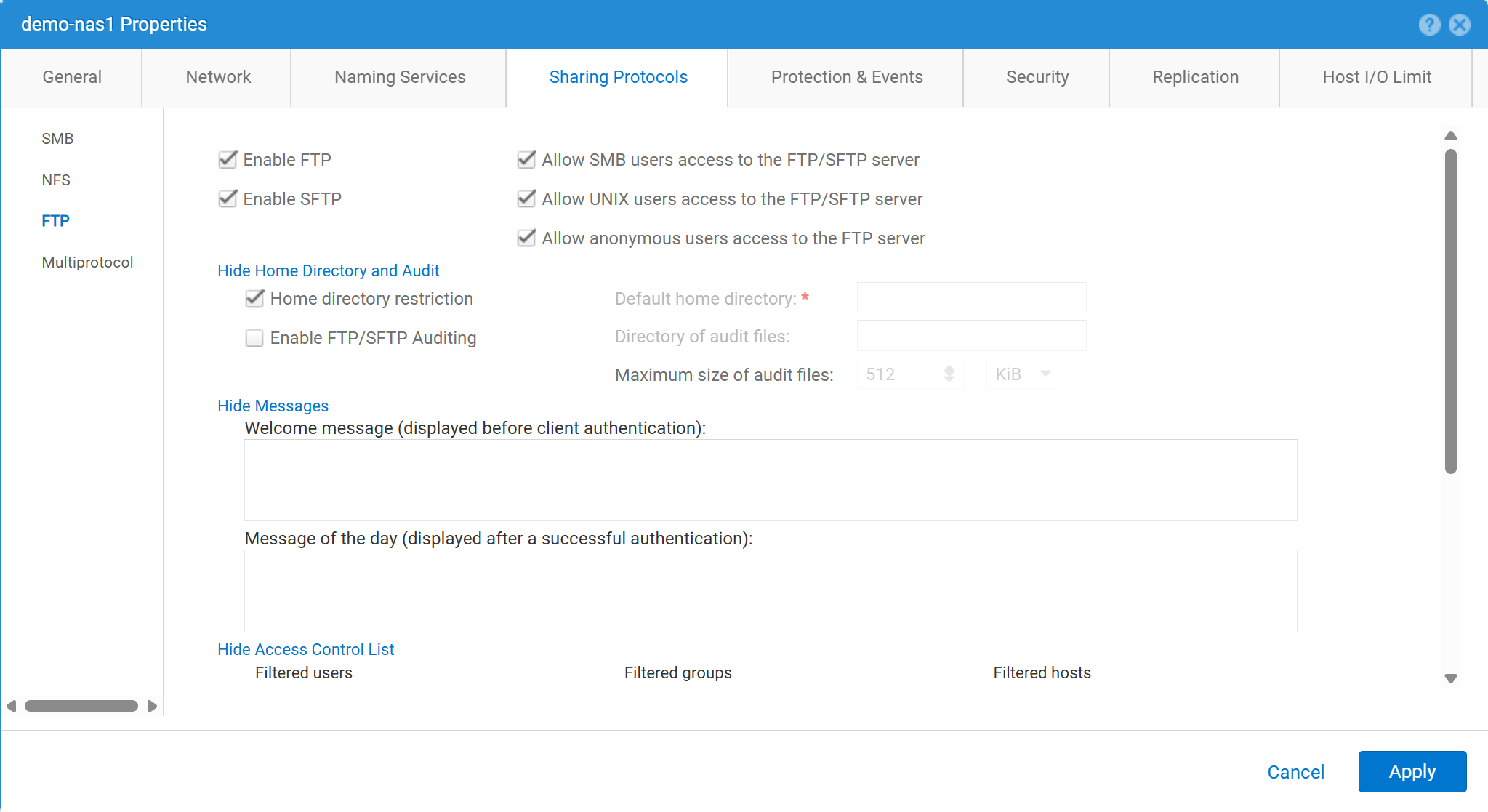

Unisphere(UI)에서 FTP를 활성화하고 구성하려면 다음을 수행합니다.
service@spa spa:~> uemcli -no -u admin -p mypasswd /net/nas/ftp -server nas_8 set -ftpEnabled yes -sftpEnabled yes -anonymousUserEnabled yes -cifsUserEnabled yes -unixUserEnabled yes
Operation completed successfully.


Note : Refer to "uemcli /net/nas/ftp -help" for all other available options
FTP 사용자로 로그인하려면 다음을 수행합니다.
NAS 서버에 도메인이 연결되어 있는 경우 CIFS(Common Internet File System ) 서버에서 도메인 사용자는 다음 중 하나로 로그인할 수 있습니다.
domain\user or user@domain

Example (domain name is EXAMPLE):
EXAMPLE\user100 or user100@example.com
NAS 서버가 Unity의 독립 실행형 CIFS 서버인 경우 다음 방법으로 로그인할 수 있습니다.
servername\user or user@servername or local\user or user@local

Example (standalone nas server name is MYCIFS):

MYCIFS\user100 or user100@mycifs or local\user100 or user100@local

C:\>ftp ftp02
Connected to ftp02
220 NASFTP FTP server (EMC:upc_Unity_6_HF5_upcBuilder:9328432) ready.
User ( ftp02   :( none)): Local\administrator
331 Password required for Local\administrator.
Password:
230- No directory! Logging in with home=/nasftp_fs01.
230 NT User Local\administrator logged in.
ftp>
NAS 서버가 다음에 사용되는 경우 NFS(Network File System)만 해당하며 Unity는 사용자 인증을 위해 LDAP(Lightweight Directory Access Protocol) 또는 NIS(Network Information Service) 등의 디렉토리 서비스가 필요합니다. 사용 가능한 LDAP 또는 NIS가 없는 경우에도 로컬 파일을 사용할 수 있습니다(수동 사용자/암호 구성 필요).
C:\>ftp ftp02
Connected to ftp02
220 FTP02 FTP server (EMC:upc_Unity_6_HF5_upcBuilder:9328432) ready.
User (ftp02 :(none)): user100
331 Password required for user100.
Password:
230 UNIX User user100 logged in.
ftp> ls
200 PORT command successful.
150 Opening ASCII mode data connection for 'file list'.
lost+found
etc
publicftp
226 Transfer complete.
ftp: 29 bytes received in 0.00Seconds 29000.00Kbytes/sec.
ftp> bye
221 Goodbye.
익명 로그인(ftp라고도 함):
C:\>ftp ftp02
Connected to ftp02
220 FTP02 FTP server (EMC:upc_Unity_6_HF5_upcBuilder:9328432) ready.
User (ftp02  :(none)): anonymous
331 Guest login ok, type your name as password.
Password:
230 Guest login ok, access restrictions apply.
ftp> _
로컬 사용자를 구성하려면 다음을 수행합니다.
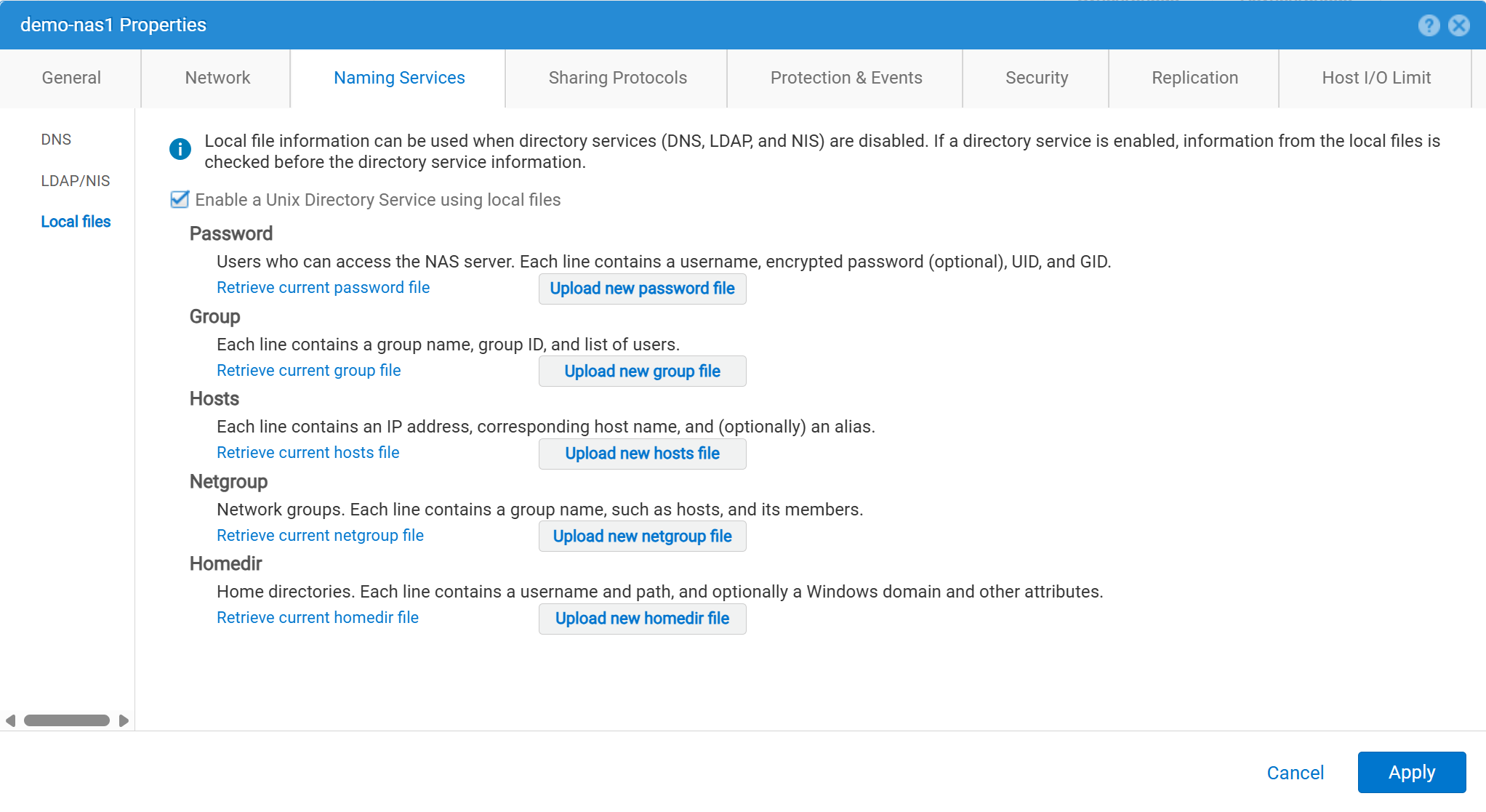
사용자 세부 정보는 다음과 같이 입력해야 합니다.
01:42:18 service@spa spa:~> cat passwd
# The passwd file contains the users who can access the NAS server.
#
# Each line of the passwd file defines a user and has the format:
#   username:password:uid:gid:gcos
# where:
# - username is the user's login name.
#   When querying for Windows users, the system checks for CIFS usernames without domain extensions.
# - password is an empty field. The encrypted password for the user is in the
# corresponding entry in the shadow file.
# - uid is the user's unique numerical ID for the system.
# - gid is the unique numerical ID of the group to which the user belongs.
#
# user:password:uid:gid:gcos:homedir:
ftp:ffX6M7x34lzYI:2000:2000::/fs01:
user100:ffX6M7x34lzYI:2001:2001::/fs01:
user200:l8Yykofh8ckbU:2002:2002:
user300:ABVmdrEehFnsI:2002:2002:QLs4hM#3w2s1drrYowsXsaPMuz:/fs01/publicftp:
user400:QQueVwnnAFCjc:2003:2003:PZraGM#K321ldrWKowssLaPVgp::
usertest:eeRJFmFoGS4lw:2004:2004::/fs01/publicftp:
usertest2:8II12yC6iqFEY:2004:2004::/fs01/publicftp:
UEMCLI를 사용하여 다운로드:
uemcli -u admin -p password -download /net/nas/server -name server_name -type passwd


EXAMPLE:
03:37:51 service@spa spa:~> uemcli -u admin -p mypasswd -upload -f /home/service/passwd /net/nas/server -name FTP02 -type passwd

Uploaded 962 byte of 962 byte [ 100.0% ] -PROCESSING-
Operation completed successfully.
업로드하려면 UEMCLI:
uemcli -u admin -p password -upload -f /cores/service/passwd /net/nas/server -name server_name -type passwd


EXAMPLE:
03:37:40 service@spa spa:~> uemcli -download -f /cores/service/passwd /net/nas/server -name FTP02 -type passwd

Downloaded 962 byte of 962 byte [ 100.0% ] -STALLED-
Operation completed successfully.
Additional Information
참고:
- 익명 사용자가 작동하려면
ftp수정 값UID디렉토리 공급자 또는 로컬 파일에 정의되어야 합니다.- 로컬 파일의 예:
ftp:*:1000:1000::/fs01/publicftp:
- 로컬 파일의 예:
- 로컬 파일을 사용하는 경우 다음을 사용하여 암호 필드를 생성할 수 있습니다.
openssl(Unity에서 직접) :- 예:
User user100, Password to be "Password123#", uid and gid as 3000, homedir as /fshomedir/data - 이 명령은 SHA256 기반 암호 알고리즘을 사용합니다. 명령 프롬프트에서
'openssl passwd -6 Password123#'SHA512 기반 암호 알고리즘이 필요한 경우
- 예:
$ openssl passwd Password123#
Warning: truncating password to 8 characters              <-- note, it takes only 1st 8 char
9QWNQEDjvlRog
$ openssl passwd
Password:                     <-- password can be typed here if not to be seen
Verifying - Password:
yT4C/OPx6AHXM
Entry on "passwd" file should be: user100:9QWNQEDjvlRog:3000:3000::/fshomedir/data:- SFTP를 사용하려면 로그인한 사용자가 홈 디렉토리를 소유해야 합니다.
- 이렇게 하면 익명 사용자가 차단될 수 있습니다.
- 다음과 같은 경우 SFTP가 실패할 수 있습니다.
LACP가 사용됩니다.- 포트 22가 차단된 것으로 보이는 경우 다음을 참조하십시오. Dell Unity: LACP가 활성화된 경우 Unity SFTP가 작동하지 않습니다.
Affected Products
Dell EMC Unity, Dell EMC Unity Family |Dell EMC Unity All Flash, Dell EMC Unity HybridProducts
Dell EMC Unity FamilyArticle Properties
Article Number: 000021919
Article Type: How To
Last Modified: 28 Oct 2025
Version: 7
Find answers to your questions from other Dell users
Support Services
Check if your device is covered by Support Services.