Dell Unity: FTP ve SFTP'yi tüm özelliklerle yapılandırma
Summary: Bu makalede, Dell Unity dizilerindeki NAS sunucuları için Dosya Aktarım Protokolü (FTP) ve Güvenli Dosya Aktarım Protokolü nün (SFTP) nasıl yapılandırılacağı açıklanmaktadır.
Instructions
Unisphere'den (UI) FTP'yi etkinleştirmek ve yapılandırmak için:
Unisphere > File > NAS Servers >> Edit Sharing Protocols > FTP'ye gidin: 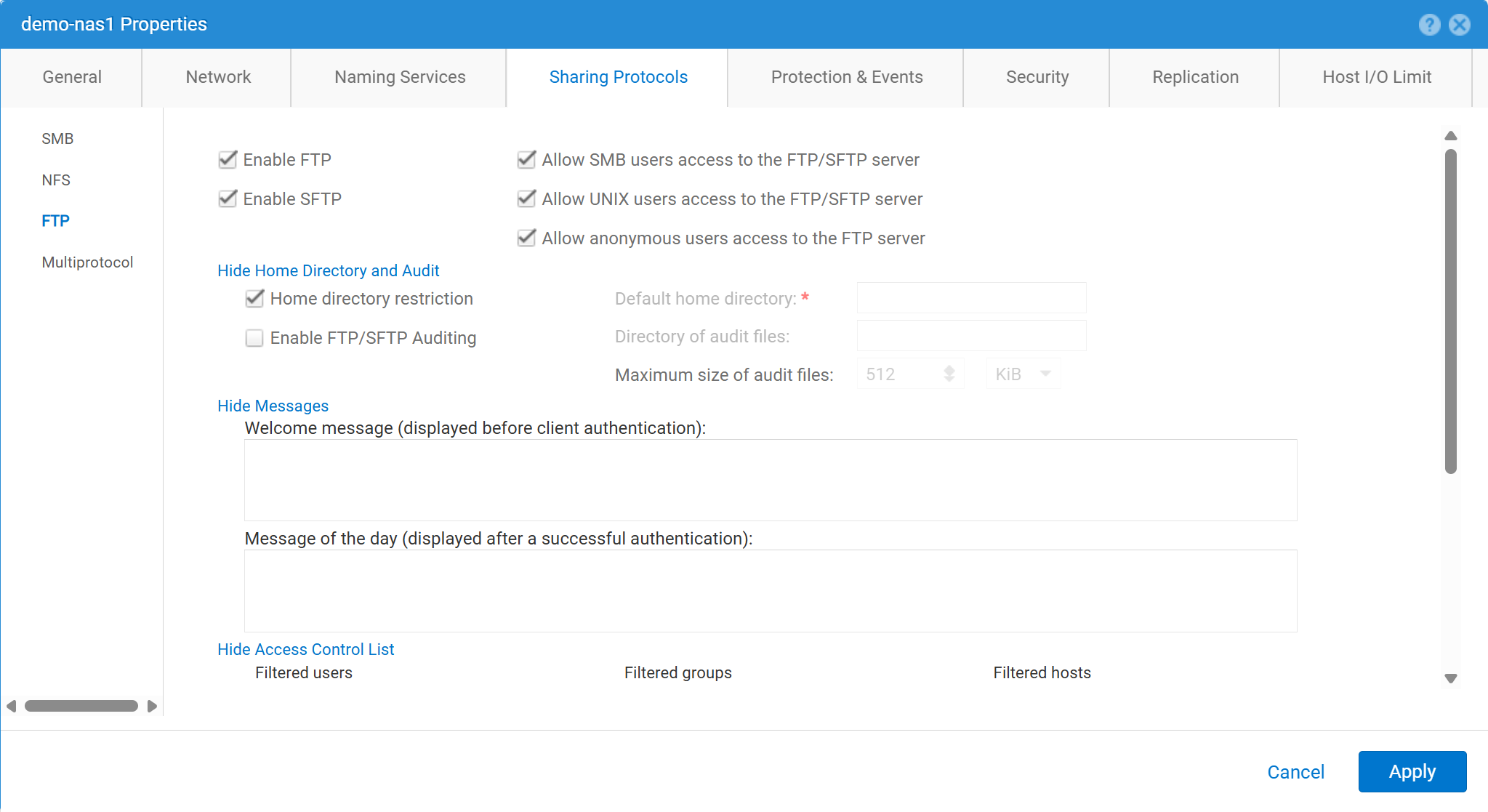
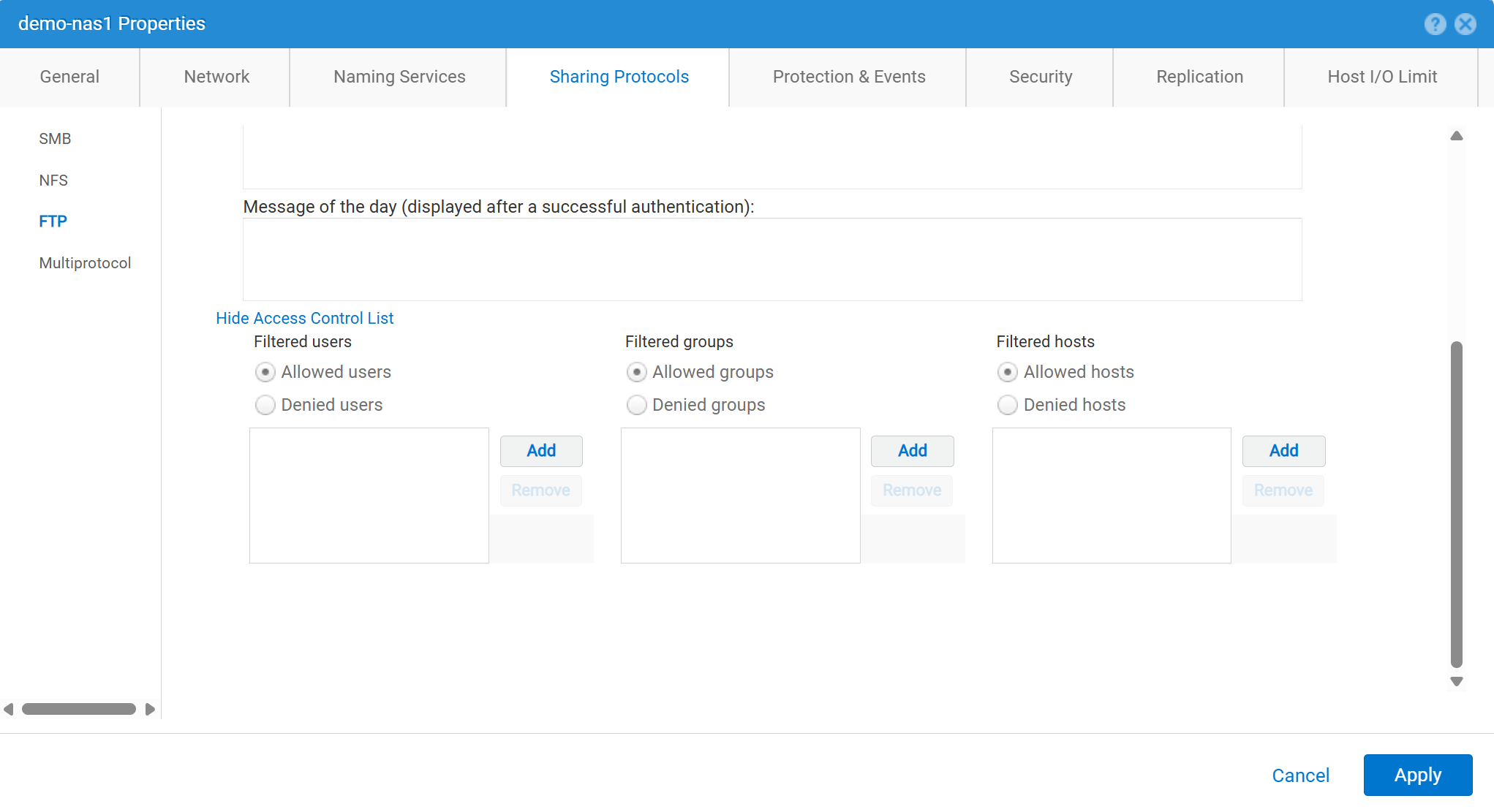
Unisphere'den (UI) FTP'yi etkinleştirmek ve yapılandırmak için:
service@spa spa:~> uemcli -no -u admin -p mypasswd /net/nas/ftp -server nas_8 set -ftpEnabled yes -sftpEnabled yes -anonymousUserEnabled yes -cifsUserEnabled yes -unixUserEnabled yes
Operation completed successfully.


Note : Refer to "uemcli /net/nas/ftp -help" for all other available options
FTP Kullanıcısı Olarak Oturum Açmak İçin:
NAS Sunucusunda katılmış bir etki alanı varsa Common Internet File System (CIFS) sunucusu kullanıyorsanız etki alanı kullanıcısı aşağıdakilerden biriyle oturum açabilir:
domain\user or user@domain

Example (domain name is EXAMPLE):
EXAMPLE\user100 or user100@example.com
NAS sunucusu Unity'de bağımsız bir CIFS sunucusuysa aşağıdaki yöntemle oturum açmaya izin verilir:
servername\user or user@servername or local\user or user@local

Example (standalone nas server name is MYCIFS):

MYCIFS\user100 or user100@mycifs or local\user100 or user100@local

C:\>ftp ftp02
Connected to ftp02
220 NASFTP FTP server (EMC:upc_Unity_6_HF5_upcBuilder:9328432) ready.
User ( ftp02   :( none)): Local\administrator
331 Password required for Local\administrator.
Password:
230- No directory! Logging in with home=/nasftp_fs01.
230 NT User Local\administrator logged in.
ftp>
NAS Sunucusu aşağıdakiler için kullanılıyorsa Yalnızca Network File System (NFS) ve Unity, kullanıcı kimlik doğrulaması için bir dizin hizmeti (Basit Dizin Erişim Protokolü (LDAP) veya Network Information Service (NIS) gibi) gerektirir. Yerel Dosyalar, kullanılabilir LDAP veya NIS olmadığında da kullanılabilir (manuel kullanıcı/parola yapılandırması gerektirir).
C:\>ftp ftp02
Connected to ftp02
220 FTP02 FTP server (EMC:upc_Unity_6_HF5_upcBuilder:9328432) ready.
User (ftp02 :(none)): user100
331 Password required for user100.
Password:
230 UNIX User user100 logged in.
ftp> ls
200 PORT command successful.
150 Opening ASCII mode data connection for 'file list'.
lost+found
etc
publicftp
226 Transfer complete.
ftp: 29 bytes received in 0.00Seconds 29000.00Kbytes/sec.
ftp> bye
221 Goodbye.
Anonim oturum açma (ftp olarak da adlandırılır):
C:\>ftp ftp02
Connected to ftp02
220 FTP02 FTP server (EMC:upc_Unity_6_HF5_upcBuilder:9328432) ready.
User (ftp02  :(none)): anonymous
331 Guest login ok, type your name as password.
Password:
230 Guest login ok, access restrictions apply.
ftp> _
Yerel kullanıcıları yapılandırmak için:
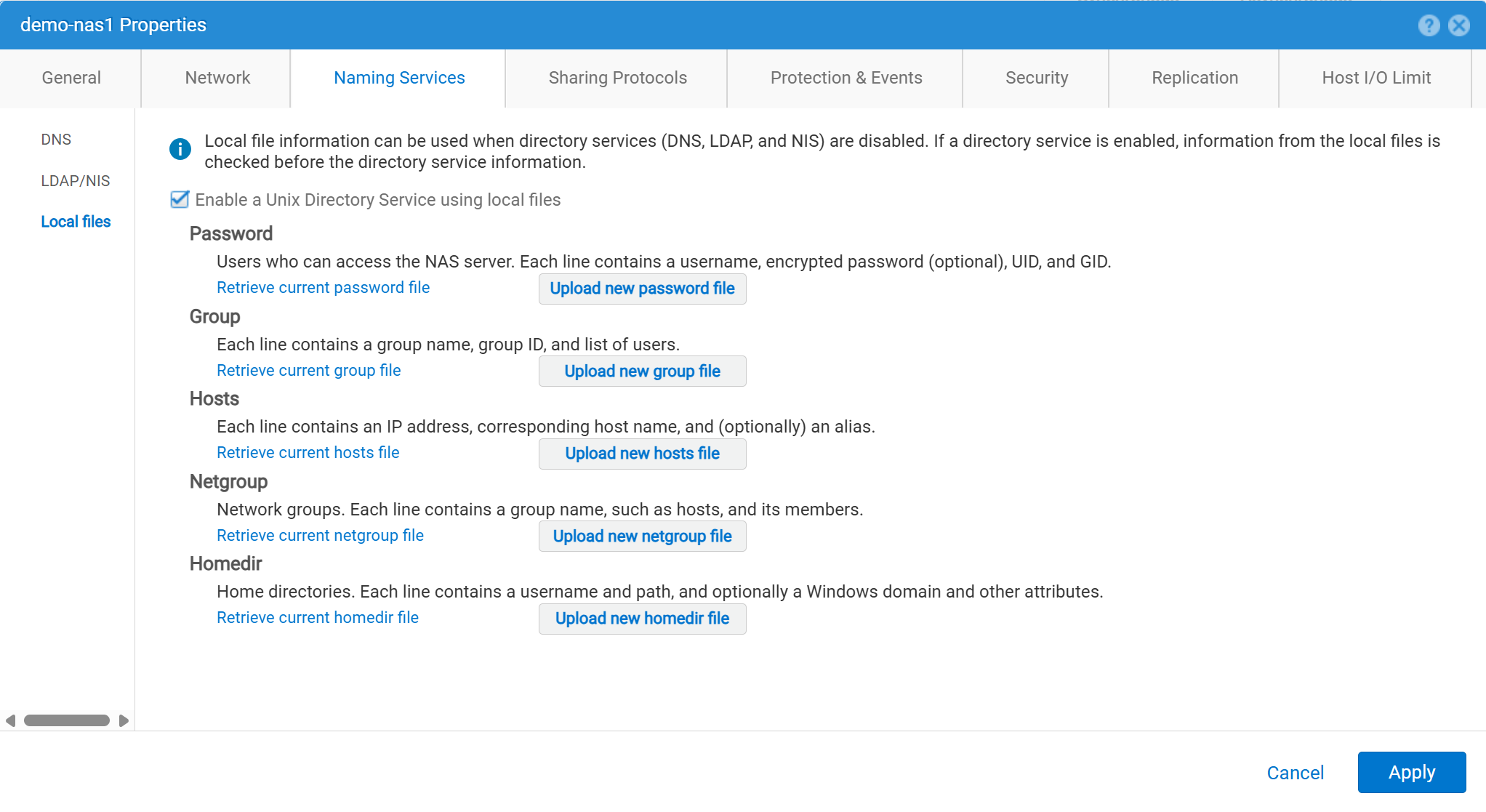
Kullanıcı bilgileri şu şekilde girilmelidir:
01:42:18 service@spa spa:~> cat passwd
# The passwd file contains the users who can access the NAS server.
#
# Each line of the passwd file defines a user and has the format:
#   username:password:uid:gid:gcos
# where:
# - username is the user's login name.
#   When querying for Windows users, the system checks for CIFS usernames without domain extensions.
# - password is an empty field. The encrypted password for the user is in the
# corresponding entry in the shadow file.
# - uid is the user's unique numerical ID for the system.
# - gid is the unique numerical ID of the group to which the user belongs.
#
# user:password:uid:gid:gcos:homedir:
ftp:ffX6M7x34lzYI:2000:2000::/fs01:
user100:ffX6M7x34lzYI:2001:2001::/fs01:
user200:l8Yykofh8ckbU:2002:2002:
user300:ABVmdrEehFnsI:2002:2002:QLs4hM#3w2s1drrYowsXsaPMuz:/fs01/publicftp:
user400:QQueVwnnAFCjc:2003:2003:PZraGM#K321ldrWKowssLaPVgp::
usertest:eeRJFmFoGS4lw:2004:2004::/fs01/publicftp:
usertest2:8II12yC6iqFEY:2004:2004::/fs01/publicftp:
İndirmek için UEMCLI kullanın:
uemcli -u admin -p password -download /net/nas/server -name server_name -type passwd


EXAMPLE:
03:37:51 service@spa spa:~> uemcli -u admin -p mypasswd -upload -f /home/service/passwd /net/nas/server -name FTP02 -type passwd

Uploaded 962 byte of 962 byte [ 100.0% ] -PROCESSING-
Operation completed successfully.
Yüklemek için UEMCLI kullanın:
uemcli -u admin -p password -upload -f /cores/service/passwd /net/nas/server -name server_name -type passwd


EXAMPLE:
03:37:40 service@spa spa:~> uemcli -download -f /cores/service/passwd /net/nas/server -name FTP02 -type passwd

Downloaded 962 byte of 962 byte [ 100.0% ] -STALLED-
Operation completed successfully.
Additional Information
Notlar:
- Anonim kullanıcının çalışması için, adında bir kullanıcı olmalıdır.
ftp-UIDdizin sağlayıcısında veya Yerel Dosyalar'da tanımlanmalıdır.- Yerel dosyalar için örnek:
ftp:*:1000:1000::/fs01/publicftp:
- Yerel dosyalar için örnek:
- Yerel Dosyalar kullanılıyorsa, parola alanı kullanılarak oluşturulabilir.
openssl(doğrudan Birlik'ten):- Örneğin:
User user100, Password to be "Password123#", uid and gid as 3000, homedir as /fshomedir/data - Bu komut, SHA256 tabanlı parola algoritması kullanır. Windows x64
'openssl passwd -6 Password123#'SHA512 tabanlı parola algoritması gerekiyorsa.
- Örneğin:
$ openssl passwd Password123#
Warning: truncating password to 8 characters              <-- note, it takes only 1st 8 char
9QWNQEDjvlRog
$ openssl passwd
Password:                     <-- password can be typed here if not to be seen
Verifying - Password:
yT4C/OPx6AHXM
Entry on "passwd" file should be: user100:9QWNQEDjvlRog:3000:3000::/fshomedir/data:- SFTP, ana dizinin sahibinin oturum açmış kullanıcı tarafından oluşturulmasını gerektirir.
- Bu, anonim bir kullanıcıyı engelleyebilir.
- SFTP şu durumlarda başarısız olabilir
LACPkullanılır.- Bağlantı noktası 22 engellenmiş gibi görünüyorsa Dell Unity'ye bakın: Unity SFTP, LACP etkinleştirildiğinde çalışmaz.