Avamar:Microsoft Hyper-Vに導入されたAvamar Virtual Edition(AVE)を再起動すると、ネットワーク インターフェイス構成が失われる
Summary: Microsoft Hyper-Vに導入されたAVEの再起動後にネットワーク インターフェイス構成が失われる
This article applies to
This article does not apply to
This article is not tied to any specific product.
Not all product versions are identified in this article.
Symptoms
AVEには、デフォルトで1つのネットワーク インターフェイス作成名があります eth0.
AVEの再起動後、eth0インターフェイスは存在しません。
ifconfig eth0
eth0: error fetching interface information: Device not found
使用可能なネットワークインタフェースのリストでは、eth0 が欠落しているが、eth1 と呼ばれる新しい未設定のインタフェースが存在することが確認できます。
ifconfig -a
eth1      Link encap:Ethernet  HWaddr 00:15:5D:C8:BC:B4
          BROADCAST MULTICAST  MTU:1500  Metric:1
          RX packets:0 errors:0 dropped:0 overruns:0 frame:0
          TX packets:0 errors:0 dropped:0 overruns:0 carrier:0
          collisions:0 txqueuelen:1080
          RX bytes:0 (0.0 b)  TX bytes:0 (0.0 b)

lo        Link encap:Local Loopback
          inet addr:127.0.0.1  Mask:255.0.0.0
          inet6 addr: ::1/128 Scope:Host
          UP LOOPBACK RUNNING  MTU:16436  Metric:1
          RX packets:5258453 errors:0 dropped:0 overruns:0 frame:0
          TX packets:5258453 errors:0 dropped:0 overruns:0 carrier:0
          collisions:0 txqueuelen:0
          RX bytes:3043137745 (2902.1 Mb)  TX bytes:3043137745 (2902.1 Mb)
eth0 構成ファイルが存在し、変更されていません。
ls -l /etc/sysconfig/network/ifcfg-eth0
-rw-r--r-- 1 root root 62 Jul 21 2003 /etc/sysconfig/network/ifcfg-eth0
cat /etc/sysconfig/network/ifcfg-eth0
STARTMODE='auto'
BOOTPROTO='static'
IPADDR='10.10.10.10/24'
NETMASK='255.255.255.0'
BROADCAST=''
ETHTOOL_OPTIONS=''
MTU=''
NAME=''
NETWORK=''
REMOTE_IPADDR=''
USERCONTROL='no'
eth1 設定ファイルはありません。
ls -l /etc/sysconfig/network/ifcfg-eth1
ls: cannot access /etc/sysconfig/network/ifcfg-eth1: No such file or directory
デバイス メッセージには、eth0の名前がeth1に変更されたことが示されます。
dmesg | grep -i eth0
[ 1678.268338] udev: renamed network interface eth0 to eth1
スクリプト「 /etc/udev/rules.d/70-persistent-net.rules file には eth0 のエントリと eth1 のエントリがあり、どちらも異なる MAC アドレスを持ちます。
cat /etc/udev/rules.d/70-persistent-net.rules
# PCI device 0x8086:0x100f (e1000)
SUBSYSTEM=="net", ACTION=="add", DRIVERS=="?*", ATTR{address}=="00:50:56:80:94:f7", ATTR{dev_id}=="0x0", ATTR{type}=="1", KERNEL=="eth*", NAME="eth0"
SUBSYSTEM=="net", ACTION=="add", DRIVERS=="?*", ATTR{address}=="00:15:5D:C8:BC:B4", ATTR{dev_id}=="0x0", ATTR{type}=="1", KERNEL=="eth*", NAME="eth1"
Cause
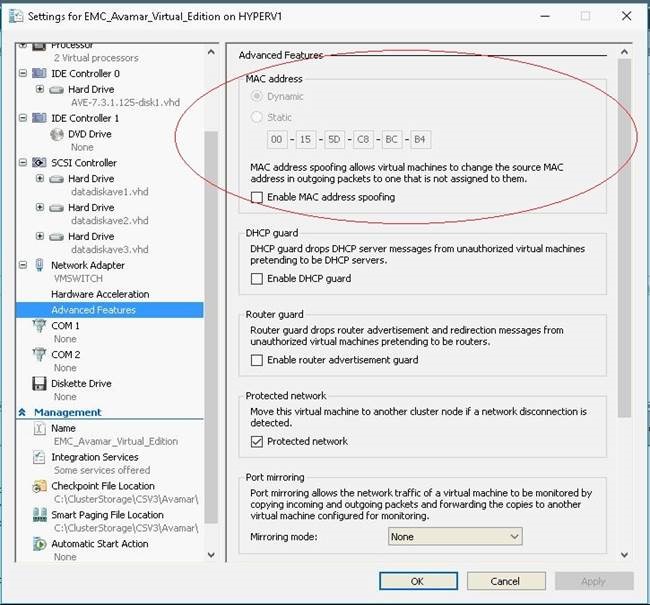
デフォルトでは、Microsoft Hyper-Vは動的MACアドレス生成を使用するため、別のMACアドレスがAVE仮想マシンに再割り当てされます。
Resolution
1.AVEをシャットダウンします。
2.Hyper-VマネージャーでAVEのSettingsに移動します。
3.左側のペインで[ネットワーク アダプター]の設定を展開し、[高度な機能]を選択します。
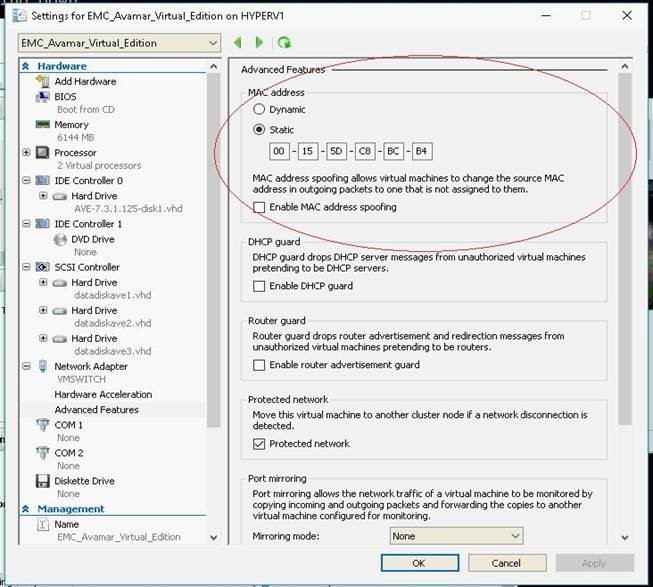
4.[MAC Address]ボックス内の[Static]を選択します(上図を参照)。アドレス フィールドには、Hyper-Vによって割り当てられたデフォルトがすでに入力されているはずです。
5.[OK]を押して設定を保存します。
6.AVEの電源を入れます。
7.AvamarにData Domainが接続されている場合は、次のコマンドを使用します。 dpnctl start all をクリックしてAvamarサービスを再起動します。
Affected Products
Avamar, Avamar Server, Avamar Virtual EditionArticle Properties
Article Number: 000053868
Article Type: Solution
Last Modified: 09 Jan 2026
Version: 7
Find answers to your questions from other Dell users
Support Services
Check if your device is covered by Support Services.