Avamar: Microsoft Hyper-V에 배포된 AVE(Avamar Virtual Edition)를 재부팅하면 네트워크 인터페이스 구성이 손실됨
Summary: Microsoft Hyper-V에 배포된 AVE를 재부팅한 후 네트워크 인터페이스 구성이 손실됨
This article applies to
This article does not apply to
This article is not tied to any specific product.
Not all product versions are identified in this article.
Symptoms
AVE에는 기본적으로 하나의 네트워크 인터페이스 생성 이름이 있습니다 eth0.
AVE 재부팅 후 eth0 인터페이스가 표시되지 않습니다.
ifconfig eth0
eth0: error fetching interface information: Device not found
사용 가능한 네트워크 인터페이스 목록은 eth0이 누락되었지만 eth1이라는 새로운 구성되지 않은 인터페이스가 있음을 확인합니다.
ifconfig -a
eth1      Link encap:Ethernet  HWaddr 00:15:5D:C8:BC:B4
          BROADCAST MULTICAST  MTU:1500  Metric:1
          RX packets:0 errors:0 dropped:0 overruns:0 frame:0
          TX packets:0 errors:0 dropped:0 overruns:0 carrier:0
          collisions:0 txqueuelen:1080
          RX bytes:0 (0.0 b)  TX bytes:0 (0.0 b)

lo        Link encap:Local Loopback
          inet addr:127.0.0.1  Mask:255.0.0.0
          inet6 addr: ::1/128 Scope:Host
          UP LOOPBACK RUNNING  MTU:16436  Metric:1
          RX packets:5258453 errors:0 dropped:0 overruns:0 frame:0
          TX packets:5258453 errors:0 dropped:0 overruns:0 carrier:0
          collisions:0 txqueuelen:0
          RX bytes:3043137745 (2902.1 Mb)  TX bytes:3043137745 (2902.1 Mb)
eth0 구성 파일이 있으며 변경되지 않았습니다.
ls -l /etc/sysconfig/network/ifcfg-eth0
-rw-r--r-- 1 root root 62 Jul 21 2003 /etc/sysconfig/network/ifcfg-eth0
cat /etc/sysconfig/network/ifcfg-eth0
STARTMODE='auto'
BOOTPROTO='static'
IPADDR='10.10.10.10/24'
NETMASK='255.255.255.0'
BROADCAST=''
ETHTOOL_OPTIONS=''
MTU=''
NAME=''
NETWORK=''
REMOTE_IPADDR=''
USERCONTROL='no'
eth1 구성 파일이 없습니다.
ls -l /etc/sysconfig/network/ifcfg-eth1
ls: cannot access /etc/sysconfig/network/ifcfg-eth1: No such file or directory
장치 메시지는 eth0의 이름이 eth1로 변경되었음을 보여 줍니다.
dmesg | grep -i eth0
[ 1678.268338] udev: renamed network interface eth0 to eth1
이 /etc/udev/rules.d/70-persistent-net.rules file에는 eth0에 대한 항목과 eth1에 대한 항목이 있으며 둘 다 다른 MAC 주소를 가지고 있습니다.
cat /etc/udev/rules.d/70-persistent-net.rules
# PCI device 0x8086:0x100f (e1000)
SUBSYSTEM=="net", ACTION=="add", DRIVERS=="?*", ATTR{address}=="00:50:56:80:94:f7", ATTR{dev_id}=="0x0", ATTR{type}=="1", KERNEL=="eth*", NAME="eth0"
SUBSYSTEM=="net", ACTION=="add", DRIVERS=="?*", ATTR{address}=="00:15:5D:C8:BC:B4", ATTR{dev_id}=="0x0", ATTR{type}=="1", KERNEL=="eth*", NAME="eth1"
Cause
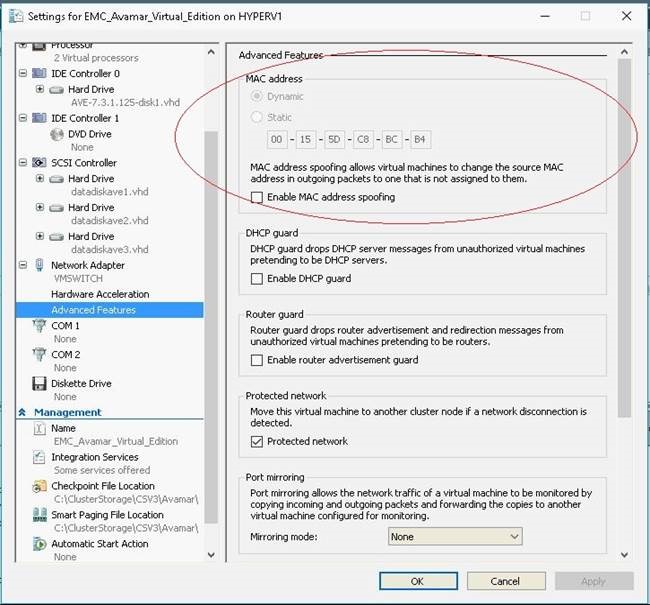
기본적으로 Microsoft Hyper-V는 동적 MAC 주소 생성을 사용하므로 다른 MAC 주소가 AVE 가상 머신에 재할당됩니다.
Resolution
1. AVE를 종료합니다.
2. Hyper-V Manager에서 AVE에 대한 설정으로 이동합니다.
3. 왼쪽 창에서 "Network Adapter" 설정을 확장하고 "Advanced Features"를 선택합니다.
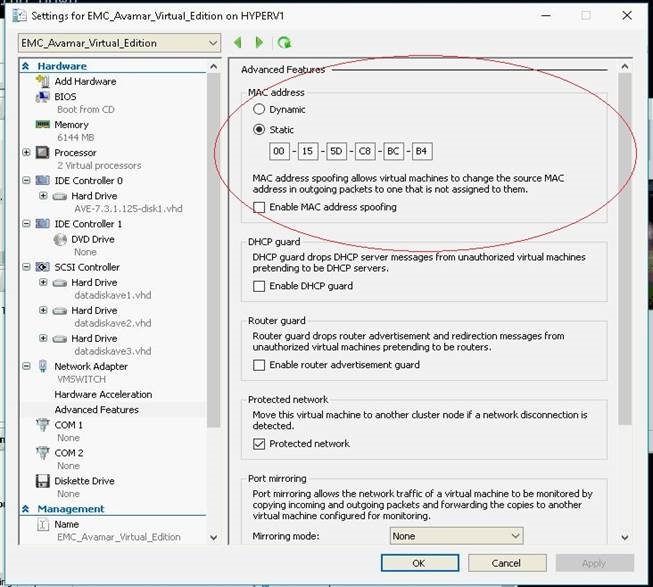
4. "MAC 주소" 상자 내에서 "정적"을 선택합니다(위 그림 참조). 주소 필드는 Hyper-V에서 할당한 기본값으로 이미 채워져 있어야 합니다.
5. OK를 눌러 설정을 저장합니다.
6. AVE의 전원을 켭니다.
7. Avamar에 연결된 Data Domain이 있는 경우 다음 명령을 사용합니다. dpnctl start all 을 클릭하여 Avamar 서비스를 재시작합니다.
Affected Products
Avamar, Avamar Server, Avamar Virtual EditionArticle Properties
Article Number: 000053868
Article Type: Solution
Last Modified: 09 Jan 2026
Version: 7
Find answers to your questions from other Dell users
Support Services
Check if your device is covered by Support Services.