Avamar:重新開機部署在 Microsoft Hyper-V 上的 Avamar Virtual Edition (AVE) 後,網路介面組態遺失
Summary: 在 Hyper-V 上部署的 AVE 重新開機後,網路介面組態遺失Microsoft
This article applies to
This article does not apply to
This article is not tied to any specific product.
Not all product versions are identified in this article.
Symptoms
在 AVE 上,預設會建立一個網路介面建立的名稱 eth0。
AVE 重新開機後,eth0 介面不存在:
ifconfig eth0
eth0: error fetching interface information: Device not found
可用網路介面的清單確認缺少 eth0,但存在名為 eth1 的新未配置介面:
ifconfig -a
eth1      Link encap:Ethernet  HWaddr 00:15:5D:C8:BC:B4
          BROADCAST MULTICAST  MTU:1500  Metric:1
          RX packets:0 errors:0 dropped:0 overruns:0 frame:0
          TX packets:0 errors:0 dropped:0 overruns:0 carrier:0
          collisions:0 txqueuelen:1080
          RX bytes:0 (0.0 b)  TX bytes:0 (0.0 b)

lo        Link encap:Local Loopback
          inet addr:127.0.0.1  Mask:255.0.0.0
          inet6 addr: ::1/128 Scope:Host
          UP LOOPBACK RUNNING  MTU:16436  Metric:1
          RX packets:5258453 errors:0 dropped:0 overruns:0 frame:0
          TX packets:5258453 errors:0 dropped:0 overruns:0 carrier:0
          collisions:0 txqueuelen:0
          RX bytes:3043137745 (2902.1 Mb)  TX bytes:3043137745 (2902.1 Mb)
eth0 設定檔存在且未變更:
ls -l /etc/sysconfig/network/ifcfg-eth0
-rw-r--r-- 1 root root 62 Jul 21 2003 /etc/sysconfig/network/ifcfg-eth0
cat /etc/sysconfig/network/ifcfg-eth0
STARTMODE='auto'
BOOTPROTO='static'
IPADDR='10.10.10.10/24'
NETMASK='255.255.255.0'
BROADCAST=''
ETHTOOL_OPTIONS=''
MTU=''
NAME=''
NETWORK=''
REMOTE_IPADDR=''
USERCONTROL='no'
沒有 eth1 組態檔案:
ls -l /etc/sysconfig/network/ifcfg-eth1
ls: cannot access /etc/sysconfig/network/ifcfg-eth1: No such file or directory
裝置訊息顯示 eth0 已重新命名為 eth1:
dmesg | grep -i eth0
[ 1678.268338] udev: renamed network interface eth0 to eth1
可使用 /etc/udev/rules.d/70-persistent-net.rules 檔具有 eth0 條目和 eth1 條目,兩者都具有不同的 MAC 位址:
cat /etc/udev/rules.d/70-persistent-net.rules
# PCI device 0x8086:0x100f (e1000)
SUBSYSTEM=="net", ACTION=="add", DRIVERS=="?*", ATTR{address}=="00:50:56:80:94:f7", ATTR{dev_id}=="0x0", ATTR{type}=="1", KERNEL=="eth*", NAME="eth0"
SUBSYSTEM=="net", ACTION=="add", DRIVERS=="?*", ATTR{address}=="00:15:5D:C8:BC:B4", ATTR{dev_id}=="0x0", ATTR{type}=="1", KERNEL=="eth*", NAME="eth1"
Cause
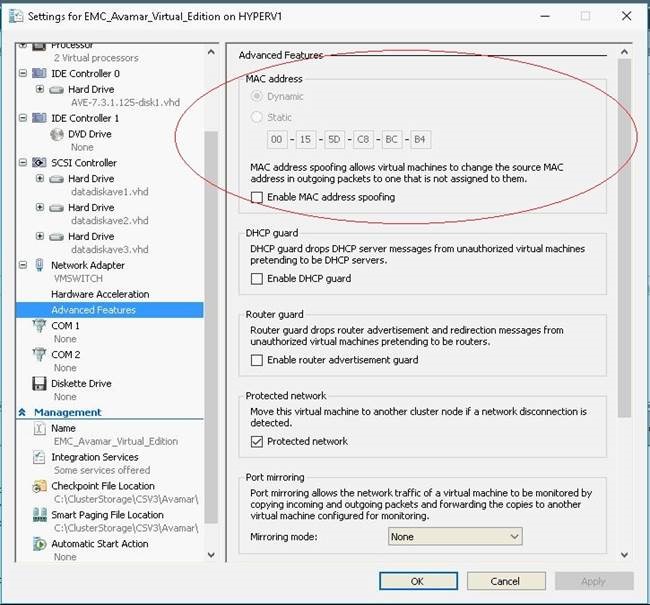
根據預設,Microsoft Hyper-V 使用動態 MAC 位址產生,這會導致將不同的 MAC 位址重新指派給 AVE 虛擬機器:
Resolution
1.關閉 AVE。
2.在 Hyper-V Manager 中前往 AVE 的設定。
3.在左窗格中展開「網路配接卡」的設定,然後選取「進階功能」:
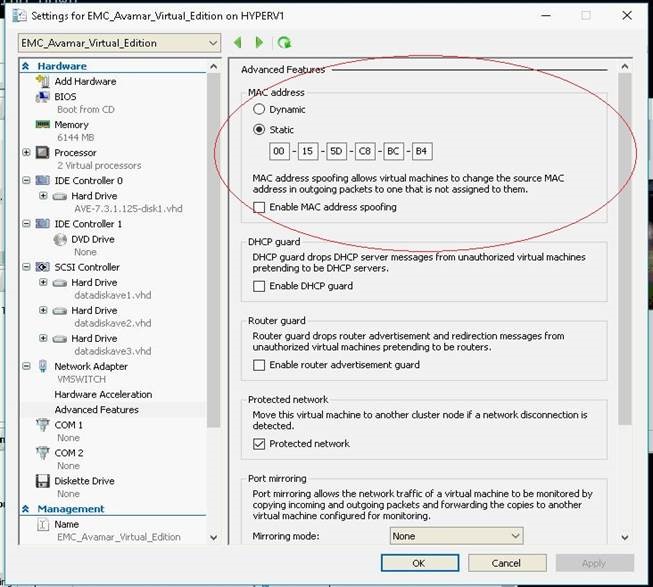
4.在「MAC 位址」方塊中選取「靜態」(如上所示)。位址欄位應已填充 Hyper-V 分配的預設值。
5.按下確定以儲存設定。
6.開啟 AVE 電源。
7.如果有附加至 Avamar 的 Data Domain,請使用以下命令: dpnctl start all 以重新啟動 Avamar 服務。
Affected Products
Avamar, Avamar Server, Avamar Virtual EditionArticle Properties
Article Number: 000053868
Article Type: Solution
Last Modified: 09 Jan 2026
Version: 7
Find answers to your questions from other Dell users
Support Services
Check if your device is covered by Support Services.