Dell Latitude 13 3379 2-in-1 Keyboard Guide
Summary: This article lists the Fn (Function) shortcut keys and what they do for a Latitude 13 3379 2 in 1 Laptop.
This article applies to
This article does not apply to
This article is not tied to any specific product.
Not all product versions are identified in this article.
Symptoms
Keyboard Shortcut Key Functions
The below table is a list of combination short-cut key functions available on the Latitude 13 3379 2-in-1 system.
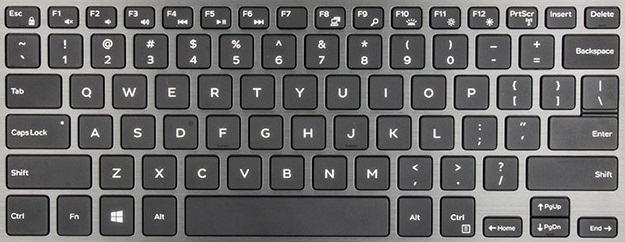
(Figure.1 Latitude 13 3379 2-in-1 Keyboard layout (En))
Cause
| Esc | Fn + Esc locks the Fn key down so all blue keys are live |
| F1 | Fn + F1 toggles Mute on/off |
| F2 | Fn + F2 decreases the sound level |
| F3 | Fn + F3 increases the sound level |
| F4 | Fn + F4 multimedia back button |
| F5 | Fn + F5 multimedia play/pause button |
| F6 | Fn + F6 multimedia forward button |
| F8 | Fn + F8 toggles the displays |
| F9 | Fn + F9 opens the search function in Windows |
| F10 | Fn + F10 toggles the LCD backlight brightness (Optional) |
| F11 | Fn + F11 decreases the LCD brightness |
| F12 | Fn + F12 increases the LCD brightness |
| PrtScr | Fn + PrtScr toggles the WIFI |
| Left Cursor Arrow | Fn + Left Cursor Arrow activates the Home key |
| Right Cursor Arrow | Fn + Right Cursor Arrow activates the End key |
| Up Cursor Arrow | Fn + Up Cursor Arrow activates PgUp |
| Down Cursor Arrow | Fn + Down Cursor Arrow activates PgDwn |
Resolution
 Visit our Keyboard knowledge base for additional resources and information.
 For additional articles and information visit our Touchpad support page.
 Additional articles and information can also be found on our Mouse support page.
Affected Products
Latitude 13 3379 2-in-1Article Properties
Article Number: 000142656
Article Type: Solution
Last Modified: 02 Oct 2023
Version: 4
Find answers to your questions from other Dell users
Support Services
Check if your device is covered by Support Services.