iDRAC: iDRAC9 - Power Supply Details Missing From Hardware Inventory

Summary: System Power Supply details might be missing from iDRAC interfaces after iDRAC9 firmware update.

This article applies to This article does not apply to This article is not tied to any specific product. Not all product versions are identified in this article.

Symptoms

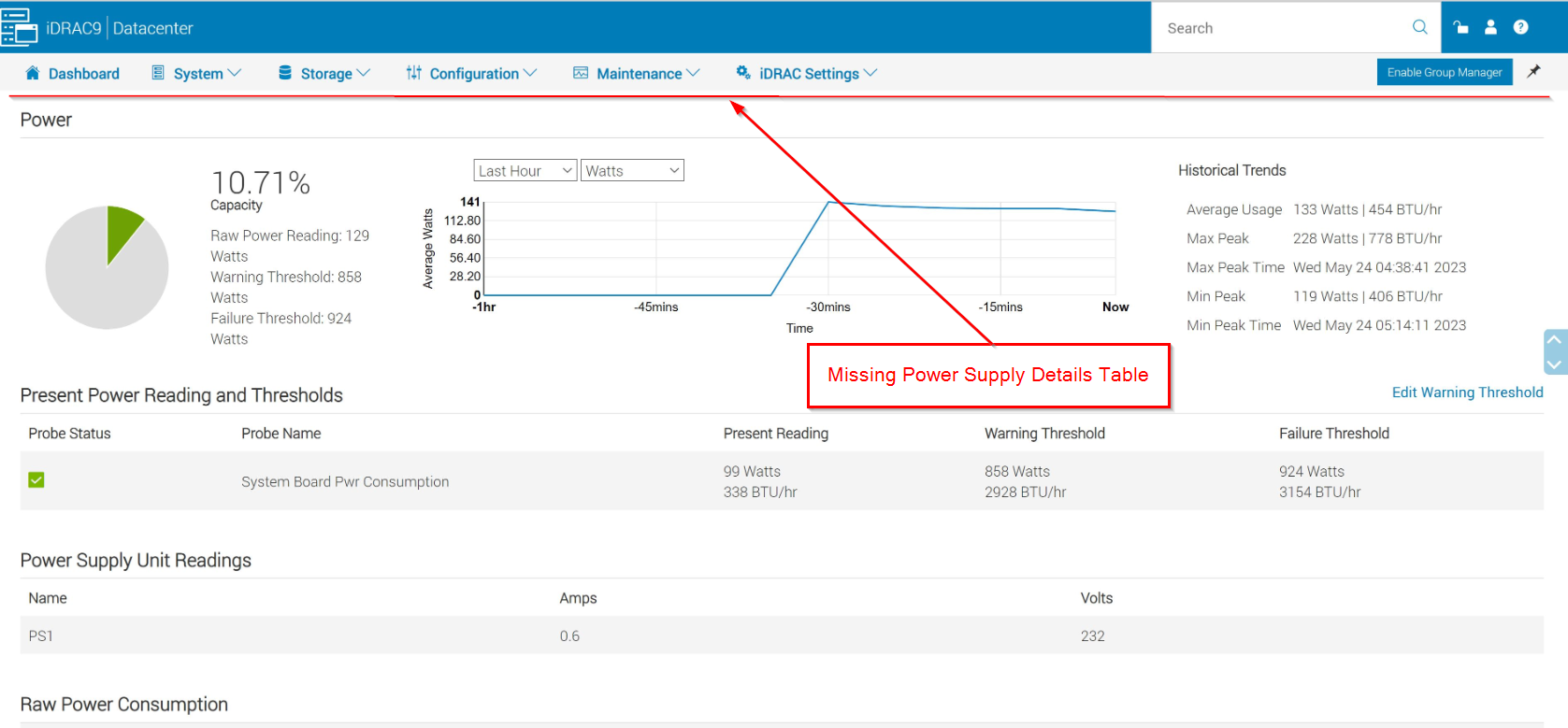
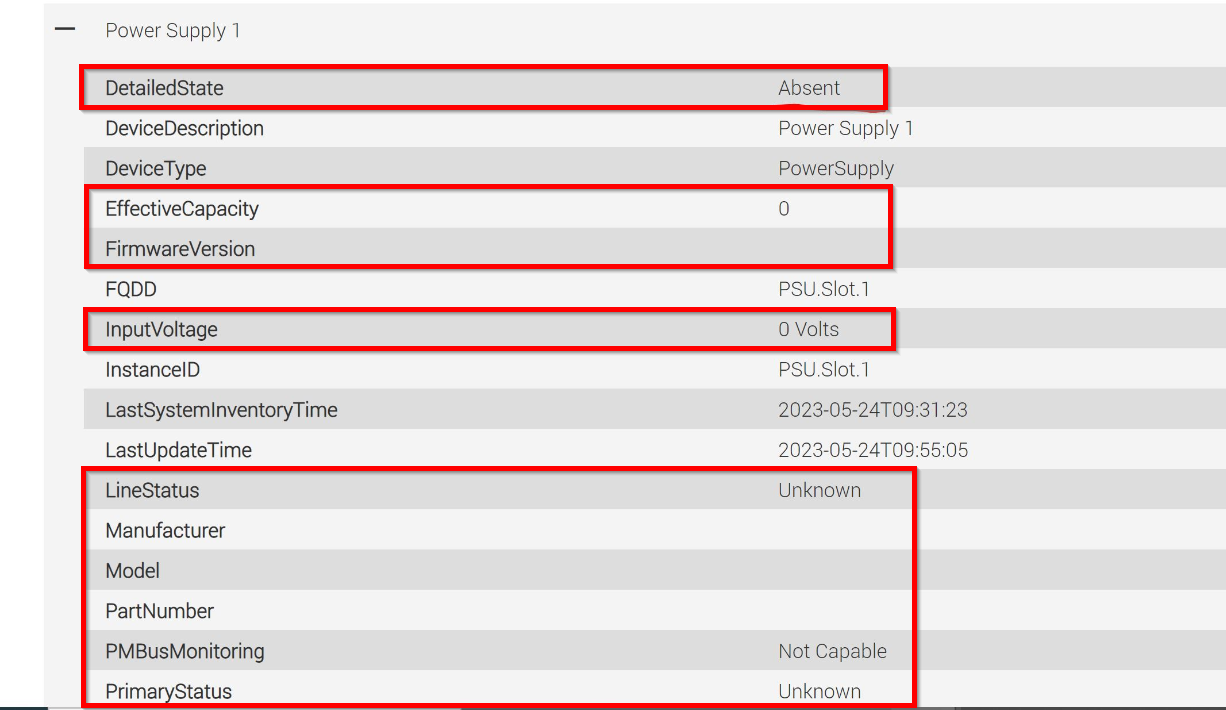
After updating iDRAC9 firmware, power supply details may not populate through iDRAC9 interfaces correctly. This impacts iDRAC9 UI, REDFISH, and RACADM interfaces. While the power supply will be included within the hardware inventory, the details of the installed power supply are not getting populated within the iDRAC9 database.
 
iDRAC9 UI >> System >> Overview >> Power Example:
iDRAC9-GUI-PSUOverview.png

iDRAC9 UI >> System >> Inventory >> Hardware Inventory Example:
iDRAC9-GUI-PSU-Details.png

Note: "racadm getsensorinfo" will continue to correctly report presence status and input power reading.
 

Cause

iDRAC9 may fail to create power supply record within the Unified Database after iDRAC9 firmware update reboots the iDRAC controller.

Resolution

iDRAC9 firmware version 7.00.60.00 (December 2023) will correct the timing condition that can lead to this object not being created.
 
Workaround:
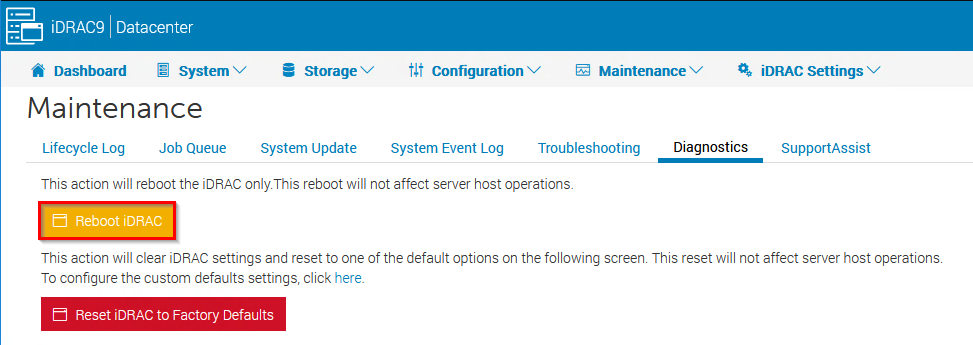
Rebooting the iDRAC (racreset) will correct this condition.
 
iDRAC9 UI >> Maintenance >> Diagnostics >> Reboot iDRAC Example:
iDRAC9-GUI-RACRESET.png

RACADM racreset Example: 
 

racadm>>racadm racreset
RAC reset operation initiated successfully. It may take a few
minutes for the RAC to come online again. 

Affected Products

iDRAC9, iDRAC9 - 6.xx Series

Products

PowerEdge XR2, Poweredge C4140, PowerEdge C6420, PowerEdge C6520, PowerEdge C6525, PowerEdge C6615, PowerEdge C6620, PowerEdge FC640, PowerEdge M640, PowerEdge M640 (for PE VRTX), PowerEdge MX740C, PowerEdge MX750c, PowerEdge MX760c, PowerEdge MX840C , PowerEdge R240, PowerEdge R250, PowerEdge R260, PowerEdge R340, PowerEdge R350, PowerEdge R360, PowerEdge R440, PowerEdge R450, PowerEdge R540, PowerEdge R550, PowerEdge R640, PowerEdge R6415, PowerEdge R650, PowerEdge R650xs, PowerEdge R6515, PowerEdge R6525, PowerEdge R660, PowerEdge R660xs, PowerEdge R6615, PowerEdge R6625, PowerEdge R740, PowerEdge R740XD, PowerEdge R740XD2, PowerEdge R7415, PowerEdge R7425, PowerEdge R750, PowerEdge R750XA, PowerEdge R750xs, PowerEdge R7515, PowerEdge R7525, PowerEdge R760, PowerEdge R760XA, PowerEdge R760xd2, PowerEdge R760xs, PowerEdge R7615, PowerEdge R7625, PowerEdge R840, PowerEdge R860, PowerEdge R940, PowerEdge R940xa, PowerEdge R960, PowerEdge T150, PowerEdge T160, PowerEdge T350, PowerEdge T360, PowerEdge T550, PowerEdge T560, PowerEdge XE2420, PowerEdge XE7420, PowerEdge XE7440, PowerEdge XE8545, PowerEdge XR11, PowerEdge XR12 ...
Article Properties
Article Number: 000214770
Article Type: Solution
Last Modified: 20 Aug 2025
Version:  4
Find answers to your questions from other Dell users
Support Services
Check if your device is covered by Support Services.