Battery Stops Charging When Smart Charging is Enabled in BIOS
Summary: Learn about the difference in battery charging behavior when Smart Charging is enabled on a Dell laptop.
This article applies to
This article does not apply to
This article is not tied to any specific product.
Not all product versions are identified in this article.
Symptoms
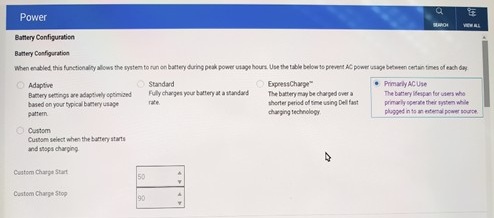
The laptop may show the following message when the battery level reaches 80%. The battery LED on the power button is on, but the AC is not charging.
- Battery status: 80% available (Plugged in) Smart charging on

This is seen when Primarily AC Use or Adaptive mode is selected in BIOS.
Affected Platforms:
- Alienware 15 DA15260
- Alienware 15 DA15265
- Alienware 16 Area-51 AA16250
- Alienware 16 Aurora AC16250
- Alienware 16X Aurora AC16251
- Alienware 18 Area-51 AA18250
- Dell 14 D14260
- Dell 14S DS14260
- Dell 14S DS14265
- Dell 15 D15260
- Dell 15 D15265
- Dell 16S DS16260
- Dell 16S DS16265
- Dell Pro 14 Premium PA14260
- Dell Pro 3 14 P314260
- Dell Pro 3 14 P314265
- Dell Pro 3 16 P316260
- Dell Pro 3 16 P316265
- Dell Pro 5 14 P514260
- Dell Pro 5 14 P514265
- Dell Pro 5 16 P516260
- Dell Pro 5 16 P516265
- Dell Pro 7 13 2-in-1 P703260
- Dell Pro 7 13 2-in-1 P703265
- Dell Pro 7 13 P713260
- Dell Pro 7 13 P713265
- Dell Pro 7 14 2-in-1 P704260
- Dell Pro 7 14 2-in-1 P704265
- Dell Pro 7 14 P714260
- Dell Pro 7 14 P714265
- Dell Pro Precision 5 14 PW514261
- Dell Pro Precision 5 14S PW514260
- Dell Pro Precision 5 14S PW514265
- Dell Pro Precision 5 16 PW516261
- Dell Pro Precision 5 16S PW516260
- Dell Pro Precision 5 16S PW516265
- Dell Pro Precision 7 14 PW714260
- Dell Pro Precision 7 16 PW716260
- XPS 13 DX13260
- XPS 14 DA14260
- XPS 16 DA16260
Cause
The battery stops charging at 80% when Smart Charging is on, and the battery light stays on to show that it is working.
| Smart Charge | Battery Relative State of Charge | Charge Status | Charging LED |
| Yes | 100% - 81% | Charge suspends | OFF |
| Yes | 80% | Charge suspends | OFF |
| Yes | 79% - 0% | Charge | ON |
| No | 100% | Charge | OFF |
| No | 99% - 0% | Charge | ON |
Note: The percentages in the table are average or typical values based on a new battery. As the battery degrades with age and usage, the actual threshold at which charging suspends may be lower. The values may also vary by model. The percentages shown are overall measurements and should not be interpreted as precise cutoffs in every scenario.
Resolution
This is expected behavior when Smart Charge is on. If you need to verify whether there is an issue with the computer or battery, you may temporarily select Standard or ExpressCharge so the battery charges to 100% when the AC adapter is plugged in.
Note: The Dell-recommended battery charging setting is Adaptive. Dell's Adaptive battery setting automatically optimizes charging based on your daily usage patterns. It learns when you plug in and unplug, preventing the battery from sitting at 100% for extended periods. This extends the overall lifespan of the battery and is perfect for a "set it and forget it" approach. Once troubleshooting is complete, change the battery charging mode back to Adaptive to help extend battery lifespan.
Affected Products
Alienware 16 Area-51 AA16250, Alienware 18 Area-51 AA18250, Alienware 16 Aurora AC16250, Alienware 16X Aurora AC16251, Alienware 15 DA15260, Alienware 15 DA15265, Dell 14 D14260, Dell 15 D15260, Dell 15 D15265, Dell 14S DS14260, Dell 14S DS14265
, Dell 16S DS16260, Dell 16S DS16265, Dell Pro 3 14 P314260, Dell Pro 3 14 P314265, Dell Pro 3 16 P316260, Dell Pro 3 16 P316265, Dell Pro 5 14 P514260, Dell Pro 5 14 P514265, Dell Pro 5 16 P516260, Dell Pro 5 16 P516265, Dell Pro 7 13 2-in-1 P703260, Dell Pro 7 13 2-in-1 P703265, Dell Pro 7 14 2-in-1 P704260, Dell Pro 7 14 2-in-1 P704265, Dell Pro 7 13 P713260, Dell Pro 7 13 P713265, Dell Pro 7 14 P714260, Dell Pro 7 14 P714265, Dell Pro 14 Premium PA14260, Dell Pro Precision 5 14S PW514260, Dell Pro Precision 5 14 PW514261, Dell Pro Precision 5 14S PW514265, Dell Pro Precision 5 16S PW516260, Dell Pro Precision 5 16 PW516261, Dell Pro Precision 5 16S PW516265, Dell Pro Precision 7 14 PW714260, Dell Pro Precision 7 16 PW716260, XPS 14 DA14260, XPS 16 DA16260, XPS 13 DX13260
...
Article Properties
Article Number: 000416875
Article Type: Solution
Last Modified: 07 Aug 2026
Version: 5
Find answers to your questions from other Dell users
Support Services
Check if your device is covered by Support Services.