NetWorker: Understanding Schedule Overrides
Summary: This KB provides a brief overview of how to configure schedule overrides in NetWorker Protection Policies.
This article applies to
This article does not apply to
This article is not tied to any specific product.
Not all product versions are identified in this article.
Instructions
Backup levels and schedules are set at the NetWorker policy level, but schedule overrides can be defined in the workflow's actions.
For example, configuring overrides in the action properties in the "Specify the Advanced Options" window. The below example demonstrates how to skip every day of the month, but schedule a level full backup on the first Sunday every quarter:
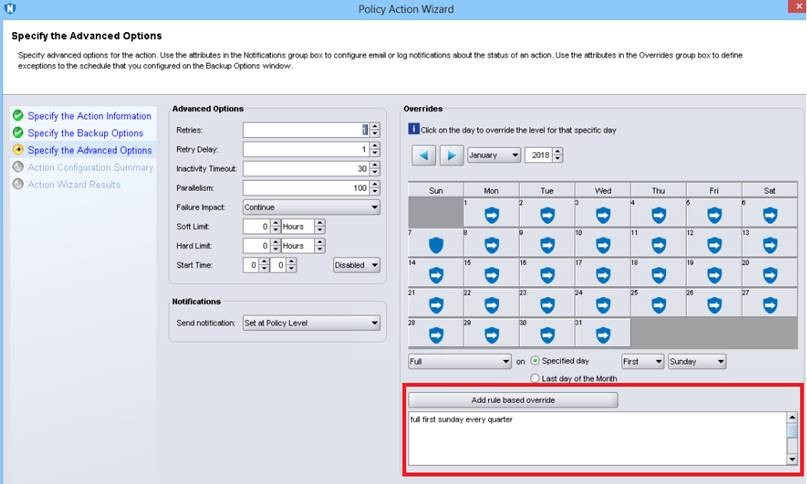
The options set here use nsr_schedule. The syntax of the action must start with the backup level being performed: "full," "txnlog," "incr_synth_full," "incr," "skip," or the number "1." This is followed by a date which must be either a fixed date or a recurring date.
NOTE: See the NetWorker Documentation for specific backup levels supported by the datatype being backed up; For example, the VMware Integration Guide, NetWorker Module for Microsoft Administration Guide, and so forth. https://www.dell.com/support/product-details/product/networker/docs
Fixed date: This format is: level month/day/year. Month and day are two-digit numbers, year may be either two or four digits.
NOTE: Two-digit years 70-99 are offsets from 1900, while 00-69 are offsets from 2000.
Example: full 01/01/2023
Recurring date: This format is: level [ number ] weekday [ [ every ] [ number ] period ]
Number: Use a number (1, 2, 3, so forth) or an ordinal (first, second, third, so forth) for the first instance, and a number for the second.
Weekday: Must be "Monday," "Tuesday," "Wednesday," "Thursday," "Friday," "Saturday," "Sunday"
Period: Must be "week," "month," "quarter", or "year."
Weekday: Must be "Monday," "Tuesday," "Wednesday," "Thursday," "Friday," "Saturday," "Sunday"
Period: Must be "week," "month," "quarter", or "year."
Example: full first Friday every month
Action and date pairs are separated by commas (,).
Additional Information
For more information, see the version-specific NetWorker Administration Guide https://www.dell.com/support/home/product-support/product/networker/docs
Affected Products
NetWorkerProducts
NetWorkerArticle Properties
Article Number: 000008797
Article Type: How To
Last Modified: 12 Mar 2025
Version: 6
Find answers to your questions from other Dell users
Support Services
Check if your device is covered by Support Services.