NetWorker:如何從 NMC 偵錯復原工作失敗
Summary: 從 NetWorker Management Console (NMC) 除錯復原工作失敗
This article applies to
This article does not apply to
This article is not tied to any specific product.
Not all product versions are identified in this article.
Instructions
下列程序詳細說明如何從 NMC 執行傳統用戶端的復原動作期間啟用偵錯
- 在復原視窗中,以滑鼠右鍵按一下復原組態,然後選取再次復原 。
- 點擊 返回 按鈕,直到到達 選擇恢復選項 視窗。
- 選取 Advanced 選項。
- 增加 「調試級別」屬性中的值以啟用調試。值越高,恢復日誌檔中顯示的調試輸出就越多。
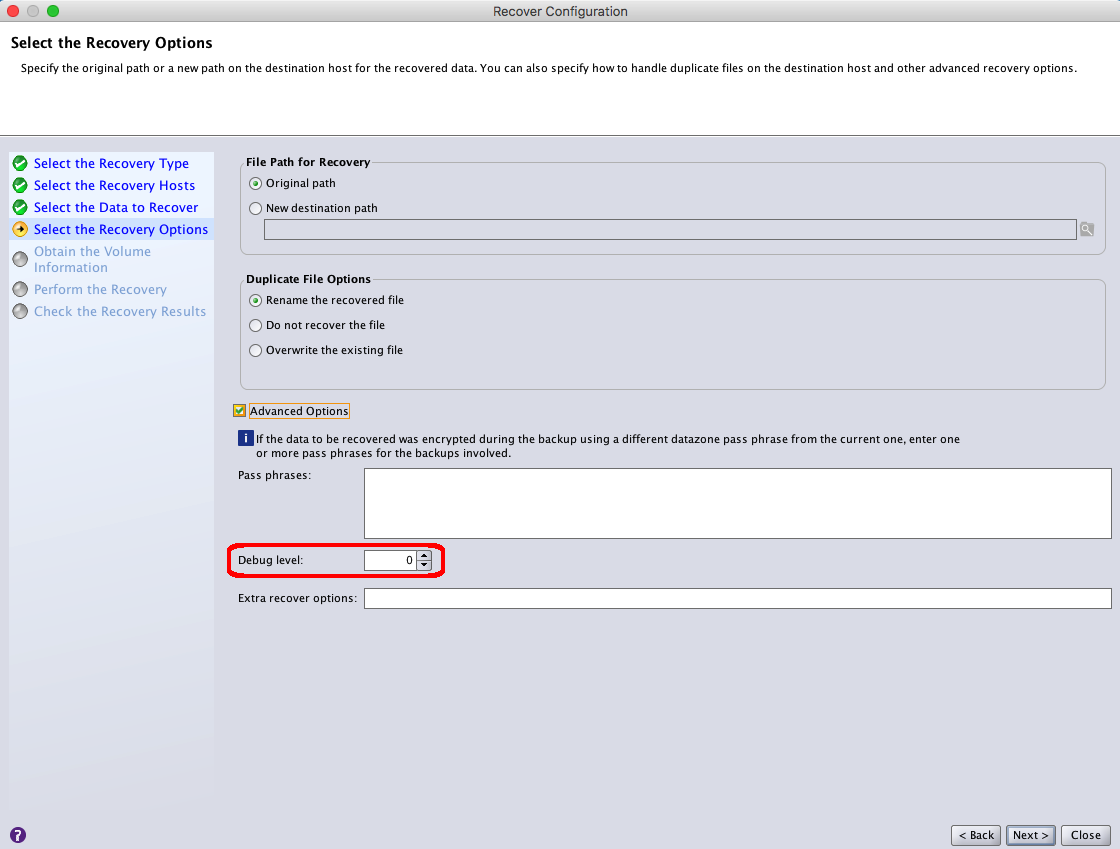
注意:更改恢復日誌中生成的調試輸出級別。預設值 0 代表正常復原輸出。最高調試級別可以設置為級別 9。
- 按一下下一步,直到您到達執行復原視窗。
- 在“恢復 名稱”字段中,為恢復配置提供新名稱。
- 按一下執行復原。
- 在復原視窗的選項中監控復原工作的狀態。
- 恢復完成後,查看恢復日誌檔。
- Linux:
/nsr/logs/recover - Windows (預設):
C:\Program Files\EMC NetWorker\nsr\logs\recover
Additional Information
Affected Products
NetWorkerProducts
NetWorkerArticle Properties
Article Number: 000019360
Article Type: How To
Last Modified: 03 Oct 2025
Version: 4
Find answers to your questions from other Dell users
Support Services
Check if your device is covered by Support Services.