Dell EMC Unity: Systembegrænsninger (kan rettes af brugeren).
Summary: Dell EMC Unity: Systembegrænsninger (kan rettes af brugeren).
This article applies to
This article does not apply to
This article is not tied to any specific product.
Not all product versions are identified in this article.
Instructions
Hver systemmodel er defineret af visse systembegrænsninger. maksimale drevslots, maksimalt konfigurerbare LUN er osv.
Du kan se systemgrænser i listerne Support Matrix, Unisphere, Data Collects, UEMCLI eller Driver Properties Objects.
- Supportmatrix
Gå til supportmatrixen, og kontroller tabel 6, 7 og 8. Klik her Support Matrix.
- Unisphere
-
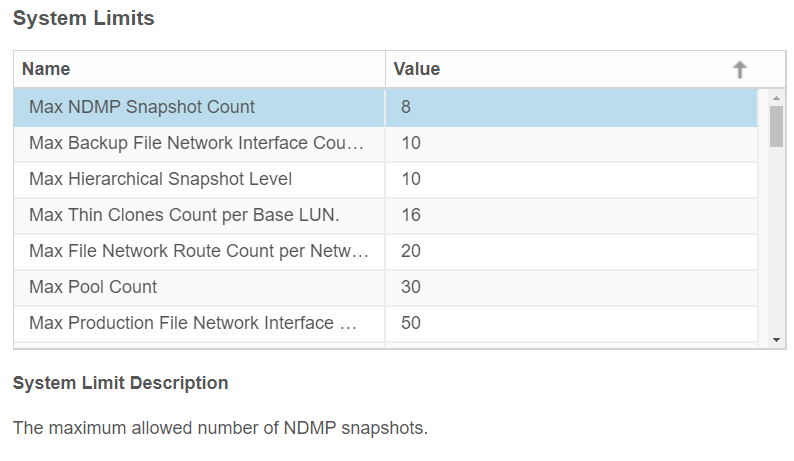
Start Unisphere ved at indtaste SP-administrations-IP-adressen, og log derefter på.
-
Klik på Indstillinger.
-
Find systembegrænsninger under fanen Software og licenser .
-
Klik på Systemgrænser.
Eksempel fra Unity 350F:

- UEMCLI
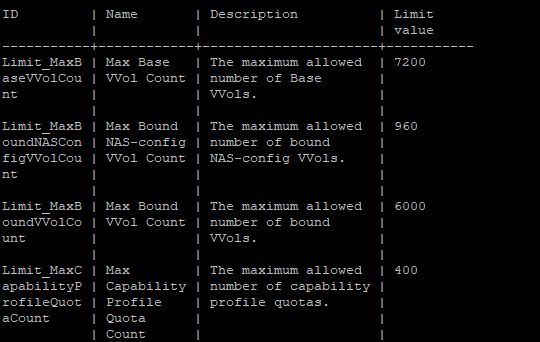
service@spa:~/user# uemcli /sys/limit show -output tabel -wrap
Eksempel fra Unity 350F:
- Driveregenskaber Objektliste
service@spa:~/user# svc_storagecheck --list | grep -i Max_
Eller
service@spa:~/user# svc_storagecheck --list | sed -n '/Driver Properties Object List/,/<< nye objekter >>/p'
Max_Pools : 30
Max_LUs : 1500
Max_DrivesPerPool : 250
Max_DrivesPerOperation : 250
Max_DrivesUsableForAllPools : 250
Max_LUSizeInBlocks : 549755813888 (0x8000000000)
Max_CompressLUs : 500
Max_CompressBackgroundProcesses : 10
Max_PrivateFLUs : 126
Max_LUs : 1500
Max_DrivesPerPool : 250
Max_DrivesPerOperation : 250
Max_DrivesUsableForAllPools : 250
Max_LUSizeInBlocks : 549755813888 (0x8000000000)
Max_CompressLUs : 500
Max_CompressBackgroundProcesses : 10
Max_PrivateFLUs : 126
Additional Information
Dette indhold er oversat til 15 sprog:
| https://downloads.dell.com/TranslatedPDF/DE_KB540548.pdf |
| https://downloads.dell.com/TranslatedPDF/ES_KB540548.pdf |
| https://downloads.dell.com/TranslatedPDF/ES-XL_KB540548.pdf |
| https://downloads.dell.com/TranslatedPDF/FR_KB540548.pdf |
| https://downloads.dell.com/TranslatedPDF/IT_KB540548.pdf |
| https://downloads.dell.com/TranslatedPDF/JA_KB540548.pdf |
| https://downloads.dell.com/TranslatedPDF/KO_KB540548.pdf |
| https://downloads.dell.com/TranslatedPDF/NL_KB540548.pdf |
| https://downloads.dell.com/TranslatedPDF/PT_KB540548.pdf |
| https://downloads.dell.com/TranslatedPDF/PT-BR_KB540548.pdf |
| https://downloads.dell.com/TranslatedPDF/RU_KB540548.pdf |
| https://downloads.dell.com/TranslatedPDF/SV_KB540548.pdf |
| https://downloads.dell.com/TranslatedPDF/ZH-CN_KB540548.pdf |
| https://downloads.dell.com/TranslatedPDF/ZH-TW_KB540548.pdf |
| https://downloads.dell.com/TranslatedPDF/AR_KB540548.pdf |
Affected Products
Dell EMC Unity Family |Dell EMC Unity All FlashProducts
Dell Unity 300, Dell EMC Unity 300F, Dell EMC Unity 350F, Dell EMC Unity XT 380, Dell EMC Unity XT 380F, Dell EMC Unity 400, Dell EMC Unity 400F, Dell EMC Unity 450F, Dell EMC Unity XT 480, Dell EMC Unity XT 480F, Dell EMC Unity 500
, Dell EMC Unity 500F, Dell EMC Unity 600, Dell EMC Unity 600F, Dell EMC Unity 650F, Dell EMC Unity XT 680, Dell EMC Unity XT 880, Dell EMC Unity XT 880F, Dell EMC Unity Family |Dell EMC Unity All Flash, Dell EMC Unity Hybrid, UnityVSA, Dell EMC UnityVSA Professional Edition/Unity Cloud Edition
...
Article Properties
Article Number: 000021404
Article Type: How To
Last Modified: 11 Dec 2025
Version: 5
Find answers to your questions from other Dell users
Support Services
Check if your device is covered by Support Services.