PowerFlex 2.6: SVM OS'yi dönüştürme başarısız oluyor "BEKLENMEYEN Hata java.lang.NullPointerException komut yürütülüyor . CustomizeSvmCommand"
Summary: PowerFlex Convert SVM OS, "UNEXPECTED Error java.lang.NullPointerException executing command ile başarısız oluyor. CustomizeSvmCommand"
This article applies to
This article does not apply to
This article is not tied to any specific product.
Not all product versions are identified in this article.
Symptoms
GW ile SVM İşletim Sistemini SLES 11.3'ten SLES 12.2'ye Dönüştürme
Belirtiler
GW işlemindeki görev Beklenmeyen bir hatayla başarısız olur.
scaleio-trace.log aşağıdakileri içerir:
2018-08-28 13:39:40,241 [executor-27] ERROR c.e.s.s.d.i.c.CustomizeSvmCommand - UNEXPECTED Error java.lang.NullPointerException executing command .CustomizeSvmCommand (abort) : com.emc.scaleio.serverCommons.vmwareObj.VmWareSpecGenerator.getCustomizationSpec(VmWareSpecGenerator.java:88)
com.emc.scaleio.serverCommons.vmwareObj.vCenterClient.copyCustomization(vCenterClient.java:1863)
com.emc.scaleio.serverCommons.vmwareConnectors.VCenterConnectorImpl.copyVmCustomization(VCenterConnectorImpl.java:416)
com.emc.s3g.scaleio.domain.installation.VCenterConnectionImpl.copyVmCustomization(VCenterConnectionImpl.java:238)
com.emc.s3g.scaleio.domain.installation.commands.CustomizeSvmCommand.executeVCenterCommand(CustomizeSvmCommand.java:59)
com.emc.s3g.scaleio.domain.installation.commands.CustomizeSvmCommand.executeVCenterCommand(CustomizeSvmCommand.java:29)
com.emc.s3g.scaleio.domain.installation.commands.VCenterCommand.executeCommand(VCenterCommand.java:48)
com.emc.s3g.scaleio.domain.installation.commands.BaseCommand.call(BaseCommand.java:515)
java.util.concurrent.FutureTask.run(FutureTask.java:266)
java.util.concurrent.ThreadPoolExecutor.runWorker(ThreadPoolExecutor.java:1149)
java.util.concurrent.ThreadPoolExecutor$Worker.run(ThreadPoolExecutor.java:624)
java.lang.Thread.run(Thread.java:748)
Etki
Dönüştürme işlemine devam edilemiyor.
Cause
Orijinal SVM'deki vmware-tools işleminde bir sorun var ve VCenter IP'leri ondan alamıyor ve bu nedenle yeni SVM'leri buna göre yapılandıramıyor.
VCenter'ın VM özet sekmesine bakıldığında, aşağıdaki ekran görüntüsünde gösterildiği gibi "IP Adresleri" listesi boştur. Ancak "VMware Tools" durumu yine de "Running" olabilir.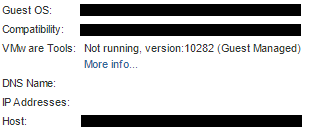
Resolution
IP adreslerini vCenter'da göstermeyen tüm (orijinal) SVM'leri belirleyin, bu SVM'lerde oturum açın ve vmware-tools işlemini yeniden başlatın. Örneğin:
systemctl restart vmtoolsd
Additional Information
Etkilenen sürümler
Bu bir ScaleIO/VxFlex OS sorunu değildir.
Affected Products
PowerFlex SoftwareProducts
PowerFlex SoftwareArticle Properties
Article Number: 000031281
Article Type: Solution
Last Modified: 22 Sept 2025
Version: 4
Find answers to your questions from other Dell users
Support Services
Check if your device is covered by Support Services.