Avamar:SQLバックアップが「BACKUP DATABASE permission denied in database」エラーで失敗する
Summary: このナレッジベース(KB)記事では、権限の問題によるAvamar SQLバックアップの失敗について説明します。
This article applies to
This article does not apply to
This article is not tied to any specific product.
Not all product versions are identified in this article.
Symptoms
ログに次のエラー メッセージが表示され、SQLクライアントのバックアップが失敗することがあります。
avsql Error <9072>: sqlconnectimpl_smo::execute Microsoft.SqlServer.Management.Common.ExecutionFailureException: An exception occurred while executing a Transact-SQL statement or batch. ---> System.Data.SqlClient.SqlException: BACKUP DATABASE permission denied in database 'OperationsManager'.
 (Log #10)
avsql Error <6478>: VDS::Getconfig failed with 'The api was waiting and the timeout interval had elapsed' (Log #10)
avsql Error <6478>: VDS::Getconfig failed with 'The api was waiting and the timeout interval had elapsed' (Log #10)
avsql Error <6479>: Timed out. Was Microsoft SQLServer running? (Log #10)
avsql Error <6479>: Timed out. Was Microsoft SQLServer running? (Log #10)
avtar Info <7202>: Backup CANCELLED, wrapping-up session with Server (Log #2)
avtar Info <7202>: Backup CANCELLED, wrapping-up session with Server (Log #3)
...
avsql Error <9072>: sqlconnectimpl_smo::execute Microsoft.SqlServer.Management.Common.ExecutionFailureException: An exception occurred while executing a Transact-SQL statement or batch. ---> System.Data.SqlClient.SqlException: BACKUP DATABASE permission denied in database 'master'.
avsql Error <9072>: sqlconnectimpl_smo::execute Microsoft.SqlServer.Management.Common.ExecutionFailureException: An exception occurred while executing a Transact-SQL statement or batch. ---> System.Data.SqlClient.SqlException: BACKUP DATABASE permission denied in database 'msdb'.
...
avsql Error <14272>: There are no successfully finished database tasks!
avsql Error <14294>: An error occurred when generating sql metadata
Cause
バックアップ エージェント サービス用に構成されたアカウント(デフォルトではローカルSYSTEM)に、SQL Serverデータベースをバックアップするための適切な権限がありません。
Resolution
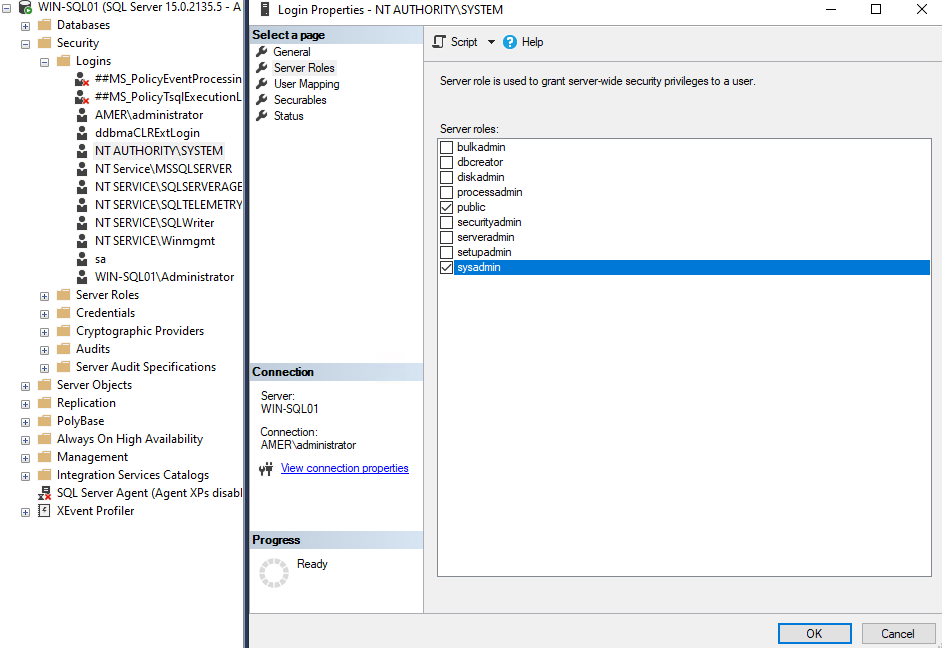
SQL Server Management Studioを開き、バックアップ エージェント サービス アカウントがSQL Serverロール「sysadmin」に追加されていることを確認します。
バックアップ エージェント サービス アカウントにSQL Serverの役割を割り当てるには、次の手順を実行します。
- SQL クライアントで、SQL Server Management Studio を起動します。
- SQL Server Management Studioウィンドウの左ペインで、ツリーを展開して必要なSQL Serverを最初に表示し、次にSecurityフォルダーを表示します。
- Securityフォルダーで、Loginsをクリックして、右ペインにユーザーを表示します。
- [ログイン] ボックスの一覧で、アカウント (NT Authority\SYSTEM または専用のバックアップ アカウント) を右クリックし、[プロパティ] をクリックします。
- [ログイン プロパティ]ボックスで、[ サーバーの役割 ]ページを選択します。
- [Server roles]ボックスで、横のチェックマークをクリックしてsysadminロールを有効にします。
- [OK]ボタンをクリックして、変更を保存します。
Affected Products
Avamar, Avamar Plug-in for SQLProducts
AvamarArticle Properties
Article Number: 000039635
Article Type: Solution
Last Modified: 22 Jul 2025
Version: 4
Find answers to your questions from other Dell users
Support Services
Check if your device is covered by Support Services.