Avamar: ADME-Backup Error - Login error 74: Account niet gevonden in de Avamar database
Summary: Avamar Data Migration Enabler (ADME) mislukt bij het exporteren omdat een client een ongeldig domeinpad heeft als gevolg van een wijziging in de domeinlocatie. Dit resulteert in een Login error 74: Account niet gevonden in de Avamar database. ...
This article applies to
This article does not apply to
This article is not tied to any specific product.
Not all product versions are identified in this article.
Symptoms
Bij het activeren van een back-up mislukt ADME onmiddellijk in de selectiefase:
========================================== SELECTION - PHASE =========================================ADMe is locked - retaining existing password...
ADMe session started...
Environment-1 is now locked by [ Batch-Owner=admbatch-OracleJob.cfg PID=13218 ]
User-Input: 1 -sid OracleGrp -select -d -butype cod mod nah
INFO-01A: Active-Auto Date Range - 2018-08-01 to 2018-08-10
Purging previous pseudo client backups from [/ADME/admepseudo]
avtar Error 5126: Login error 74: Account not found in the Avamar database
avtar FATAL 5308: Failed to initiate session with server
avtar Error 5126: Login error 74: Account not found in the Avamar database
avtar FATAL 5308: Failed to initiate session with server
avtar Error 5126: Login error 74: Account not found in the Avamar database
avtar FATAL 5308: Failed to initiate session with server
Scanning-Group [OracleGrp]-[cai-oracle.emc.com]...
avtar Error 5126: Login error 74: Account not found in the Avamar database
avtar FATAL 5308: Failed to initiate session with server
INFO-07: Configuration check succeeded
INFO-14: Total backup count selected [0]
ERROR-04A Selection list is empty [ RC=1 ], this will impact continuing with a migration operation
Env- Session Complete: RC=1 08/09/18 16:52
ATO-BATCH-FAILURE: [-select] RC=[] Start-Time:09/08/18 16:52 End-Time:09/08/18 16:52 Elapsed-Time-HH:MM=n/a Env#:1
Cause
De oorzaak hiervan is dat ADME de genoemde client niet kan vinden. Een mogelijke reden is dat de client van het ene domein naar het andere is verhuisd.
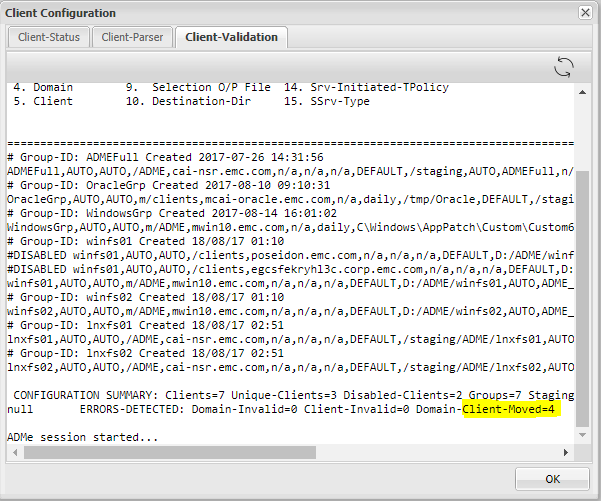
- Als we de clientvalidatie controleren, kunnen we zien dat ADME erop wijst dat sommige clients van hun bestaande domein zijn verhuisd.
- Dit betekent dat de ADME het oude clientpad ziet en moet worden bijgewerkt met het nieuwe pad (domein) waar de client naartoe is verhuisd.
Resolution
- ADME Kan sommige of specifieke clients niet exporteren omdat de client niet kan worden gevonden.
- De oorzaak hiervan is dat de cliënt is verhuisd.
- De client moet worden bijgewerkt met het juiste pad.
- De stappen voor het bijwerken van het pad zijn:
- Om het clientpad bij te werken, moeten de volgende stappen worden uitgevoerd vanuit de interactieve ADME-CLI.
- Open Avamar Server als root en typ 'adme'
- Kies voor de tweede optie, u kunt type 2 of C zijn.
- Klik op 'G' voor Groepen.
- Kies de groep waar de client is waar het domein is gewijzigd.
- Typ 'M' voor Modify.
- U moet het vierde veld met het domeinpad van de client bijwerken.
- Tot slot, na het updaten van het nieuwe clientdomein, moet u 'C' typen om de wijzigingen door te voeren.
Oud pad:
Nieuwe weg:
Additional Information
- Open Avamar Server en typ 'adme'
- Kies de tweede optie, u kunt type 2 of C zijn:
==< cai-ave74 >================================ | ADMe Avamar Data Migration (Enabler) | | MAIN - MENU | | Version-4.1.11.45e =============================================== | 1. J) Job Policy Manager | | 2. C) Client-Config Manager | | 3. E) Environment-File Manager | | 4. V) View Selection Worklist | | 5. L) Event Log View | | 6. H) Help | | 7. R) Recovery Manager | | 8. S) Interactive Selection | | 9. M) Interactive Migration | | 10. A) ADMe Administration | | 11. G) ADMe Upgrade | | | =============================================== - Klik op 'G' voor groepen
==========================================================================================================< cai-ave74 >=============== CONFIGURATION MANAGER [DOMAIN-VIEW]: <domain-name> [client-count] ==================================================================================================================================== 1) /ADME [1] 2) /MC_RETIRED [8] 3) /NDMP [2] 4) /Oracle [1] 5) /REPLICATE/cai-ave.emc.com [1] 6) /REPLICATE/cai-ave.emc.com/cai-vcen 7) /REPLICATE/cai-ave.emc.com/cai-vcen 8) /REPLICATE/cai-ave.emc.com/cai-vcen 9) /REPLICATE/cai-ave.emc.com/clients 10) /REPLICATE/cai-ave75.emc.com [1] 11) /REPLICATE/cai-ave75.emc.com/cai-vc 12) /VMWare [2] 13) /cai-vcenter.emc.com [3] 14) /cai-vcenter.emc.com/ContainerClien 15) /cai-vcenter.emc.com/VirtualMachine 16) /clients [4] 17) /clients/_DESACTIVATED [1] ==================================================================================================================================== Config Options: [#=Domain I=Inhibit-Stats G=Group F=Refresh H=Search S=Status-All C=Cfg-View P=Cfg-Parse R=Report U=Cfg-Edit B=Build-CSV-Stats W=Col-Width Q=Quit] > G -
Kies de groep waar de client is waarvan het domein is gewijzigd:
==========================================================================================================< cai-ave74 >=============== CONFIGURATION MANAGER [GROUP-VIEW]: <group-name> [client-count] ==================================================================================================================================== 1) ADMEFull [1] 2) OracleGrp [1] 3) WindowsGrp [1] 4) lnxfs01 [1] 5) lnxfs02 [1] 6) winfs01 [3] 7) winfs02 [1] ==================================================================================================================================== Config Options: [#=Group Z=Calculate-Aggregate-Size C=View-Cfg R=Report U=Cfg-Edit S=Status-All Def=Domain-View>] > 2 - Typ 'M' voor Wijzigen:
==========================================================================================================< cai-ave74 >=============== CONFIGURATION MANAGER [GROUP-CLIENT-VIEW]: <client-name> [#Entries-state] Blue=Not-Config Green=Enabled Red=Disabled Yellow=Invalid ==================================================================================================================================== 1) cai-oracle.emc.com [1-E] ==================================================================================================================================== CLIENT-STATS-DISABLED: Not-Configured=0 Disabled=0 Enabled=0 Invalid=0 Retired=0 ==================================================================================================================================== Config Options: [ D=Disable E=Enable M=Modify O=Remove R=Report T=Audit V=Quick-View Def=Group-View>] > M Enter a client# to add/modify or [ Press Enter to Return ]:> 1 DEBUG2 - Itemx=cai-oracle.emc.com Domainx=OracleGrp Mode=3 Available Client Group-ID's: ADMEFull OracleGrp WindowsGrp lnxfs01 lnxfs02 winfs01 winfs02 Client [cai-oracle.emc.com] is currently defined in groups: OracleGrp Ready to Modify client [/clients][cai-oracle.emc.com] in ADMe configuration. Enter An Existing or New Group-ID or [Def=OracleGrp] Q=Quit: -
Werk het 4e veld bij met het domeinpad van de klant:
==================================================================
         Review All Fields to Establish Selected Client Entry
==================================================================

        Fld-1 ADMe Group-ID Name [OracleGrp]: >
        Fld-2 Start-Date [AUTO]: >
        Fld-3 End-Date [AUTO]: >
        Fld-4 Domain-Name [/clients]: >
        Fld-5 Client-Name [cai-oracle.emc.com]: >
        Fld-6 Avamar-Policy-Group-Name [n/a]: >
        Fld-7 Avamar-Retention-Type [daily]: >
        Fld-8 Exclude-Folders [/tmp/Oracle]: >
        Fld-9 Output-FIle [DEFAULT]: >
        Fld-10 Stage-Destination-Directory [/staging/OracleGrp]: >
        Fld-11 Migration-BU-Scripts [AUTO]: >
        Fld-12 Migration-Monthly-Policy [ORCLNWGRP]: >
        Fld-13 Migration-EOY-Policy [n/a]: >
        Fld-14 Migration-Server-Policy [n/a]: >
        Fld-15 Staging-Server-Type WINDOWS | UNIX [UNIX]: >
        Fld-16 Destination-Path-Suffix [n/a]: >
        Fld-17 Include-Folders [n/a]: >
        Fld-18 Incremental-Delete [n/a]: >


==================================================================

 Confirm Client Entry: [ C=Commit M=Modify Enter=Refresh Q=Quit]: >


==================================================================
 Enter All Fields to Modify a Client Entry, press enter to accept defaults
==================================================================

        Fld-1 ATO-Group-ID Name [OracleGrp]: >
        Fld-2 Start-Date [AUTO]:
        Fld-3 End-Date [AUTO]:
        Fld-4 Domain-Name [/clients]: > /Oracle
        Fld-5 Client-Name [cai-oracle.emc.com]: >
        Fld-6 Avamar-Policy-Group-Name [n/a]:
        Fld-7 Retention-Type [daily]:
        Fld-8 Exclude-Folders [/tmp/Oracle]:
        Fld-9 Output-FIle [DEFAULT]:
        Fld-10 Stage-Destination-Directory [/staging/OracleGrp]:
        Fld-11 Migration-BU-Scripts [AUTO]:
        Fld-12 Export-Policy-Client-Initiated [ORCLNWGRP]:
        Fld-13 Export-EOY-Policy-Client-Initiated [n/a]:
        Fld-14 Export-Policy-Server-Initiated [n/a]:
        Fld-15 Staging-Server-Type WINDOWS | UNIX [UNIX]:
        Fld-16 User-Defined-Destination-Path-Suffix [n/a]:
        Fld-17 Include-Folders [n/a]:
        Fld-18 Incremental-Delete [n/a]:


==================================================================

 Confirm Client Entry: [ C=Commit M=Modify Enter=Refresh Q=Quit]: > C
Affected Products
Avamar Data Migration EnablerProducts
Avamar Client, Avamar Data Migration EnablerArticle Properties
Article Number: 000052310
Article Type: Solution
Last Modified: 05 Sept 2025
Version: 5
Find answers to your questions from other Dell users
Support Services
Check if your device is covered by Support Services.