Dell PowerPath for Windows Installation Fails with Error 0x800401f4
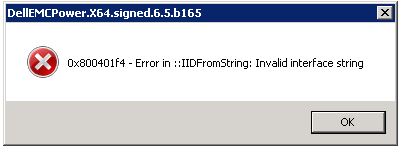
Summary: Dell PowerPath for Windows installation fails with error message "0x800401f4 - Error in ::IDFromString: Invalid interface string"
This article applies to
This article does not apply to
This article is not tied to any specific product.
Not all product versions are identified in this article.
Symptoms
Dell PowerPath for Windows installation fails with error message:
0x800401f4 - Error in ::IDFromString: Invalid interface string
### Bootstrapper.log
2019-10-30 15:05:31     --- Loaded 3 supported component(s)
2019-10-30 15:05:33     Error: 0x800401f4 - Error in ::IIDFromString: Invalid interface string
2019-10-30 15:05:33     EMC PowerPath installer finished, return code=-1
Cause
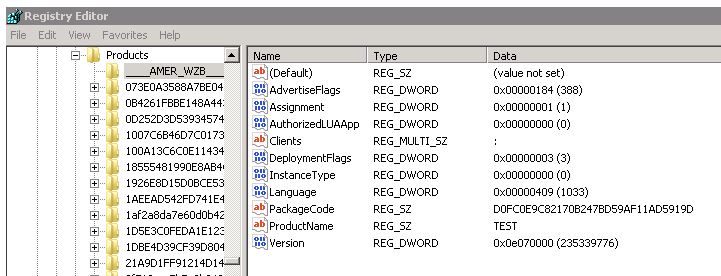
The issue is seen when there are invalid registry keys exist under HKEY_CLASSES_ROOT\Installer\Products.
In this example, there were keys which starting with _(underscore characters) instead of numbers.
Resolution
To resolve this issue:
- Run Regedit as Administrator account
- Request the customer to export the keys starting with the underscore "___" in HKEY_CLASSES_ROOT\Installer\Products\ from the affected server.
- Delete those keys.
- Run the PowerPath installation again
Additional Information
Registry DISCLAIMER: Modifying REGISTRY settings incorrectly can cause serious problems that may prevent your computer from booting properly. Dell cannot guarantee that any problems resulting from the configuring of REGISTRY settings can be solved. Modifications of these settings are at your own risk.
Affected Products
PowerPath for WindowsProducts
PowerPath for WindowsArticle Properties
Article Number: 000055739
Article Type: Solution
Last Modified: 28 May 2026
Version: 5
Find answers to your questions from other Dell users
Support Services
Check if your device is covered by Support Services.