Dell Unity: Gli storage processor vengono visualizzati come riavvio nell'interfaccia utente ma non nella CLI e nessun LED guasto (correggibile dall'utente)
Summary: Questo articolo spiega perché l'interfaccia utente di Unisphere potrebbe visualizzare gli SP danneggiati e riavviarsi quando sono in modalità normale.
This article applies to
This article does not apply to
This article is not tied to any specific product.
Not all product versions are identified in this article.
Symptoms
Small Factor Pluggable (SFP) viene visualizzato come mancante una volta nei registri, mentre successivamente viene visualizzato come funzionante.
È noto che gli SFP non vengono rilevati se hanno un po' di polvere o se non sono completamente inseriti nella porta.
Si tratta di un fattore comune di riduzione delle prestazioni, in quanto causa continue disconnessioni e può anche essere considerato un dispositivo a consumo lento.
Nell'interfaccia utente di Unisphere, gli storage processor vengono visualizzati come in riavvio e in stato danneggiato in " SYSTEM" > "Service" > "Service Tasks".
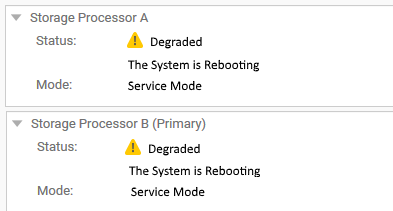
Tuttavia, in un terminale SSH che utilizza la CLI, entrambi gli SP sono in modalità normale.
Questo problema è stato riscontrato finora in Unity OE versione 4.5.1.0.5.001.
Esempio:
service@CKMxxxxxxxx spa:~/user# svc_diag
======== Now executing basic state ========
* System Serial Number is: CKMxxxxxxx
* System Model Number is: Unity 500
* System Friendly Host Name is: CKMxxxxxxxx
* Current Software version: c4dev_PIE_3786R-4.5.1.0.5.001.1552025209-GNOSIS_RETAIL
* Unisphere IP address(es): xx.xxx.xxx.xx xxxx::xxx:xxxx:xxxx:xxxx
* SSH Enabled: true
* FIPS mode: Disabled
* Boot Mode: Normal Mode
* Post Faults:  0x0000
* Backend Faults:       0x0000
* Boot Faults:  0x0000
* Rescue Reason:        0x0000
* Rescue reason for code 0x0000 - No faults detected.
* SP Service Hint Code: <None>
Cause
Questa particolare situazione si verificava durante l'installazione di nuovi moduli di I/O.
Il commit non è stato completato a causa di un SFP non ottimale, pertanto le operazioni relative all'integrità sono state temporaneamente disabilitate (in modo simile a quanto accade durante gli aggiornamenti).
Poiché il polling sull'integrità era disabilitato, il sistema non era in grado di identificare lo stato corretto degli storage processor e segnalava uno stato noto precedente, "rebooting".
Per verificare che si tratti dello stesso problema, verificare i seguenti registri: /var/tmp/ptm/ptm.log/EMC/C4Core/log/c4_safe_ktrace.log
Questo può essere visualizzato in tempo reale eseguendo i comandi su un terminale SSH o nei registri di raccolta dati del servizio triaged:
Comando/registro #1:
Output previsto:
cat /var/tmp/ptm/ptm.log
Output previsto:
=====================================Tasks=====================================
10:56 [ 16/22 ]  Core reboot sp if required (local)                  10 minutes
Start at: Thu May 23 10:56:19 2019
Complete at: Thu May 23 10:56:19 2019
===============================================================================
10:56 [ 17/22 ]  Core start c4 (local)                                5 minutes
Start at: Thu May 23 10:56:19 2019
Task Manager was terminated unexpectedly with signal <TERM>
.... <there might be a few extra lines here > ....
Previous failure detected. Not auto-restarting.
Comando/registro #2:
Quindi, cercare gli eventi correlati a SFP o mezzanine.
Si può notare che qualcosa è andato storto durante l'installazione dei nuovi moduli di I/O:
less /EMC/C4Core/log/c4_safe_ktrace.log
Quindi, cercare gli eventi correlati a SFP o mezzanine.
Si può notare che qualcosa è andato storto durante l'installazione dei nuovi moduli di I/O:
c4_safe_ktrace   INFO OBJ 3 RP:MEZZ(SP: 0, Slot: 0): fbe_base_env_send_resume_prom_read_async_cmd entry.
c4_safe_ktrace   INFO OBJ 3 RP:MEZZ(SP: 0, Slot: 0): Read async completed, workItem 0x7f2486432760, resumeStatus DEVICE_NOT_VALID_FOR_PLATFO
c4_safe_ktrace   INFO OBJ 3 100C0 : ModMgmt: CLEAR enclFaultLedReason Mezzanine RP Fault. <<<====== Fault detected in Root Port (RP)
..........
c4_safe_ktrace   INFO OBJ 3 100C0 : fbe_module_mgmt_check_module_state, SPB Mezzanine 0, state:ENABLED, substate:GOOD
c4_safe_ktrace   INFO OBJ 3 100C0 : fbe_module_mgmt_check_port_state Setting SPB Mezzanine 0, Port 0, state ENABLED, substate GOOD
c4_safe_ktrace   INFO OBJ 3 100C0 : fbe_module_mgmt_check_port_state Setting SPB Mezzanine 0, Port 1, state MISSING, substate MISS_SFP <<<=== SFP not detected
c4_safe_ktrace   INFO OBJ 3 100C0 : fbe_module_mgmt_check_port_state Setting SPB Mezzanine 0, Port 2, state ENABLED, substate GOOD
c4_safe_ktrace   INFO OBJ 3 100C0 : fbe_module_mgmt_check_port_state Setting SPB Mezzanine 0, Port 3, state ENABLED, substate GOOD
c4_safe_ktrace   INFO OBJ 3 100C0 : fbe_module_mgmt_check_port_state Setting SPB Mezzanine 0, Port 4, state ENABLED, substate GOOD
c4_safe_ktrace   INFO OBJ 3 100C0 : fbe_module_mgmt_check_port_state Setting SPB Mezzanine 0, Port 5, state ENABLED, substate GOOD
Resolution
Per risolvere questo problema, eseguire nuovamente il commit dei moduli di I/O, in quanto inizialmente avevano esito negativo, utilizzando i comandi elencati di seguito.
Nota: Questi comandi non richiedono root, ma richiedono un array integro, quindi prima di eseguirli, verificare che l'array sia completamente operativo, come tale:
Command #1:
uemcli -no /sys/general healthcheck -output csv -detail
Output di esempio:
#1 (NON ottimale) - non procedere prima di aver risolto gli errori visualizzati).
"Error code"
"Warning: One or more asynchronous replication sessions, or one or more NAS Server or file system synchronous replication sessions, exist. This could cause problems during upgrade. Pause the replication sessions on the production array prior to starting the upgrade and resume them after completing the upgrade. [Warning Code: platform::check_replication_health_4]"
"Warning: One or more NAS servers may not be in a healthy state. You can continue with the upgrade, but it is recommended that you record the error code and contact your service provider. [Warning Code: dm::check_nas_servers_health_3]"
Operation completed successfully.
Nota: Viene menzionato "Upgrade" perché si tratta del comando utilizzato prima di eseguire NDU (Non-Disruptive Upgrade). Tuttavia, il motivo per cui vengono visualizzati questi messaggi è che l'array (entrambi gli SP) deve essere riavviato.
Il comando #2 potrebbe anche richiedere un riavvio, ecco perché è importante che questo controllo integrità venga superato senza [Error Code:].
[Warnings] può essere ignorato, ma il prompt Command #2 è il messaggio
"Do you still want to continue," E puoi inserire "Yes". Tuttavia, il supporto Dell consiglia di risolvere tutte le avvertenze e gli errori nel controllo integrità prima di procedere.
Per riavviare uno storage processor, seguire la procedura descritta nell'articolo della Knowledge Base Dell Unity: come riavviare uno storage processor (correggibile dall'utente) (in inglese)
#2 (Ottimale) - puoi andare al Comando #2
"Error code"
Operation completed successfully.
Comando #2:
svc_change_hw_config -e
Output previsto:
service@CKMxxxxxxxx spa:~/user# svc_change_hw_config -e
Checking if both SPs are in Normal mode...OK
INFO:    Beginning eSLIC or CNA Hardware Upgrade...
WARNING: This operation will cause several reboots to occur on the Storage Processors.
WARNING: Do NOT proceed further if the user is unaware of this downtime!
==============================System Information===============================
Task Manager Command:            /opt/ptm/task_mgr.pl
Starts at:                       Sat Oct  5 10:03:47 2019
Dual SP:                         Yes
SP:                              b
Platform:                        OBERON
Original Primary:                Yes
Model:                           Unity xxx
Serial Number:                   xxxxxxxxxxxxx
Total number of attempts:        0
===============================================================================

==========================Time Estimate for All Tasks==========================
Task name [ 22 tasks in total ]                      Estimated     Status
                                                           Time(Minutes)
  1         Slic wait for system ready slic (local)         3
  2      Core run pre upgrade health checks (local)         2
  3         ESLIC check eslic configuration (local)         1
  4                  Core enable auto start (local)         0
  5                Core clear boot counters (local)         0
  6               Core clear boot counters (remote)         0
  7                 Core force vdms off sp (remote)         2
  8                  ESLIC set esp boolean (remote)         1
  9                 Core disable quickboot (remote)         1
 10         Core reboot peer sp if required (local)        10
 11                          Core start c4 (remote)         5
 12              Core wait for system ready on peer         3
 13                  Core force vdms off sp (local)         2
 14                   ESLIC set esp boolean (local)         1
 15                  Core disable quickboot (local)         1
 16              Core reboot sp if required (local)        10
 17                           Core start c4 (local)         5
 18              Core wait for system ready (local)         3
 19         ESLIC final configuration check (local)         1
 20                           Core clean up (local)         0
 21                      Core clean up peer (local)         0
 22                 Core disable auto start (local)         0

===============================================================================

=========================Estimated Time for Services ==========================
Current Time:                                      10:03
Estimated Time when eSLIC will be complete:      10:52
===============================================================================
Do you wish to continue [ yes or no ]? >
Dopo aver digitato "yes" e premuto il tasto "Return", viene visualizzato il seguente output:
=====================================Tasks=====================================
20:41 [ 17/22 ]  Core start c4 (local)                                5 minutes
===============================================================================
20:41 [ 18/22 ]  Core wait for system ready (local)                   3 minutes
===============================================================================
20:41 [ 19/22 ]  ESLIC final configuration check (local)             30 seconds
===============================================================================
20:41 [ 20/22 ]  Core clean up (local)                                5 seconds
===============================================================================
20:41 [ 21/22 ]  Core clean up peer (local)                           5 seconds
===============================================================================
20:41 [ 22/22 ]  Core disable auto start (local)                      5 seconds
===============================================================================
===================================SUMMARY=====================================
Status:                   Success
Actual Time Spent:        16452 minutes
Total Number of attempts: 1
Log File:                 /var/tmp/ptm/ptm.log
=====================================END=======================================
Anche questi hanno effettuato l'accesso
/EMC/backend/log_shared/EMCSystemLogFile.log:
Platform_Basic      30018 [NOTICE] Audit: Service user executed the following service script command: svc_change_hw_config -e
IOModule            30010 [INFO] User: Starting the hardware configuration commit operation
Platform_Basic      30018 [NOTICE] Audit: Service user executed the following service script command: svc_dc -pbc udoctor
IOModule            30014 [INFO] User: Completed task <17> of <22> (Restarting services)
IOModule            30014 [INFO] User: Completed task <18> of <22> (Waiting for system ready state)
IOModule            30014 [INFO] User: Completed task <19> of <22> (Checking if upgrade complete)
IOModule            30014 [INFO] User: Completed task <20> of <22> (Cleaning up)
IOModule            30014 [INFO] User: Completed task <21> of <22> (Cleaning up)
IOModule            30014 [INFO] User: Completed task <22> of <22> (Disabling automatic restart)
IOModule            30011 [NOTICE] User: The hardware configuration has been successfully committed
Health              6044f [INFO] User: Storage Processor SP A is operating normally
Health              6044f [INFO] User: Storage Processor SP B is operating normally
Dopo aver visualizzato l'output precedente, aggiornare l'interfaccia utente di Unisphere e verificare se lo stato è tornato normale (previsto).
In caso contrario, contattare il supporto tecnico Dell e fare riferimento a questo articolo.
Nota: Ulteriori informazioni su questo comando sono disponibili nel documento Dell EMC Unity™ Family Service Commands Technical Notes, al https://www.dell.com/support/home/en-us
Additional Information
NOTA: È inoltre possibile che una batteria a bottone danneggiata causi un problema di riavvio dell'SP con un falso positivo nell'interfaccia utente.
Consultare l'articolo della KB 000069296 Dell Unity: Batteria a bottone sullo storage processor (correggibile da Dell)
Affected Products
Dell Unity 300, Dell EMC Unity FamilyProducts
Dell EMC Unity 300F, Dell EMC Unity 350F, Dell EMC Unity 400, Dell EMC Unity 400F, Dell EMC Unity 450F, Dell EMC Unity 500, Dell EMC Unity 500F, Dell EMC Unity 550F, Dell EMC Unity 600, Dell EMC Unity 600F, Dell EMC Unity 650F
, Dell EMC Unity Family |Dell EMC Unity All Flash, Dell EMC Unity Family, Dell EMC Unity Hybrid
...
Article Properties
Article Number: 000056107
Article Type: Solution
Last Modified: 04 Dec 2025
Version: 6
Find answers to your questions from other Dell users
Support Services
Check if your device is covered by Support Services.