Dell Unity:ストレージ プロセッサーは、ユーザー インターフェイスでは再起動中と表示されるが、CLIでは表示されず、障害のあるLEDも表示されない(ユーザー修正可能)
Summary: この記事では、SPが通常モードのときに、Unisphereユーザー インターフェイスに「degraded」と表示され、SPが再起動する理由について説明します。
This article applies to
This article does not apply to
This article is not tied to any specific product.
Not all product versions are identified in this article.
Symptoms
Small Factor Pluggable (SFP)がログに1回欠落していると表示され、その後は正常と表示されます
SFPは、ほこりが少し残っているか、ポートに完全に挿入されていない場合、検出されないことが知られています
これは、絶え間ない切断を引き起こすため、パフォーマンスを低下させる一般的な要因であり、低速ドレイン デバイスとしての原因となる場合もあります。
Unisphereユーザー インターフェイスでは、ストレージ プロセッサーが「SYSTEM」>「Service」>「Service Tasks」に「Degraded」状態で表示されます。
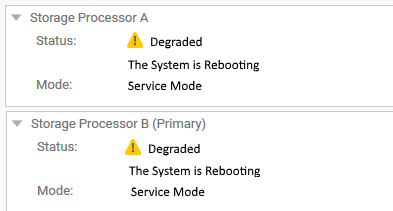
ただし、CLIを使用するSSHターミナルでは、両方のSPが通常モードです。
これは、これまでのところ、Unity OEバージョン4.5.1.0.5.001で確認されています
例:
service@CKMxxxxxxxx spa:~/user# svc_diag
======== Now executing basic state ========
* System Serial Number is: CKMxxxxxxx
* System Model Number is: Unity 500
* System Friendly Host Name is: CKMxxxxxxxx
* Current Software version: c4dev_PIE_3786R-4.5.1.0.5.001.1552025209-GNOSIS_RETAIL
* Unisphere IP address(es): xx.xxx.xxx.xx xxxx::xxx:xxxx:xxxx:xxxx
* SSH Enabled: true
* FIPS mode: Disabled
* Boot Mode: Normal Mode
* Post Faults:  0x0000
* Backend Faults:       0x0000
* Boot Faults:  0x0000
* Rescue Reason:        0x0000
* Rescue reason for code 0x0000 - No faults detected.
* SP Service Hint Code: <None>
Cause
この特定の状況は、新しいI/Oモジュールを取り付けるときに発生しました
SFPが最適でないため、コミットが完了しなかったため、稼働状態に関連する操作が一時的に無効になりました(アップグレード中に発生するのと同様)。
正常性ポーリングが無効になっていたため、システムはストレージ プロセッサーの正しいステータスを識別できず、「再起動中」という以前の既知のステータスを報告しました
これが同じ問題であることを確認するには、次のログを確認します。 /var/tmp/ptm/ptm.log/EMC/C4Core/log/c4_safe_ktrace.log
これは、SSHターミナルまたはトリアージされたサービス データ コレクション ログでコマンドを実行することでライブで確認できます。
コマンド/ログ#1:
予期される出力:
cat /var/tmp/ptm/ptm.log
予期される出力:
=====================================Tasks=====================================
10:56 [ 16/22 ]  Core reboot sp if required (local)                  10 minutes
Start at: Thu May 23 10:56:19 2019
Complete at: Thu May 23 10:56:19 2019
===============================================================================
10:56 [ 17/22 ]  Core start c4 (local)                                5 minutes
Start at: Thu May 23 10:56:19 2019
Task Manager was terminated unexpectedly with signal <TERM>
.... <there might be a few extra lines here > ....
Previous failure detected. Not auto-restarting.
コマンド/ログ#2:
SFPまたはメザニン関連のイベントを探します
新しいI/Oモジュールを取り付ける際に問題が発生したことがわかります。
less /EMC/C4Core/log/c4_safe_ktrace.log
SFPまたはメザニン関連のイベントを探します
新しいI/Oモジュールを取り付ける際に問題が発生したことがわかります。
c4_safe_ktrace   INFO OBJ 3 RP:MEZZ(SP: 0, Slot: 0): fbe_base_env_send_resume_prom_read_async_cmd entry.
c4_safe_ktrace   INFO OBJ 3 RP:MEZZ(SP: 0, Slot: 0): Read async completed, workItem 0x7f2486432760, resumeStatus DEVICE_NOT_VALID_FOR_PLATFO
c4_safe_ktrace   INFO OBJ 3 100C0 : ModMgmt: CLEAR enclFaultLedReason Mezzanine RP Fault. <<<====== Fault detected in Root Port (RP)
..........
c4_safe_ktrace   INFO OBJ 3 100C0 : fbe_module_mgmt_check_module_state, SPB Mezzanine 0, state:ENABLED, substate:GOOD
c4_safe_ktrace   INFO OBJ 3 100C0 : fbe_module_mgmt_check_port_state Setting SPB Mezzanine 0, Port 0, state ENABLED, substate GOOD
c4_safe_ktrace   INFO OBJ 3 100C0 : fbe_module_mgmt_check_port_state Setting SPB Mezzanine 0, Port 1, state MISSING, substate MISS_SFP <<<=== SFP not detected
c4_safe_ktrace   INFO OBJ 3 100C0 : fbe_module_mgmt_check_port_state Setting SPB Mezzanine 0, Port 2, state ENABLED, substate GOOD
c4_safe_ktrace   INFO OBJ 3 100C0 : fbe_module_mgmt_check_port_state Setting SPB Mezzanine 0, Port 3, state ENABLED, substate GOOD
c4_safe_ktrace   INFO OBJ 3 100C0 : fbe_module_mgmt_check_port_state Setting SPB Mezzanine 0, Port 4, state ENABLED, substate GOOD
c4_safe_ktrace   INFO OBJ 3 100C0 : fbe_module_mgmt_check_port_state Setting SPB Mezzanine 0, Port 5, state ENABLED, substate GOOD
Resolution
この問題を解決するには、最初に失敗したI/Oモジュールを、次のコマンドを使用して再コミットします
手記:これらのコマンドにはrootは必要ありませんが、正常なアレイが必要です。そのため、実行する前に、次のようにアレイが完全に動作していることを確認してください。
Command #1:
uemcli -no /sys/general healthcheck -output csv -detail
出力例:
#1 (最適ではない) - 表示されたエラーを解決する前に続行しないでください)。
"Error code"
"Warning: One or more asynchronous replication sessions, or one or more NAS Server or file system synchronous replication sessions, exist. This could cause problems during upgrade. Pause the replication sessions on the production array prior to starting the upgrade and resume them after completing the upgrade. [Warning Code: platform::check_replication_health_4]"
"Warning: One or more NAS servers may not be in a healthy state. You can continue with the upgrade, but it is recommended that you record the error code and contact your service provider. [Warning Code: dm::check_nas_servers_health_3]"
Operation completed successfully.
メモ: 「アップグレード」と表示されているのは、無停止アップグレード(NDU)を実行する前に使用するコマンドであるためです。ただし、これらのメッセージが表示されるのは、アレイ(両方のSP)を再起動する必要があるためです。
コマンド#2でも再起動が必要になる場合があります。このため、このヘルス チェックは[エラー コード:]なしで合格することが重要です。
[警告]は無視できますが、コマンド#2プロンプトはメッセージです
"Do you still want to continue," 「はい」と入力できます。ただし、Dellサポートでは、続行する前に、ヘルス チェックのすべての警告とエラーを解決することをお勧めします。
ストレージ プロセッサーを再起動するには、「KB Dell Unity: ストレージ プロセッサーを再起動する方法(ユーザー修正可能)(英語)」
#2 (最適) - コマンド #2 に移動できます。
"Error code"
Operation completed successfully.
コマンド#2:
svc_change_hw_config -e
予期される出力:
service@CKMxxxxxxxx spa:~/user# svc_change_hw_config -e
Checking if both SPs are in Normal mode...OK
INFO:    Beginning eSLIC or CNA Hardware Upgrade...
WARNING: This operation will cause several reboots to occur on the Storage Processors.
WARNING: Do NOT proceed further if the user is unaware of this downtime!
==============================System Information===============================
Task Manager Command:            /opt/ptm/task_mgr.pl
Starts at:                       Sat Oct  5 10:03:47 2019
Dual SP:                         Yes
SP:                              b
Platform:                        OBERON
Original Primary:                Yes
Model:                           Unity xxx
Serial Number:                   xxxxxxxxxxxxx
Total number of attempts:        0
===============================================================================

==========================Time Estimate for All Tasks==========================
Task name [ 22 tasks in total ]                      Estimated     Status
                                                           Time(Minutes)
  1         Slic wait for system ready slic (local)         3
  2      Core run pre upgrade health checks (local)         2
  3         ESLIC check eslic configuration (local)         1
  4                  Core enable auto start (local)         0
  5                Core clear boot counters (local)         0
  6               Core clear boot counters (remote)         0
  7                 Core force vdms off sp (remote)         2
  8                  ESLIC set esp boolean (remote)         1
  9                 Core disable quickboot (remote)         1
 10         Core reboot peer sp if required (local)        10
 11                          Core start c4 (remote)         5
 12              Core wait for system ready on peer         3
 13                  Core force vdms off sp (local)         2
 14                   ESLIC set esp boolean (local)         1
 15                  Core disable quickboot (local)         1
 16              Core reboot sp if required (local)        10
 17                           Core start c4 (local)         5
 18              Core wait for system ready (local)         3
 19         ESLIC final configuration check (local)         1
 20                           Core clean up (local)         0
 21                      Core clean up peer (local)         0
 22                 Core disable auto start (local)         0

===============================================================================

=========================Estimated Time for Services ==========================
Current Time:                                      10:03
Estimated Time when eSLIC will be complete:      10:52
===============================================================================
Do you wish to continue [ yes or no ]? >
「yes」と入力して「Return」キーを押すと、次の出力が表示されます。
=====================================Tasks=====================================
20:41 [ 17/22 ]  Core start c4 (local)                                5 minutes
===============================================================================
20:41 [ 18/22 ]  Core wait for system ready (local)                   3 minutes
===============================================================================
20:41 [ 19/22 ]  ESLIC final configuration check (local)             30 seconds
===============================================================================
20:41 [ 20/22 ]  Core clean up (local)                                5 seconds
===============================================================================
20:41 [ 21/22 ]  Core clean up peer (local)                           5 seconds
===============================================================================
20:41 [ 22/22 ]  Core disable auto start (local)                      5 seconds
===============================================================================
===================================SUMMARY=====================================
Status:                   Success
Actual Time Spent:        16452 minutes
Total Number of attempts: 1
Log File:                 /var/tmp/ptm/ptm.log
=====================================END=======================================
これらもログインして
/EMC/backend/log_shared/EMCSystemLogFile.logが使用するJava Runtime Environmentへのパスを定義します。
Platform_Basic      30018 [NOTICE] Audit: Service user executed the following service script command: svc_change_hw_config -e
IOModule            30010 [INFO] User: Starting the hardware configuration commit operation
Platform_Basic      30018 [NOTICE] Audit: Service user executed the following service script command: svc_dc -pbc udoctor
IOModule            30014 [INFO] User: Completed task <17> of <22> (Restarting services)
IOModule            30014 [INFO] User: Completed task <18> of <22> (Waiting for system ready state)
IOModule            30014 [INFO] User: Completed task <19> of <22> (Checking if upgrade complete)
IOModule            30014 [INFO] User: Completed task <20> of <22> (Cleaning up)
IOModule            30014 [INFO] User: Completed task <21> of <22> (Cleaning up)
IOModule            30014 [INFO] User: Completed task <22> of <22> (Disabling automatic restart)
IOModule            30011 [NOTICE] User: The hardware configuration has been successfully committed
Health              6044f [INFO] User: Storage Processor SP A is operating normally
Health              6044f [INFO] User: Storage Processor SP B is operating normally
上記の出力が表示されたら、Unisphereユーザー インターフェイスを更新し、ステータスが正常(想定)に戻ったかどうかを確認します
そうでない場合は、Dellテクニカル サポートにお問い合わせの上、この記事をお伝えください。
メモ: このコマンドの詳細については、https://www.dell.com/support/home/en-us にあるドキュメント『Dell EMC Unity™ Family Service Commands Technical Notes』を参照してください。
Additional Information
メモ: コイン型電池の不良が原因で、UIでSPの再起動問題が誤検出される可能性もあります。
詳細については、KB 000069296 Dell Unity: ストレージ プロセッサー上のコイン型電池(Dell修正可能)
Affected Products
Dell Unity 300, Dell EMC Unity FamilyProducts
Dell EMC Unity 300F, Dell EMC Unity 350F, Dell EMC Unity 400, Dell EMC Unity 400F, Dell EMC Unity 450F, Dell EMC Unity 500, Dell EMC Unity 500F, Dell EMC Unity 550F, Dell EMC Unity 600, Dell EMC Unity 600F, Dell EMC Unity 650F
, Dell EMC Unity Family |Dell EMC Unity All Flash, Dell EMC Unity Family, Dell EMC Unity Hybrid
...
Article Properties
Article Number: 000056107
Article Type: Solution
Last Modified: 04 Dec 2025
Version: 6
Find answers to your questions from other Dell users
Support Services
Check if your device is covered by Support Services.