Dell Unity: 스토리지 프로세서가 사용자 인터페이스에서는 재부팅으로 표시되지만 CLI에서는 표시되지 않고 LED에 장애가 발생하지 않음(사용자 수정 가능)
Summary: 이 문서에서는 SP가 정상 모드에 있을 때 Unisphere 사용자 인터페이스에 SP가 성능 저하 및 재부팅 중으로 표시되는 이유에 대해 설명합니다.
This article applies to
This article does not apply to
This article is not tied to any specific product.
Not all product versions are identified in this article.
Symptoms
SFP(Small Factor Pluggable)가 로그에서 한 번 누락된 것으로 나타나고 나중에는 양호한 것으로 표시됩니다.
SFP는 먼지가 적거나 포트에 완전히 삽입되지 않은 경우 감지되지 않는 것으로 알려져 있습니다.
이는 지속적인 연결 끊김을 유발하고 느린 드레인 장치의 원인이 될 수도 있기 때문에 성능 저하의 일반적인 요인입니다.
Unisphere 사용자 인터페이스에서 스토리지 프로세서는 재부팅 중으로 표시되고 'SYSTEM' > 'Service' > 'Service Tasks'에서 성능 저하 상태로 표시됩니다.
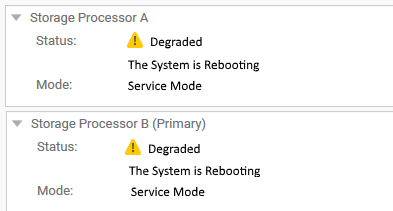
그러나 CLI를 사용하는 SSH 터미널에서는 두 SP가 모두 정상 모드에 있습니다.
지금까지 Unity OE 버전 4.5.1.0.5.001에서 확인되었습니다.
본보기:
service@CKMxxxxxxxx spa:~/user# svc_diag
======== Now executing basic state ========
* System Serial Number is: CKMxxxxxxx
* System Model Number is: Unity 500
* System Friendly Host Name is: CKMxxxxxxxx
* Current Software version: c4dev_PIE_3786R-4.5.1.0.5.001.1552025209-GNOSIS_RETAIL
* Unisphere IP address(es): xx.xxx.xxx.xx xxxx::xxx:xxxx:xxxx:xxxx
* SSH Enabled: true
* FIPS mode: Disabled
* Boot Mode: Normal Mode
* Post Faults:  0x0000
* Backend Faults:       0x0000
* Boot Faults:  0x0000
* Rescue Reason:        0x0000
* Rescue reason for code 0x0000 - No faults detected.
* SP Service Hint Code: <None>
Cause
이 특정 상황은 새 I/O 모듈을 설치할 때 발생했습니다.
최적화되지 않은 SFP로 인해 커밋이 완료되지 않아 상태 관련 작업이 일시적으로 비활성화되었습니다(업그레이드 중에 발생하는 상황과 유사).
상태 폴링이 비활성화되어 시스템이 스토리지 프로세서의 올바른 상태를 식별할 수 없으며 이전에 알려진 상태인 "재부팅 중"을 보고했습니다.
동일한 문제인지 확인하려면 다음 로그를 확인합니다. /var/tmp/ptm/ptm.log/EMC/C4Core/log/c4_safe_ktrace.log
이는 SSH 터미널 또는 심사된 서비스 데이터 수집 로그에서 명령을 실행하여 실시간으로 확인할 수 있습니다.
명령/로그 #1:
예상 출력:
cat /var/tmp/ptm/ptm.log
예상 출력:
=====================================Tasks=====================================
10:56 [ 16/22 ]  Core reboot sp if required (local)                  10 minutes
Start at: Thu May 23 10:56:19 2019
Complete at: Thu May 23 10:56:19 2019
===============================================================================
10:56 [ 17/22 ]  Core start c4 (local)                                5 minutes
Start at: Thu May 23 10:56:19 2019
Task Manager was terminated unexpectedly with signal <TERM>
.... <there might be a few extra lines here > ....
Previous failure detected. Not auto-restarting.
명령/로그 #2:
SFP 또는 메자닌 관련 이벤트를 찾아보십시오.
새 I/O 모듈을 설치할 때 문제가 발생했음을 확인할 수 있습니다.
less /EMC/C4Core/log/c4_safe_ktrace.log
SFP 또는 메자닌 관련 이벤트를 찾아보십시오.
새 I/O 모듈을 설치할 때 문제가 발생했음을 확인할 수 있습니다.
c4_safe_ktrace   INFO OBJ 3 RP:MEZZ(SP: 0, Slot: 0): fbe_base_env_send_resume_prom_read_async_cmd entry.
c4_safe_ktrace   INFO OBJ 3 RP:MEZZ(SP: 0, Slot: 0): Read async completed, workItem 0x7f2486432760, resumeStatus DEVICE_NOT_VALID_FOR_PLATFO
c4_safe_ktrace   INFO OBJ 3 100C0 : ModMgmt: CLEAR enclFaultLedReason Mezzanine RP Fault. <<<====== Fault detected in Root Port (RP)
..........
c4_safe_ktrace   INFO OBJ 3 100C0 : fbe_module_mgmt_check_module_state, SPB Mezzanine 0, state:ENABLED, substate:GOOD
c4_safe_ktrace   INFO OBJ 3 100C0 : fbe_module_mgmt_check_port_state Setting SPB Mezzanine 0, Port 0, state ENABLED, substate GOOD
c4_safe_ktrace   INFO OBJ 3 100C0 : fbe_module_mgmt_check_port_state Setting SPB Mezzanine 0, Port 1, state MISSING, substate MISS_SFP <<<=== SFP not detected
c4_safe_ktrace   INFO OBJ 3 100C0 : fbe_module_mgmt_check_port_state Setting SPB Mezzanine 0, Port 2, state ENABLED, substate GOOD
c4_safe_ktrace   INFO OBJ 3 100C0 : fbe_module_mgmt_check_port_state Setting SPB Mezzanine 0, Port 3, state ENABLED, substate GOOD
c4_safe_ktrace   INFO OBJ 3 100C0 : fbe_module_mgmt_check_port_state Setting SPB Mezzanine 0, Port 4, state ENABLED, substate GOOD
c4_safe_ktrace   INFO OBJ 3 100C0 : fbe_module_mgmt_check_port_state Setting SPB Mezzanine 0, Port 5, state ENABLED, substate GOOD
Resolution
이 문제를 해결하려면 처음에 장애가 발생한 I/O 모듈을 아래 나열된 명령을 사용하여 다시 커밋합니다.
메모: 이러한 명령에는 루트가 필요하지 않지만 정상 어레이가 필요하므로 실행하기 전에 다음과 같이 어레이가 완전히 작동하는지 확인하십시오.
명령 #1:
uemcli -no /sys/general healthcheck -output csv -detail
예제 출력:
#1(최적이 아님) - 표시된 오류를 해결하기 전에 진행하지 마십시오.)
"Error code"
"Warning: One or more asynchronous replication sessions, or one or more NAS Server or file system synchronous replication sessions, exist. This could cause problems during upgrade. Pause the replication sessions on the production array prior to starting the upgrade and resume them after completing the upgrade. [Warning Code: platform::check_replication_health_4]"
"Warning: One or more NAS servers may not be in a healthy state. You can continue with the upgrade, but it is recommended that you record the error code and contact your service provider. [Warning Code: dm::check_nas_servers_health_3]"
Operation completed successfully.
참고: NDU(Non-Disruptive Upgrade)를 수행하기 전에 사용되는 명령이므로 "업그레이드"를 언급합니다. 그러나 이러한 메시지가 표시되는 이유는 어레이(두 SP 모두)를 재부팅해야 하기 때문입니다.
명령 #2도 재부팅이 필요할 수 있습니다. 따라서 이 상태 점검을 [오류 코드:] 없이 통과하는 것이 중요합니다.
[경고]는 무시할 수 있지만 명령 #2 프롬프트의 메시지는
"Do you still want to continue," "예"를 입력할 수 있습니다. 그러나 Dell 지원에서는 계속 진행하기 전에 상태 점검의 모든 경고 및 오류를 해결할 것을 권장합니다.
스토리지 프로세서를 재부팅하려면 KB Dell Unity: 스토리지 프로세서를 재부팅하는 방법(사용자 수정 가능)
#2(최적) - 명령 #2로 이동할 수 있습니다.
"Error code"
Operation completed successfully.
명령 #2:
svc_change_hw_config -e
예상 출력:
service@CKMxxxxxxxx spa:~/user# svc_change_hw_config -e
Checking if both SPs are in Normal mode...OK
INFO:    Beginning eSLIC or CNA Hardware Upgrade...
WARNING: This operation will cause several reboots to occur on the Storage Processors.
WARNING: Do NOT proceed further if the user is unaware of this downtime!
==============================System Information===============================
Task Manager Command:            /opt/ptm/task_mgr.pl
Starts at:                       Sat Oct  5 10:03:47 2019
Dual SP:                         Yes
SP:                              b
Platform:                        OBERON
Original Primary:                Yes
Model:                           Unity xxx
Serial Number:                   xxxxxxxxxxxxx
Total number of attempts:        0
===============================================================================

==========================Time Estimate for All Tasks==========================
Task name [ 22 tasks in total ]                      Estimated     Status
                                                           Time(Minutes)
  1         Slic wait for system ready slic (local)         3
  2      Core run pre upgrade health checks (local)         2
  3         ESLIC check eslic configuration (local)         1
  4                  Core enable auto start (local)         0
  5                Core clear boot counters (local)         0
  6               Core clear boot counters (remote)         0
  7                 Core force vdms off sp (remote)         2
  8                  ESLIC set esp boolean (remote)         1
  9                 Core disable quickboot (remote)         1
 10         Core reboot peer sp if required (local)        10
 11                          Core start c4 (remote)         5
 12              Core wait for system ready on peer         3
 13                  Core force vdms off sp (local)         2
 14                   ESLIC set esp boolean (local)         1
 15                  Core disable quickboot (local)         1
 16              Core reboot sp if required (local)        10
 17                           Core start c4 (local)         5
 18              Core wait for system ready (local)         3
 19         ESLIC final configuration check (local)         1
 20                           Core clean up (local)         0
 21                      Core clean up peer (local)         0
 22                 Core disable auto start (local)         0

===============================================================================

=========================Estimated Time for Services ==========================
Current Time:                                      10:03
Estimated Time when eSLIC will be complete:      10:52
===============================================================================
Do you wish to continue [ yes or no ]? >
"yes"를 입력하고 "Return" 키를 누르면 아래 출력이 표시됩니다.
=====================================Tasks=====================================
20:41 [ 17/22 ]  Core start c4 (local)                                5 minutes
===============================================================================
20:41 [ 18/22 ]  Core wait for system ready (local)                   3 minutes
===============================================================================
20:41 [ 19/22 ]  ESLIC final configuration check (local)             30 seconds
===============================================================================
20:41 [ 20/22 ]  Core clean up (local)                                5 seconds
===============================================================================
20:41 [ 21/22 ]  Core clean up peer (local)                           5 seconds
===============================================================================
20:41 [ 22/22 ]  Core disable auto start (local)                      5 seconds
===============================================================================
===================================SUMMARY=====================================
Status:                   Success
Actual Time Spent:        16452 minutes
Total Number of attempts: 1
Log File:                 /var/tmp/ptm/ptm.log
=====================================END=======================================
이들은 또한 로그인됩니다.
/EMC/backend/log_shared/EMCSystemLogFile.log:
Platform_Basic      30018 [NOTICE] Audit: Service user executed the following service script command: svc_change_hw_config -e
IOModule            30010 [INFO] User: Starting the hardware configuration commit operation
Platform_Basic      30018 [NOTICE] Audit: Service user executed the following service script command: svc_dc -pbc udoctor
IOModule            30014 [INFO] User: Completed task <17> of <22> (Restarting services)
IOModule            30014 [INFO] User: Completed task <18> of <22> (Waiting for system ready state)
IOModule            30014 [INFO] User: Completed task <19> of <22> (Checking if upgrade complete)
IOModule            30014 [INFO] User: Completed task <20> of <22> (Cleaning up)
IOModule            30014 [INFO] User: Completed task <21> of <22> (Cleaning up)
IOModule            30014 [INFO] User: Completed task <22> of <22> (Disabling automatic restart)
IOModule            30011 [NOTICE] User: The hardware configuration has been successfully committed
Health              6044f [INFO] User: Storage Processor SP A is operating normally
Health              6044f [INFO] User: Storage Processor SP B is operating normally
위의 출력이 표시된 후 Unisphere 사용자 인터페이스를 새로 고치고 상태가 다시 정상(예상)으로 변경되었는지 확인합니다.
그렇지 않은 경우 Dell 기술 지원 부서에 문의하여 이 문서를 참조하십시오.
참고: 이 명령에 대한 자세한 내용은 https://www.dell.com/support/home/en-us 의 Dell EMC Unity™ 제품군 서비스 명령 기술 노트 문서에 나와 있습니다.
Additional Information
참고: 또한 코인 셀 배터리 불량으로 인해 UI에서 거짓 양성 SP 재부팅 문제가 발생할 수도 있습니다.
Dell Unity 000069296 KB 문서를 참조하십시오. 스토리지 프로세서의 코인 셀 배터리(Dell 수정 가능)
Affected Products
Dell Unity 300, Dell EMC Unity FamilyProducts
Dell EMC Unity 300F, Dell EMC Unity 350F, Dell EMC Unity 400, Dell EMC Unity 400F, Dell EMC Unity 450F, Dell EMC Unity 500, Dell EMC Unity 500F, Dell EMC Unity 550F, Dell EMC Unity 600, Dell EMC Unity 600F, Dell EMC Unity 650F
, Dell EMC Unity Family |Dell EMC Unity All Flash, Dell EMC Unity Family, Dell EMC Unity Hybrid
...
Article Properties
Article Number: 000056107
Article Type: Solution
Last Modified: 04 Dec 2025
Version: 6
Find answers to your questions from other Dell users
Support Services
Check if your device is covered by Support Services.