Dell Security Management Server Virtual 无法升级,并且显示错误,表明指定了未验证的 Postgresql 包
Summary: 本文介绍如何解决在升级 Dell Security Management Server Virtual 期间声明无法验证 postgresql-contrib-9.5 包的错误消息。
This article applies to
This article does not apply to
This article is not tied to any specific product.
Not all product versions are identified in this article.
Symptoms
受影响的产品:
- Dell Security Management Server Virtual
受影响的版本:
- v10.1.0 及更高版本
Cause
在执行到 Dell Security Management Server Virtual 的升级时,可能会显示警告或错误,指示 postgresql-contrib-9.5、 postgresql-client-9.5 和 postgresql-9.5 软件包无法正确进行身份验证。
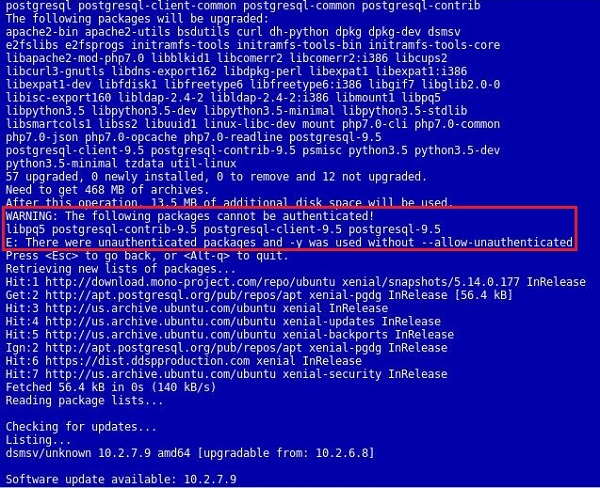
图 1:(仅限英文)此警告和错误显示在更新的用户界面中
Resolution
此失败事件发生的原因是:用于签署 postgresql 包的密钥已更新,并且它不在 Ubuntu 的默认存储库中。用于验证的密钥必须在 Dell Security Management Server Virtual 上进行手动更新,以解决该错误。要更新该密钥,请执行以下步骤。
- 使用 登录控制台
delluser帐户(默认密码:delluser)。

图 2:(仅限英文)登录到控制台
- 转至 Launch Shell 选项。

图 3:(仅限英文)选择“Launch Shell”
- 将用户切换到
dellsupport使用 命令su dellsupport(默认密码:dellsupport)。
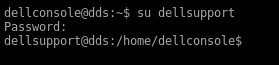
图 4:(仅限英文)切换用户
- 运行 命令
sudo apt-get update && sudo apt-key update。

图 5:(仅限英文)运行 命令 sudo apt-get update && sudo apt-key updat

图 6:(仅限英文)屏幕上命令输出示例
提醒:运行此命令需要在 Dell Security Management Server Virtual 上访问互联网。这个过程可能需要几秒钟的时间来运行。
- 运行命令:
sudo apt-get install curl ca-certificates gnupg并接受提示,询问是否有其他磁盘空间正常。
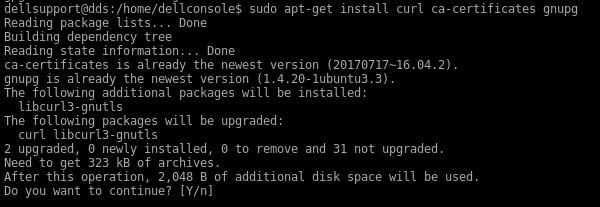
图 7:(仅限英文)运行 sudo apt-get install curl ca-certificates gnupg
提醒:运行此命令需要在 Dell Security Management Server Virtual 上访问互联网。这个过程可能需要几秒钟的时间来运行。
- 运行命令:
curl https://www.postgresql.org/media/keys/ACCC4CF8.asc | sudo apt-key add -.

图 8:(仅限英文)运行 curl https://www.postgresql.org/media/keys/ACCC4CF8.asc | sudo apt-key add -
提醒:运行此命令需要在 Dell Security Management Server Virtual 上访问互联网。这个过程可能需要几秒钟的时间来运行。
如果这些命令失败,请参阅下面的附录 A。
如果这些命令失败,请参阅下面的附录 A。
- 退出
dellsupport通过键入用户上下文exit。 - 通过键入返回控制台
exit再次。 - 通过转至 Basic Configuration,然后转至 Update Dell Security Management Server Virtual…,重新运行更新。

图 9:(仅限英文)重新运行更新
附录 A
如果更新 PostgreSQL 的密钥失败,可以调用一种方法直接从 下载密钥 Ubuntu keyservers,但此方法会绕过密钥验证。
在 shell 中,并以身份登录 dellsupport 运行以下命令。此命令不区分大小写。
sudo apt-key adv --keyserver keyserver.ubuntu.com --recv-keys 7FCC7D46ACCC4CF8

图 10:(仅英文)运行 sudo apt-key adv --keyserver keyserver.ubuntu.com --recv-keys 7FCC7D46ACCC4CF8
这应该会导致在本地密钥库中更新密钥,并允许涉及 PostgreSQL 的更新继续进行。下面的示例是已导入的 PostgreSQL 密钥的示例。在成功导入时,会导入多个密钥。

图 11:(仅限英文)已导入的 PostgreSQL 密钥的示例
要联系支持部门,请参阅 Dell Data Security 国际支持电话号码。
转至 TechDirect,在线生成技术支持请求。
要获得更多见解和资源,请加入戴尔安全社区论坛。
Affected Products
Dell EncryptionArticle Properties
Article Number: 000130901
Article Type: Solution
Last Modified: 16 Jan 2024
Version: 9
Find answers to your questions from other Dell users
Support Services
Check if your device is covered by Support Services.