NetWorker: How To Configure Policy Email Notifications
Summary: This KB offers an overview of NetWorker logging and how to configure Simple Mail Transfer Protocol (SMTP) email notifications for policy-based actions.
This article applies to
This article does not apply to
This article is not tied to any specific product.
Not all product versions are identified in this article.
Instructions
NetWorker notifications can send backup info to default logs or email addresses using SMTP, using the NetWorker server's operating system mail command.
Log Locations:
Linux:
Windows (Default):
/nsr/logs
Windows (Default):
C:\Program Files\EMC NetWorker\nsr\logs
NOTE: Policy logs go to
/nsr/logs/policy by default, even if email is used for notifications instead of nsrlog. The 'nsrlog -f filename' command is used to send the policy completion details to a specified file under /nsr/logs. The default file is /nsr/logs/policy_notifications.log.
Email Commands:
Linux:
mailx [-S smtp=smtp://smtphost] [-s subject] [-r sender] recipient [recipient[...]]Windows:
smtpmail [-h smtphost] [-s subject] [-p port] [-f sender] recipient [recipient[...]]
For more information about these commands, refer to the man pages of the operating system
mail command:
mail/mailx: https://linux.die.net/man/1/mailsmtpmail: https://www.mkssoftware.com/docs/man1/smtpmail.1.asp

NOTE: Different variables are available for the Subject of the mail commands to automatically pull information (for example: policy name, workflow name, completion status). These variables can vary depending on NetWorker version, refer to the NOTIFICATION VARIABLES section of the NetWorker Command Reference Guide available through: https://www.dell.com/support/home/product-support/product/networker/docs
The Send Notification conditions have the following options:
- On Failure: Only sends a notification when a job has failed.
- On Completion: An email is sent whether the backup is successful or failed.
The notifications are configured at the POLICY, WORKFLOW, or ACTION level.
For example, the POLICY notification is set under Protection-->Policies:
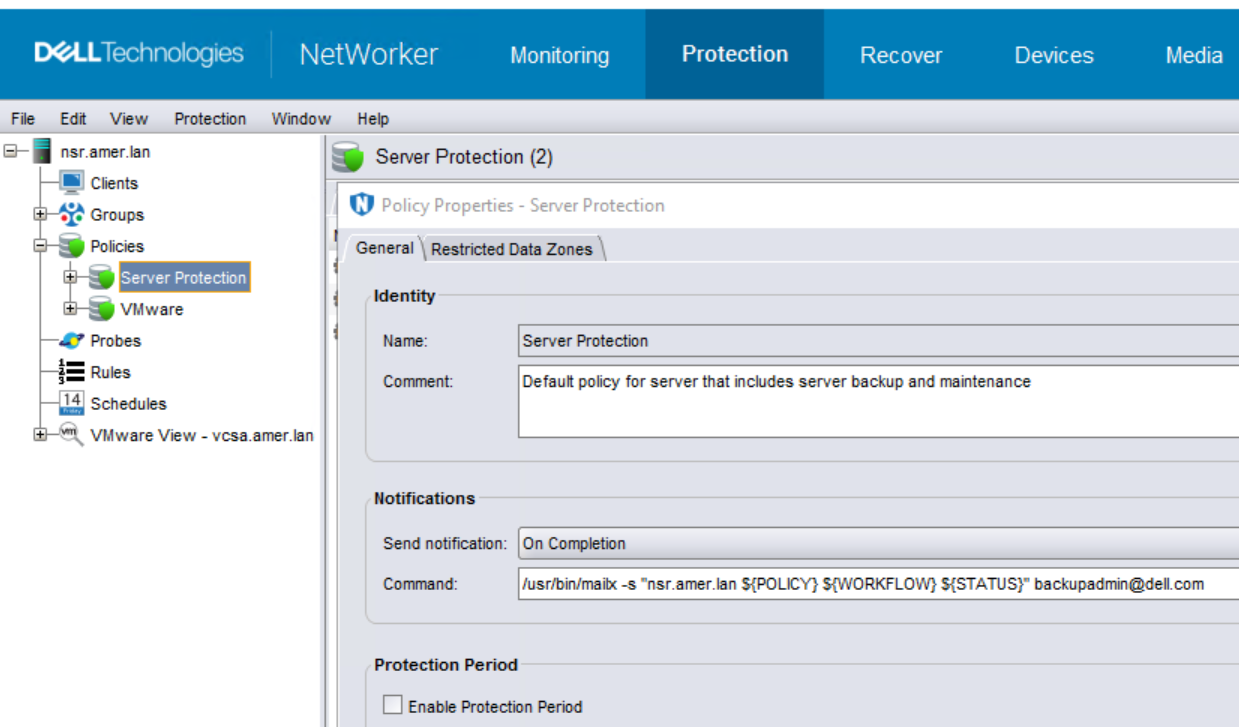
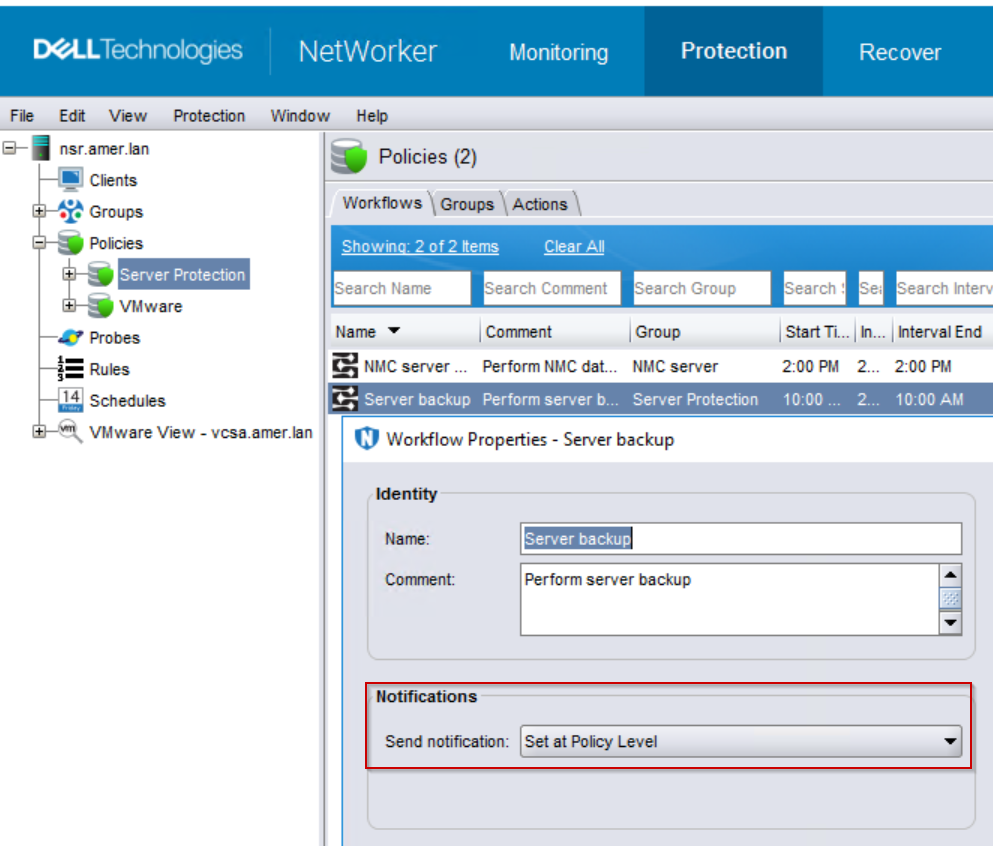
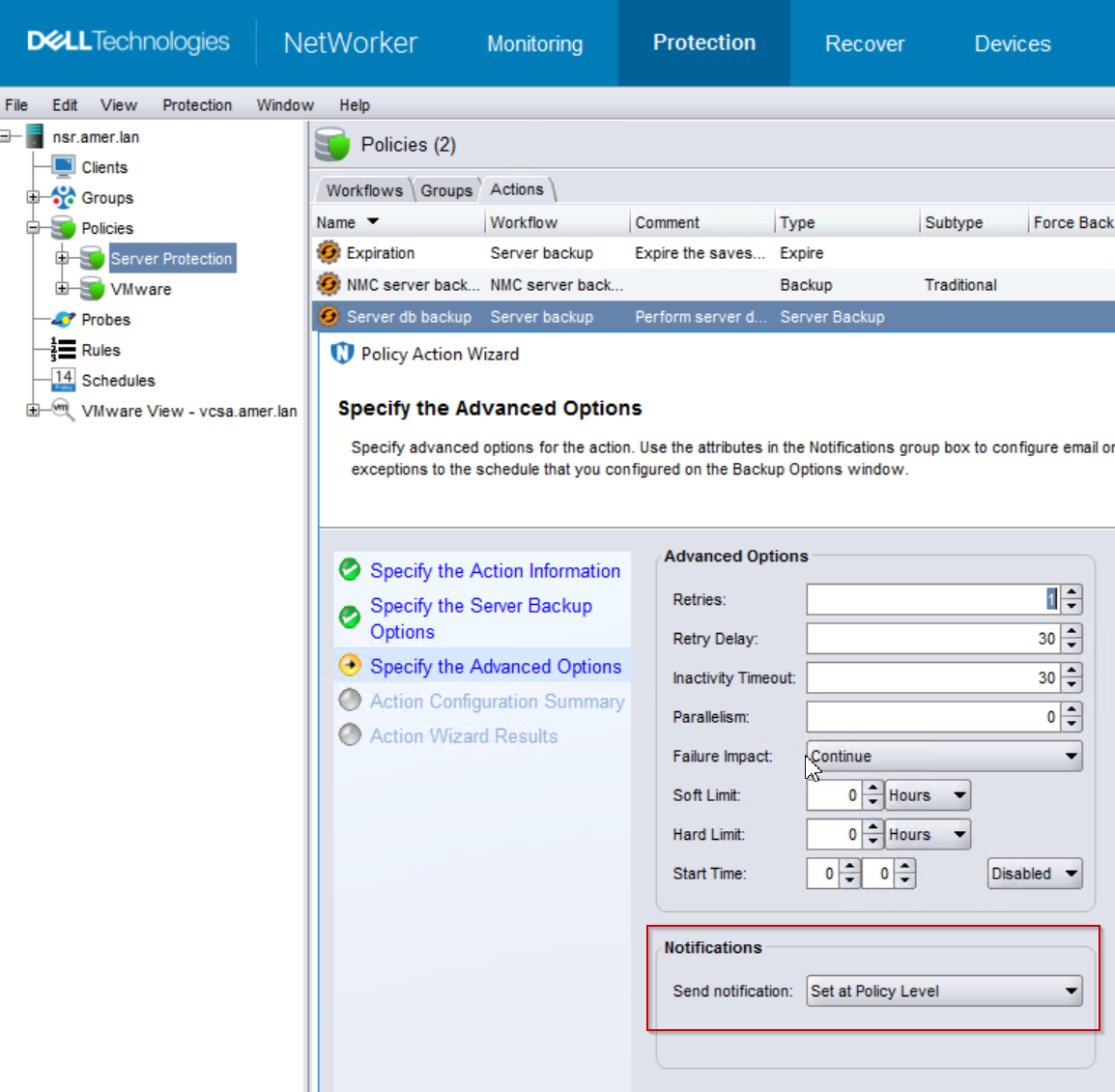
By default the WORKFLOW and ACTION notification setting is set to "Set at Policy Level":
Workflow notification settings:
Action notification settings:
With this configuration, the following would be received:
1 "Summary Notification Report" for each WORKFLOW in the policy upon completion.
1 "Action Report" for each ACTION under this policy.
1 "Action Report" for each ACTION under this policy.
For example, with this configuration the "Server Protection" policy sends three email messages:
1 "Summary Notification Report" notifications showing the completion time and status of each WORKFLOW.
2 "Action Report" notifications show the completion time and status and information for each ACTION, e.g: the "Expiration" and "Server db backup" ACTIONS.
2 "Action Report" notifications show the completion time and status and information for each ACTION, e.g: the "Expiration" and "Server db backup" ACTIONS.
This many email messages may be unwanted for one policy. You cannot set 'Do not notify' in the WORKFLOW or ACTION fields, but you can redirect output to ..\nsr\logs by configuring the following:
POLICY: On completion or failure - operating system-specific mail command and options. See Email Commands.
WORKFLOW: On completion or failure - "nsrlog -f policy_notifications.log"
ACTION (expiration only): On completion or failure - "nsrlog -f policy_notifications.log"
With this configuration one email is received showing the backup details, the WORKFLOW notifications and "Expiration" ACTION details are sent to the default policy_notifications.log
Additional Information
Affected Products
NetWorkerProducts
NetWorker Family, NetWorker SeriesArticle Properties
Article Number: 000156456
Article Type: How To
Last Modified: 12 Feb 2026
Version: 10
Find answers to your questions from other Dell users
Support Services
Check if your device is covered by Support Services.