NVP vProxy:FLR 失败并显示“Unable to run SSH command, error Unable to make ssh connection to 'DD_HOSTNAME', error ssh: handshake failed...connection reset by peer”
Summary: 通过 NVP vProxy 执行的虚拟机 FLR 无法在 Data Domain 上创建 NFS 导出,并且连接由对等方重置
This article applies to
This article does not apply to
This article is not tied to any specific product.
Not all product versions are identified in this article.
Symptoms
NetWorker VMware 保护集成配置了 vProxy Appliance。 文件级恢复 (FLR) 失败,并显示以下错误消息:
159373:nsrvproxy_flr: vProxy Log: YYYY-MM-DDTHH:MM:SSZ ERROR: [@(#) Build number: ###] Unable to create NFS export at 'dd.emclab.local:/data/col1/nwserver/FLR-nvp.emclab.local-f4b12a68-7ffc-413a-91ba-9087b3a09d36': Unable to run SSH command, error Unable to make ssh connection to 'dd.emclab.local', error ssh: handshake failed: read tcp 192.168.25.213:35304->192.168.25.18:22: read: connection reset by peer
- 您可以通过端口 22:curl -v DD_HOSTNAME:22 从 NVP vProxy 应用装置连接到 Data Domain (DD)
[root@nvp ~]# curl -v dd.emclab.local:22
* About to connect() to dd.emclab.local port 22 (#0)
*   Trying 192.168.25.18...
* Connected to dd.emclab.local (192.168.25.18) port 22 (#0)
> GET / HTTP/1.1
> User-Agent: curl/7.29.0
> Host: dd.emclab.local:22
> Accept: */*
>
* Recv failure: Connection reset by peer
* Closing connection 0
curl: (56) Recv failure: Connection reset by peer
- 您无法从 vProxy:ssh sysadmin@通过 SSH 登录 DD DD_HOSTNAME
[root@nvp ~]# ssh sysadmin@dd.emclab.local
ssh_exchange_identification: read: Connection reset by peer
Cause
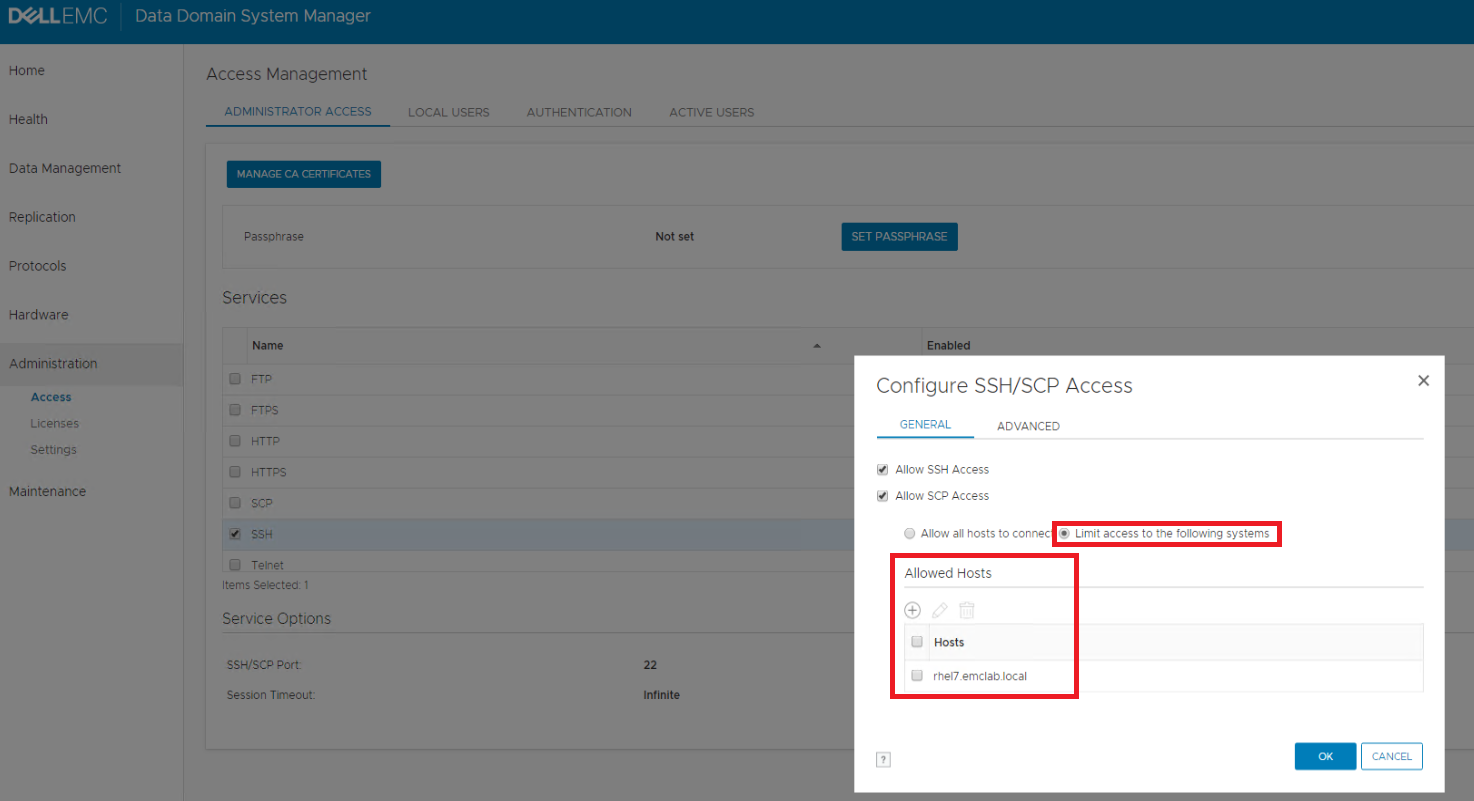
Data Domain 访问管理配置了 SSH 限制,仅允许某些主机连接。
Resolution
- 确保满足所有端口要求:NVP vProxy:备份和恢复操作的网络连接故障排除
- 使用 sysadmin 帐户登录 Data Domain Enterprise Manager (DDEM) Web GUI: https://DD_HOSTNAME
- 在左侧菜单中选择 管理 选项卡。
- 从顶部菜单中选择 Administrator Access 。
- 选择 SSH 并单击 Configure 。
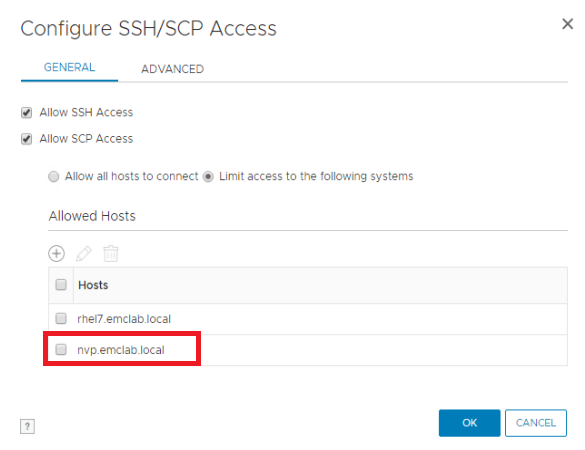
- 如果选择了 Limit access to the following systems 单选按钮,您将需要将 vProxies 的 FQDN 添加到列表中。
提醒:(可选)如果不需要严格的 SSH 访问,您可以选择 Allow all hosts to connect 。
- 通过打开与 DD 的 PuTTy 会话或重新运行 ssh sysadmin@来测试与 DD 的 SSH 连接DD_HOSTNAME
- 如果 SSH 连接成功,请重新尝试 FLR 装载。
Additional Information
以下命令可用于测试端口连接:
Windows/Linux NW 服务器: nsrports -t HOSTNAME -p 端口
Windows: telnet HOSTNAME PORT
Linux: curl -v HOSTNAME:PORT
ESXi: nc -zv HOSTNAME PORT
Windows: telnet HOSTNAME PORT
Linux: curl -v HOSTNAME:PORT
ESXi: nc -zv HOSTNAME PORT
Affected Products
NetWorkerProducts
Data Domain, NetWorkerArticle Properties
Article Number: 000166434
Article Type: Solution
Last Modified: 04 Jun 2025
Version: 5
Find answers to your questions from other Dell users
Support Services
Check if your device is covered by Support Services.