VPLEX: show-use-hierarchy cli 명령 오류: 이름이 <device name>인 디바이스가 없습니다.
Summary: 이 문서에서는 레그가 미러에 다시 연결될 때 show-use-hierarchy 명령이 해당 이름의 디바이스가 없다고 보고하는 문제에 대해 설명합니다.
This article applies to
This article does not apply to
This article is not tied to any specific product.
Not all product versions are identified in this article.
Symptoms
"show-use-hierarchy" 명령이 레그가 동일한 이름으로 다시 연결된 후 디바이스의 세부 정보를 가져오지 못합니다.
동일한 미러 레그를 다시 연결한 후 "show-use-hierarchy" 명령이 실패하고 "no device with the name <device name>" 오류가 표시됩니다.
이 오류의 예:
VPlexcli:/>show-use-hierarchy distributed-storage/distributed-devices/device_EAST_UNITY_NONPROD_255
show-use-hierarchy: show-use-hierarchy distributed-storage/distributed-devices/device_EAST_UNITY_NONPROD_255>> 평가<<하지 못했습니다.
원인: 'used-by' 특성의 값을 가져올 수 없습니다.
원인: 펌웨어 명령 오류입니다.
원인: 이름이 <device name>인 디바이스가 없습니다.
Cause
해당 없음
Resolution
1. 오류를 보고하는 장치를 나열하고 정상 상태인지 확인합니다.
예:
VPlexcli:/>ll /distributed-storage/distributed-devices/device_EAST_UNITY_NONPROD_255
특성:
Name Value
---------------------- ---------------------------------
application-consistent false
auto-resume true
block-count 1342177280
block-size-4K
capacity 5T
clusters-involved [cluster-1, cluster-2]
geometry raid-1
health-indications[]
health-stateoklocalitydistributed
(분산된
)operational-status ok
rebuild-allowed true
rebuild-eta -
rebuild-progress -
rebuild-status done
rebuild-type full
rule-set-name cluster-2-detaches
service-status running
stripe-depth -
system-id device_EAST_UNITY_NONPROD_255
thin-capable false
transfer-size 2M
가상 볼륨 device_EAST_UNITY_NONPROD_255_vol
특성:
Name Value
---------------------- ---------------------------------
application-consistent false
auto-resume true
block-count 1342177280
block-size-4K
capacity 5T
clusters-involved [cluster-1, cluster-2]
geometry raid-1
health-indications[]
health-stateoklocalitydistributed
(분산된
)operational-status ok
rebuild-allowed true
rebuild-eta -
rebuild-progress -
rebuild-status done
rebuild-type full
rule-set-name cluster-2-detaches
service-status running
stripe-depth -
system-id device_EAST_UNITY_NONPROD_255
thin-capable false
transfer-size 2M
가상 볼륨 device_EAST_UNITY_NONPROD_255_vol
2. GUI에서 디바이스 계층 구조가 표시되는지 확인합니다.
a. GUI에서 확인하려면 다음 단계를 따르십시오.
i. Provision storage -- Distributed -- Distributed Devices
로 이동합니다. ii. 분산 디바이스 이름을 선택하고 DD 이름을 마우스 오른쪽 버튼으로 클릭한 다음 아래와 같이 "View map" 옵션을 클릭합니다.
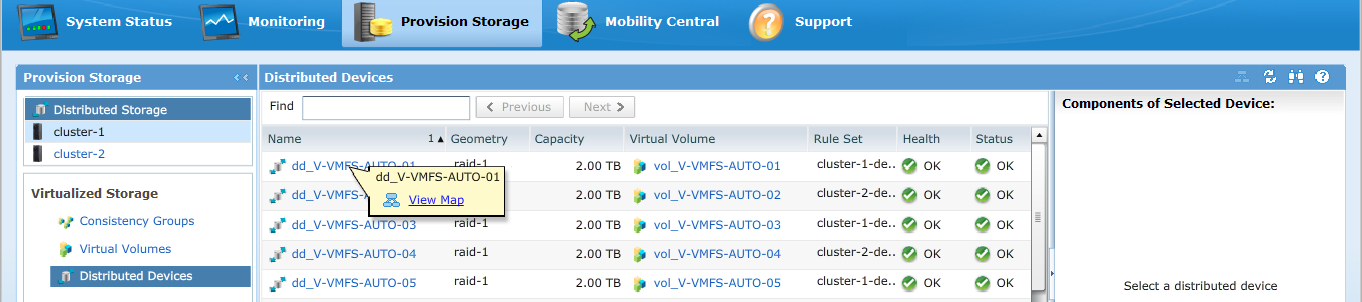
GUI 맵 보기의 예:
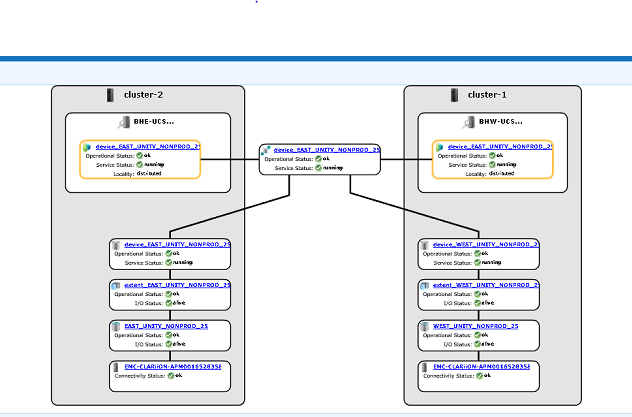
3. 맵 보기에 디바이스가 표시되는 경우 아래 해결 방법을 따릅니다.
a. 아래 명령을 통해 관리 콘솔을 다시 시작합니다.
service@managementserver:~>sudo /etc/init.d/VPlexManagementConsole 재시작
EMC VPlex 관리 콘솔을 재시작하는 중... done
EMC VPlex 관리 콘솔을 재시작하는 중... done
b. 또는 관리 콘솔을 재시작하는 방법은 아래 나열된 KBA를 참조하십시오.
KBA 000040517 : https://www.dell.com/support/kbdoc/en-uk/000040517/vplex-how-to-restart-vplexmanagementconsole-to-refresh-vplex-cli-gui
GUI에서 디바이스 맵을 볼 수 없거나 VPLEX 관리 콘솔로 문제가 해결되지 않은 경우 VPLEX 지원 팀과 라이브 채팅을 진행하십시오.
메모: 지원 팀과 채팅을 열려면 지원 페이지에서 검은색 메뉴 표시줄이 나타나야 https://www.dell.com/support/ 메뉴 표시줄의 맨 오른쪽에 있는 "지원 문의"를 클릭하면 "연락처 정보" 페이지로 이동합니다. 화면 오른쪽에 "Dell EMC 관리 채팅"이 있습니다. 이 옵션을 클릭하면 라이브 채팅 페이지로 이동합니다. 첫 번째 단계는 "채팅 주제 선택" 필드에서 오른쪽의 드롭다운 화살표를 클릭한 다음 채팅과 관련된 주제를 선택합니다. 그런 다음 요청한 대로 나머지 단계를 수행하고 각 질문/선택에 필요한 정보를 제공합니다.
Additional Information
이 콘텐츠는 다음과 같은 기타 언어로 번역되어 있습니다.
| https://downloads.dell.com/TranslatedPDF/AR-SA_533945.pdf |
| https://downloads.dell.com/TranslatedPDF/DE_533945.pdf |
| https://downloads.dell.com/TranslatedPDF/ES_533945.pdf |
| https://downloads.dell.com/TranslatedPDF/ES-XL_533945.pdf |
| https://downloads.dell.com/TranslatedPDF/FR_533945.pdf |
| https://downloads.dell.com/TranslatedPDF/IT_533945.pdf |
| https://downloads.dell.com/TranslatedPDF/JA_533945.pdf |
| https://downloads.dell.com/TranslatedPDF/KO_533945.pdf |
| https://downloads.dell.com/TranslatedPDF/NL_533945.pdf |
| https://downloads.dell.com/TranslatedPDF/PT_533945.pdf |
| https://downloads.dell.com/TranslatedPDF/PT-BR_533945.pdf |
| https://downloads.dell.com/TranslatedPDF/RU_533945.pdf |
| https://downloads.dell.com/TranslatedPDF/SV_533945.pdf |
| https://downloads.dell.com/TranslatedPDF/ZH-CN_533945.pdf |
| https://downloads.dell.com/TranslatedPDF/ZH-TW_533945.pdf |
Affected Products
VPLEX SeriesProducts
VPLEX Series, VPLEX VS1, VPLEX VS6Article Properties
Article Number: 000168361
Article Type: Solution
Last Modified: 07 Oct 2025
Version: 4
Find answers to your questions from other Dell users
Support Services
Check if your device is covered by Support Services.