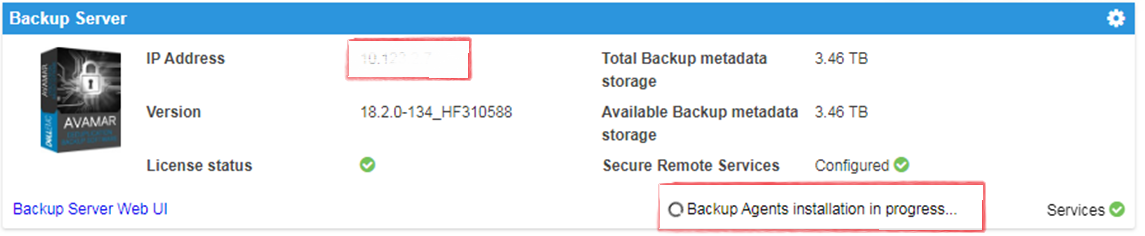
IDPA:UI 显示正在进行备份代理安装,部署后转圈旋转
Summary: 融合备份一体机 (IDPA) 用户界面 (UI) 显示代理程序安装正在进行中,安装程序已完成。缺少成功标识会使 UI 认为代理程序正在安装。
This article applies to
This article does not apply to
This article is not tied to any specific product.
Not all product versions are identified in this article.
Symptoms
- A
Backup Agents installation in Progress消息显示在 Appliance Configuration Manager (ACM) 上。 - AVI 显示没有准备好安装的软件包。历史记录将程序包显示为完整,而在 ACM 上
- A
Backup Agents installation in Progress此时将显示消息:
Cause
在执行全新部署后,会出现此问题。
Resolution
- 登录 Avamar:
https://<Avamar_IP>/avi
Avamar 的“经过验证的 AVI”安装程序用户界面显示没有等待安装的程序包,历史记录显示程序包已完成。
- 登录到 Avamar SSH。
以下项的验证状态 dpnctl 状态,所有服务均已启动并正常运行。
运行命令: dpnctl status
- 登录到 ACM SSH 并运行以下命令以清除
Backup Agents installation in Progress消息:touch /usr/local/dataprotection/var/av_ucd_install_success
- 使用以下命令重新启动 ACM webapp 服务:
Stop webapp
停止 webapp 服务:
启动 webapp 服务:
service dataprotection_webapp
启动 webapp 服务:
service dataprotection_webapp start
Affected Products
Integrated Data Protection Appliance FamilyProducts
PowerProtect Data Protection Software, Integrated Data Protection Appliance FamilyArticle Properties
Article Number: 000170900
Article Type: Solution
Last Modified: 20 Jan 2026
Version: 4
Find answers to your questions from other Dell users
Support Services
Check if your device is covered by Support Services.