IDPA: IDPA Deployment fails at 22% with error "FAILED: Deploying AVE. Error: AVE deployment failed."
Summary: This KB walks you through the steps to troubleshoot and resolve an issue with IDPA Deployment failing at 22% with error "FAILED: Deploying AVE. Error: AVE deployment failed." This could be caused by '/data01' partition being corrupt on ACM or if the ovf files for AVE deployment are not present on ACM. ...
This article applies to
This article does not apply to
This article is not tied to any specific product.
Not all product versions are identified in this article.
Symptoms
VSAN Issues, Unclean shutdown of ACM VM, or ACM VM crash can cause this issue.
The following error is seen on the IDPA ACM UI:
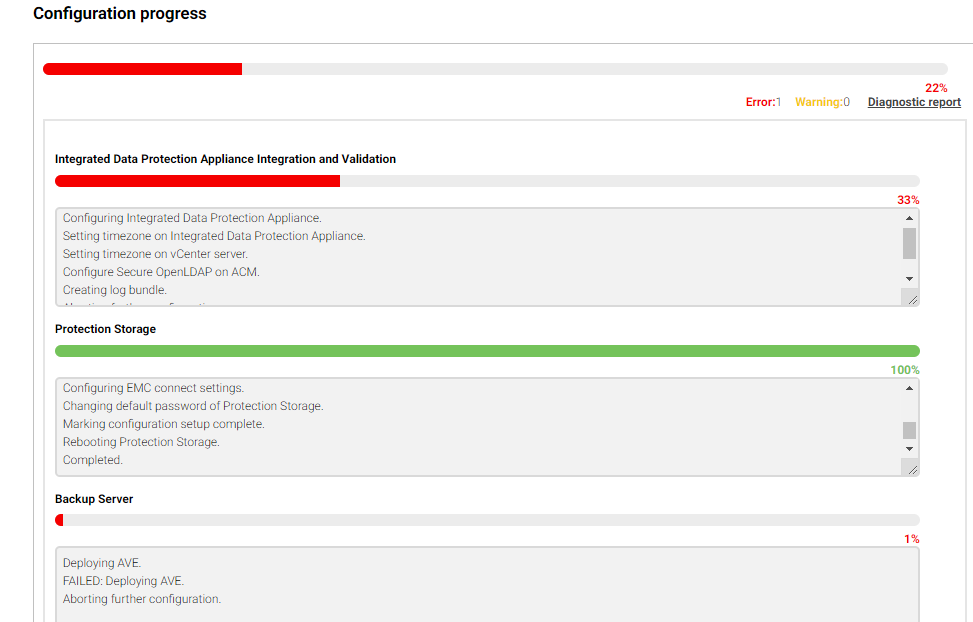
The Diagnostics report provides the following error:
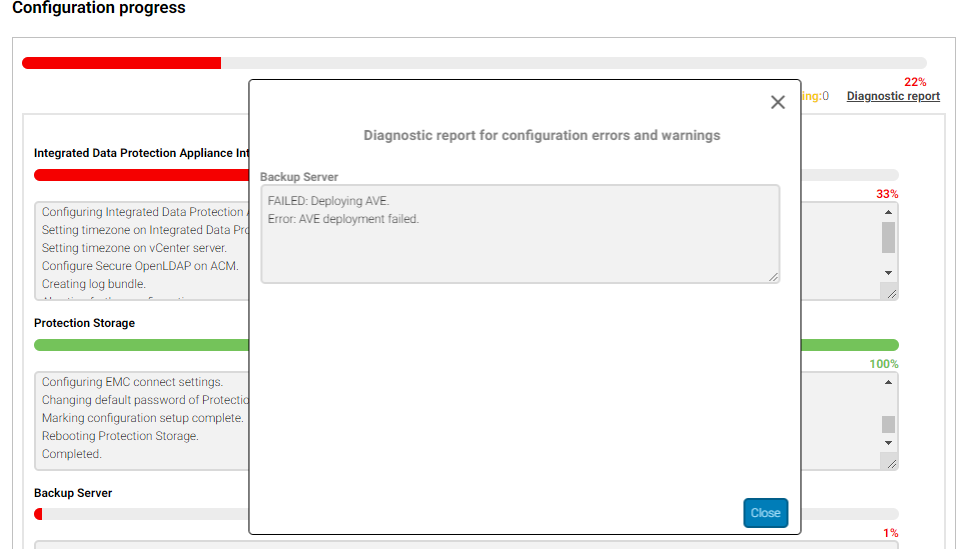
On ACM virtual machine, server.log is verified to find the root cause for this error. The following error is seen on the ACM:
The following error is seen on the IDPA ACM UI:
The Diagnostics report provides the following error:
On ACM virtual machine, server.log is verified to find the root cause for this error. The following error is seen on the ACM:
2019-12-11 22:56:05,784 ERROR [pool-19-thread-3]-ovf.OvfDeployer: OVF deployment failed with Exception.
java.io.FileNotFoundException: /data01/productrepo/ave/AVE-18.2.0.134.ovf (Input/output error)
at java.io.FileInputStream.open0(Native Method)
at java.io.FileInputStream.open(FileInputStream.java:195)
at java.io.FileInputStream.<init>(FileInputStream.java:138)
at java.io.FileInputStream.<init>(FileInputStream.java:93)
at com.emc.vcedpa.common.vi.ovf.OvfDeployer.readOvfContent(OvfDeployer.java:414)
at com.emc.vcedpa.common.vi.ovf.OvfDeployer.deployOvf(OvfDeployer.java:218)
at com.emc.vcedpa.common.vi.ovf.OvfDeployer.deployOvf(OvfDeployer.java:107)
at com.emc.vcedpa.common.vi.ovf.OvfDeployer.deployOvf(OvfDeployer.java:171)
at com.emc.vcedpa.avadapter.DeployAvamarServerTask.deployAVEOvf(DeployAvamarServerTask.java:144)
at com.emc.vcedpa.avadapter.DeployAvamarServerTask.run(DeployAvamarServerTask.java:79)
at java.util.concurrent.ThreadPoolExecutor.runWorker(ThreadPoolExecutor.java:1149)
at java.util.concurrent.ThreadPoolExecutor$Worker.run(ThreadPoolExecutor.java:624)
at java.lang.Thread.run(Thread.java:748)
2019-12-11 22:56:05,786 ERROR [pool-19-thread-3]-ovf.OvfDeployer: OVF deployment failed with ApplianceException.
com.emc.vcedpa.common.exception.ApplianceException: Error occurred while deploying OVF.
2019-12-11 22:56:05,800 ERROR [pool-19-thread-3]-avadapter.DeployAvamarServerTask: Exception occurred while executing deploy Avamar server task. com.emc.vcedpa.common.exception.ApplianceException: AVE deployment failed.
java.io.FileNotFoundException: /data01/productrepo/ave/AVE-18.2.0.134.ovf (Input/output error)
at java.io.FileInputStream.open0(Native Method)
at java.io.FileInputStream.open(FileInputStream.java:195)
at java.io.FileInputStream.<init>(FileInputStream.java:138)
at java.io.FileInputStream.<init>(FileInputStream.java:93)
at com.emc.vcedpa.common.vi.ovf.OvfDeployer.readOvfContent(OvfDeployer.java:414)
at com.emc.vcedpa.common.vi.ovf.OvfDeployer.deployOvf(OvfDeployer.java:218)
at com.emc.vcedpa.common.vi.ovf.OvfDeployer.deployOvf(OvfDeployer.java:107)
at com.emc.vcedpa.common.vi.ovf.OvfDeployer.deployOvf(OvfDeployer.java:171)
at com.emc.vcedpa.avadapter.DeployAvamarServerTask.deployAVEOvf(DeployAvamarServerTask.java:144)
at com.emc.vcedpa.avadapter.DeployAvamarServerTask.run(DeployAvamarServerTask.java:79)
at java.util.concurrent.ThreadPoolExecutor.runWorker(ThreadPoolExecutor.java:1149)
at java.util.concurrent.ThreadPoolExecutor$Worker.run(ThreadPoolExecutor.java:624)
at java.lang.Thread.run(Thread.java:748)
2019-12-11 22:56:05,786 ERROR [pool-19-thread-3]-ovf.OvfDeployer: OVF deployment failed with ApplianceException.
com.emc.vcedpa.common.exception.ApplianceException: Error occurred while deploying OVF.
2019-12-11 22:56:05,800 ERROR [pool-19-thread-3]-avadapter.DeployAvamarServerTask: Exception occurred while executing deploy Avamar server task. com.emc.vcedpa.common.exception.ApplianceException: AVE deployment failed.
Cause
'/data01' partition on ACM is corrupt and, because of which, ACM is unable to access AVE OVF File for deployment. The input/output error is seen while accessing '/data01' partition.
Resolution
-
Log in to the ACM Virtual Machine as 'root' user.
-
Traverse to "/data01" to verify the integrity of the partition and file:
cd /data01
- Verify if we are able to write/create file to this directory:
touch test
- If the following error is seen, then the /data01 partition is corrupt.
acmlab:/data01 # touch test
touch: cannot touch test : Input/output error
touch: cannot touch test : Input/output error
- Hit Retry to complete the rollback. Do not proceed to next step until the rollback is complete.
-
Take a snapshot of ACM Virtual Machine from ESXi/vCenter UI.
- Stop the dataprotection_webapp service on ACM gracefully:
service dataprotection_webapp stop
Note: Do not run this step in ACM rollback or configuration is in progress.
- Reboot the ACM VM.
-
Retry Step 3-4.
-
If the issue is still seen, run xfs_repair on the /data01 partition.
Additional Information
This content is translated in different languages:
| https://downloads.dell.com/TranslatedPDF/AR-SA_539656.pdf |
| https://downloads.dell.com/TranslatedPDF/DE_539656.pdf |
| https://downloads.dell.com/TranslatedPDF/ES_539656.pdf |
| https://downloads.dell.com/TranslatedPDF/ES-XL_539656.pdf |
| https://downloads.dell.com/TranslatedPDF/FR_539656.pdf |
| https://downloads.dell.com/TranslatedPDF/IT_539656.pdf |
| https://downloads.dell.com/TranslatedPDF/JA_539656.pdf |
| https://downloads.dell.com/TranslatedPDF/KO_539656.pdf |
| https://downloads.dell.com/TranslatedPDF/NL_539656.pdf |
| https://downloads.dell.com/TranslatedPDF/PT_539656.pdf |
| https://downloads.dell.com/TranslatedPDF/PT-BR_539656.pdf |
| https://downloads.dell.com/TranslatedPDF/RU_539656.pdf |
| https://downloads.dell.com/TranslatedPDF/SV_539656.pdf |
| https://downloads.dell.com/TranslatedPDF/ZH-CN_539656.pdf |
| https://downloads.dell.com/TranslatedPDF/ZH-TW_539656.pdf |
Affected Products
Integrated Data Protection Appliance FamilyProducts
PowerProtect Data Protection Software, Integrated Data Protection Appliance Family, PowerProtect Data Protection Hardware, Integrated Data Protection Appliance SoftwareArticle Properties
Article Number: 000171351
Article Type: Solution
Last Modified: 27 May 2025
Version: 4
Find answers to your questions from other Dell users
Support Services
Check if your device is covered by Support Services.