Operating System Failure when Carbon Black is installed on unsupported Linux Kernels
Summary: This article describes an incompatibility between Carbon Black security software and Red Hat Enterprise Linux v7.4 that causes a kernel panic.
This article applies to
This article does not apply to
This article is not tied to any specific product.
Not all product versions are identified in this article.
Symptoms
Affected Products:
- VMware Carbon Black Cloud
Affected Operating Systems:
- Red Hat Enterprise Linux v7.4
Carbon Black software that is installed on Red Hat Enterprise Linux 7.4 may cause the computer to kernel panic and not boot into the normal graphical or multiuser environments.
Cause
Not Applicable
Resolution
The Carbon Black software is incompatible with this version of Red Hat Enterprise Linux and must be removed, with a supported version installed after a successful boot.
- Enter single user mode:
- At the grub menu, press E to edit the grub option
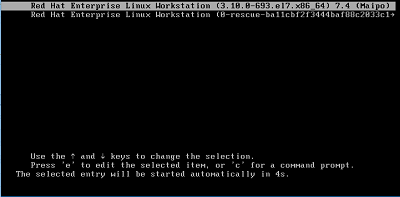
- Arrow down to get to our linux16 option.
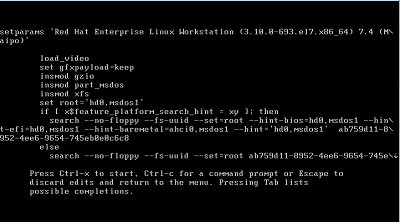
- Find the linux line and add single to that line.
- Press CTRL + X to boot.
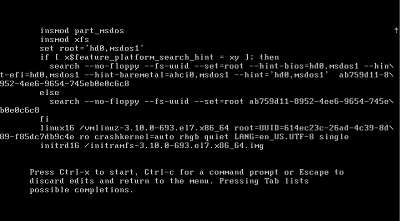
- At the grub menu, press E to edit the grub option
- When booted into single user mode, run the script with the command:
sh /opt/cbsensor/sensoruninstall.sh

- Once the software has been uninstalled, reboot the computer.
To contact support, reference Dell Data Security International Support Phone Numbers.
Go to TechDirect to generate a technical support request online.
For additional insights and resources, join the Dell Security Community Forum.
Additional Information
Reference
- For information about supported Linux Operating Systems and versions: VMware Carbon Black Cloud Endpoint Sensor System Requirements
- Additional information about Carbon Black installation processes is available at: How to Install VMware Carbon Black Cloud Endpoint
- Additional information about Carbon Black uninstall is available at: How to Uninstall VMware Carbon Black Cloud Endpoint
Affected Products
VMware Carbon BlackArticle Properties
Article Number: 000176882
Article Type: Solution
Last Modified: 02 Oct 2024
Version: 11
Find answers to your questions from other Dell users
Support Services
Check if your device is covered by Support Services.