「VxRail:外部vCenter 7.0 Update 2を使用した初期構成が次のエラーで失敗する: ホストをVDSに追加できませんでした VMware HCIA分散スイッチ
Summary: この記事では、外部vCenter 7.0 Update 2を使用している場合に、VxRailの初期構成または初回実行が失敗することがある問題について説明します。
This article applies to
This article does not apply to
This article is not tied to any specific product.
Not all product versions are identified in this article.
Symptoms
外部のvCenter 7.0 Update 2でVxRailバージョン4.7.300~4.7.411または7.0.000~7.0.101の初期設定(または初回実行)を行おうとすると、次のような状況が発生することがあります。
- Dell Technologies VxRail導入ウィザードのUIに、「
VxRail Cluster Configured Failed"[Host Add into VDS]ステップで - Dell EMC VxRail導入ウィザードのUIに、次のエラーが表示されます。
Failed to add host xxx to VDS VMware HCIA Distributed Switch yyy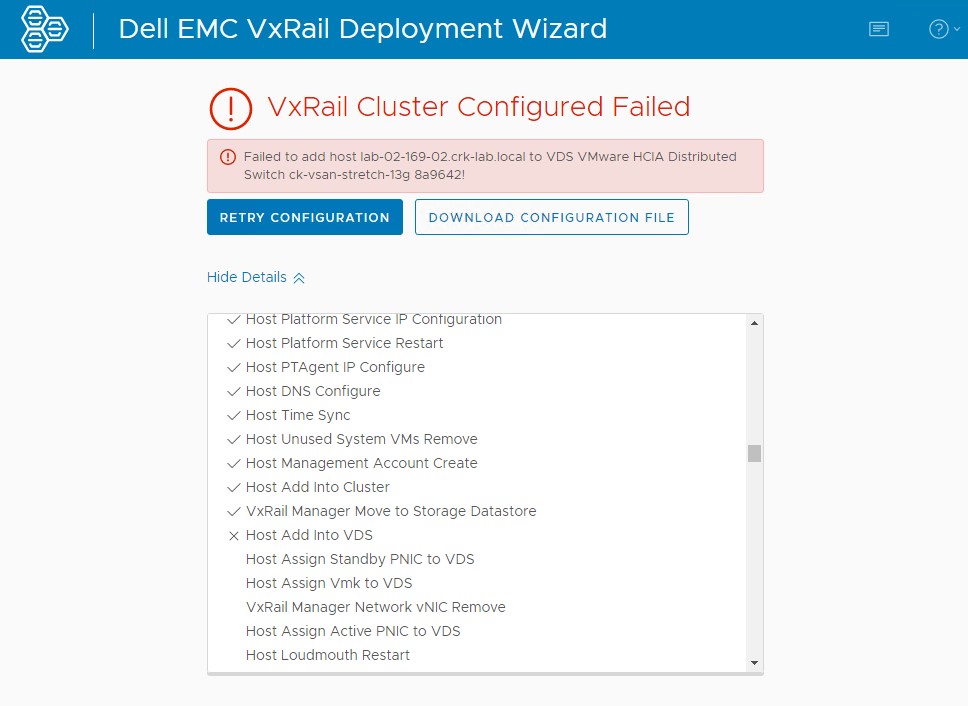
- 「Reconfigure vSphere Distributed Switch」タスクの実行中に、vCenterのUIに次のエラーが表示されます。
The operation is not supported on the object. Host xxx is not compatible with the VDS version 7.0.2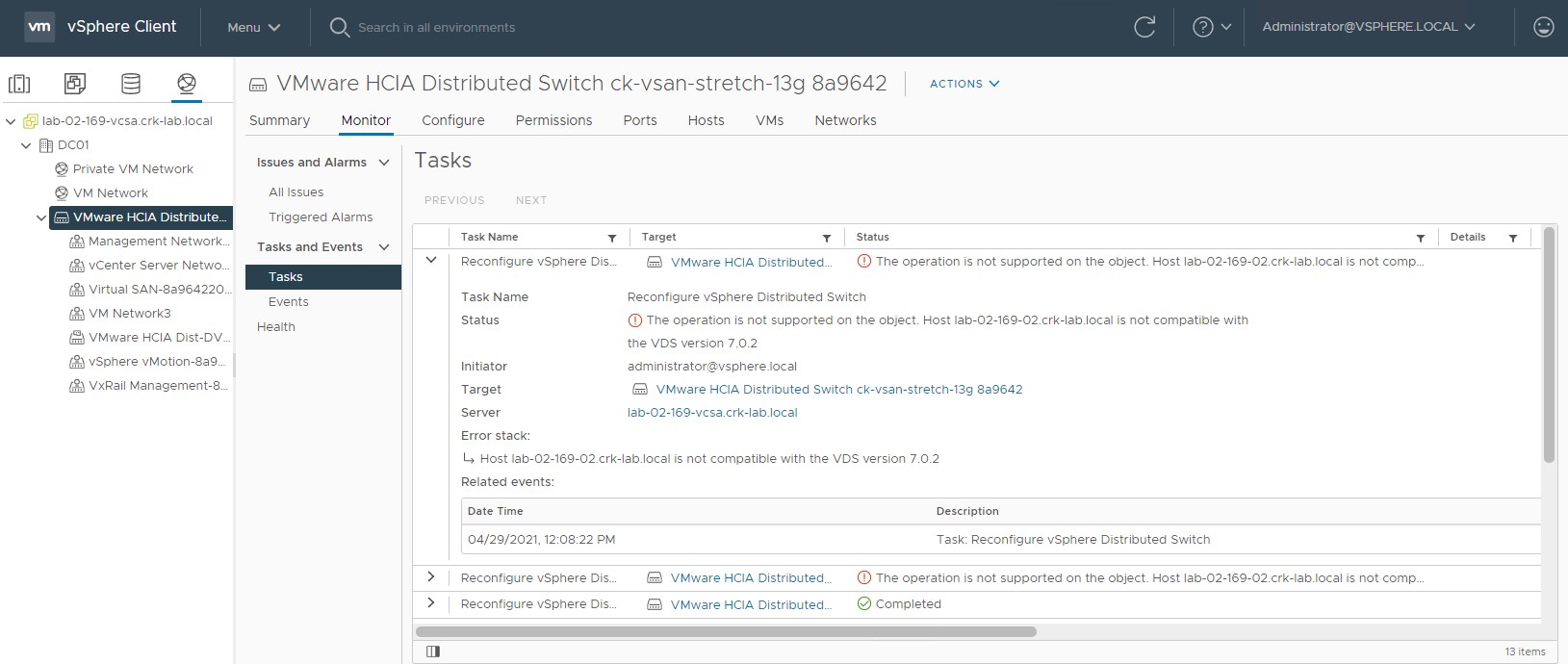
- VxRail Managerの/var/log/microservice_log/dayone.logログ ファイルに、次のようなエラーが記録されることがあります。
2021-04-29-11:08:23 microservice.do-network "do_common.exceptions.OperationException: OperationException: {""message"": ""Add host lab-02-169-02.crk-lab.local to vds VMware HCIA Distributed Switch ck-vsan-stretch-13g 8a9642 did not complete successfully: (vmodl.fault.NotSupported) {\n dynamicType = ,\n dynamicProperty = (vmodl.DynamicProperty) [],\n msg = 'The operation is not supported on the object.',\n faultCause = ,\n faultMessage = (vmodl.LocalizableMessage) [\n (vmodl.LocalizableMessage) {\n dynamicType = ,\n dynamicProperty = (vmodl.DynamicProperty) [],\n key = 'com.vmware.vim.vpxd.dvs.notSupportedHostVersion.label',\n arg = (vmodl.KeyAnyValue) [\n (vmodl.KeyAnyValue) {\n dynamicType = ,\n dynamicProperty = (vmodl.DynamicProperty) [],\n key = 'host',\n value = 'xxxxxxx.xxxxx.local'\n },\n (vmodl.KeyAnyValue) {\n dynamicType = ,\n dynamicProperty = (vmodl.DynamicProperty) [],\n key = 'version',\n value = '7.0.2'\n }\n ],\n message = 'Host lab-02-169-02.crk-lab.local is not compatible with the VDS version 7.0.2'\n }\n ]\n}"", ""bundle"": """", ""prefix"": ""do_common.exceptions.OperationException"", ""key"": """", ""field"": """", ""error_code"": ""0"", ""exit_code"": ""-1"", ""params"": []}"
Cause
vCenter 7.0 Update 2では、新しいvDSバージョン7.0.2が導入されます。
このESXiのビルドには、以下が付属して出荷されます。
初期設定時に、VxRail ManagerのVxRail導入ウィザードで次の作業を行います。
このESXiのビルドには、以下が付属して出荷されます。
- VxRail 4.7.300~4.7.411:バージョン6.6.0までのvDSをサポートします。
- VxRail 7.0.000~7.0.101:バージョン7.0.0までのvDSをサポートします。
初期設定時に、VxRail ManagerのVxRail導入ウィザードで次の作業を行います。
- vDSバージョン7.0.2のvCenterのビルドで使用可能な最新バージョンを使用し、新しいvDSを作成する。
- 新しいvDSにVxRailホストの追加または登録を試みる。
- ESXiのビルド(最大vDSバージョン6.6.0または7.0.0をサポート)をvDSバージョン7.0.2に追加できないため、このステップは失敗します
Resolution
この問題は、VxRailのバージョン4.7.510と7.0.130で解決されました。
この修正により、次のように初期設定時に作成されるvDSバージョンは、VxRailリリースに付属するESXiのビルドに適したものになります。
この問題に対処するには、次の手順を実行します。
この修正により、次のように初期設定時に作成されるvDSバージョンは、VxRailリリースに付属するESXiのビルドに適したものになります。
- VxRail 4.7.510以降の場合、vDSバージョンは6.6.0になります
- VxRail 7.130以降の場合、vDSバージョンは7.0.0になります
対策
VxRailエンジニアリングが作成したスクリプトを、この記事に添付してあります。導入時にエラーが発生したら、このスクリプトをVxRail Managerで使用して、vDSバージョンを変更してください。この問題に対処するには、次の手順を実行します。
- 上記のスクリーンショットにあるエラーで導入が失敗した段階にあり、問題修正のために他の試みが行われていないことを確認してください。何らかの試みが行われている場合、スクリプトによってプロセスが中断されることがあります。
- 添付のPythonスクリプトをVxRail Managerにアップロードします。
- 次のように、スクリプトをrootで実行します。
python vds_redeploy_7_0_010.py -a "VCENTER-IP-OR-FQDN" -u "VCENTER-ADMIN-USER" -p VCENTER-ADMIN-USER-PASSWORD -n "VDS-SWITCH-NAME-FROM-VCENTER-UI" -v 7.0.0

Where:
-a = vCenter IP or FQDN
-u = vCenter administrator user
-p = Password
-u = vDS which is currently at version 7.0.2 that we are trying to add the hosts too, name will likely include spaces so enclose in double quotes
-v = vDS version to set the switch too, in this case we need to change it from a 7.0.2 vDS to a 7.0.0 vDS to allow us to add pre-7.0u2 hosts to it

Example:
python vds_redeploy_7_0_010.py -a "172.16.10.201" -u "administrator@vsphere.local" -p Password123! -n "VMware HCIA Distributed Switch ck-vsan-stretch-13g 8a9642" -v 7.0.0
Go back to initial configuration / deployment web UI and click "TRY AGAIN".
Affected Products
VxRail SoftwareProducts
VxRail, VxRail Appliance Family, VxRail Appliance SeriesArticle Properties
Article Number: 000185996
Article Type: Solution
Last Modified: 03 Jul 2025
Version: 13
Find answers to your questions from other Dell users
Support Services
Check if your device is covered by Support Services.