VxRail: 외부 vCenter 7.0 업데이트 2를 사용한 초기 구성이 실패하고 다음 오류가 표시됩니다. VDS VMware HCIA Distributed Switch에 호스트를 추가하지 못했습니다.
Summary: 이 문서에서는 외부 vCenter 7.0 업데이트 2를 사용할 때 VxRail의 초기 구성 또는 첫 실행이 실패할 수 있는 문제에 대해 설명합니다.
This article applies to
This article does not apply to
This article is not tied to any specific product.
Not all product versions are identified in this article.
Symptoms
VxRail 버전 4.7.300~4.7.411 또는 7.0.000~7.0.101과 외부 vCenter 7.0 업데이트 2의 초기 구성(또는 최초 실행)을 시도할 때 다음과 같은 문제가 발생할 수 있습니다.
- Dell Technologies VxRail 구축 마법사 UI에 "
VxRail Cluster Configured Failed""VDS에 호스트 추가" 단계에서 - Dell EMC VxRail 배포 마법사 UI에 다음 오류가 표시됩니다.
Failed to add host xxx to VDS VMware HCIA Distributed Switch yyy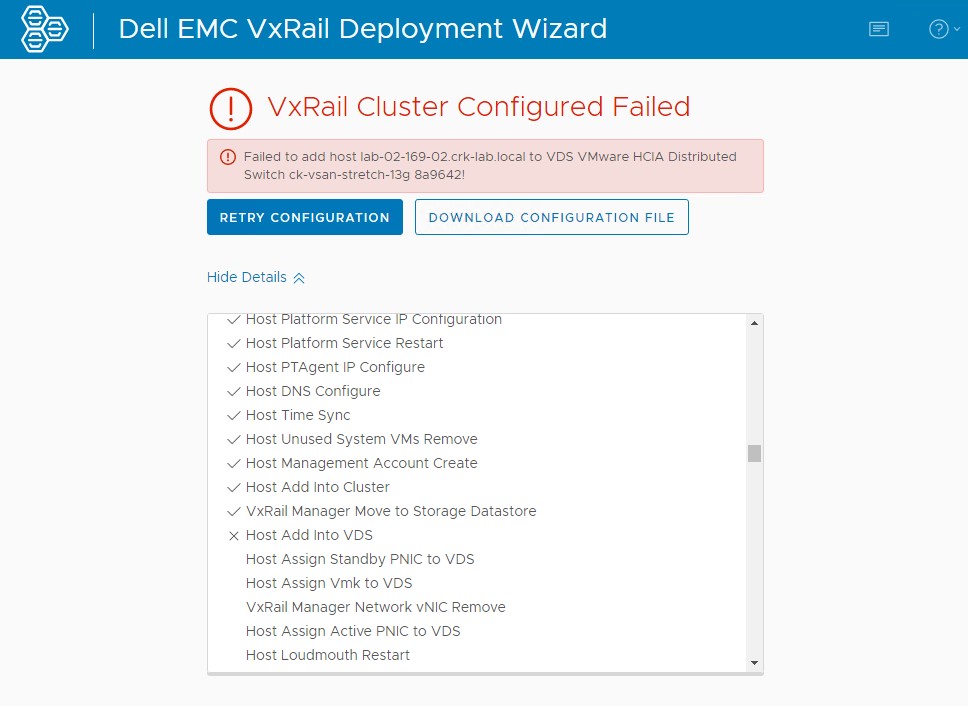
- "Reconfigure vSphere Distributed Switch" 작업을 수행하는 동안 vCenter UI에 다음 오류가 표시됩니다.
The operation is not supported on the object. Host xxx is not compatible with the VDS version 7.0.2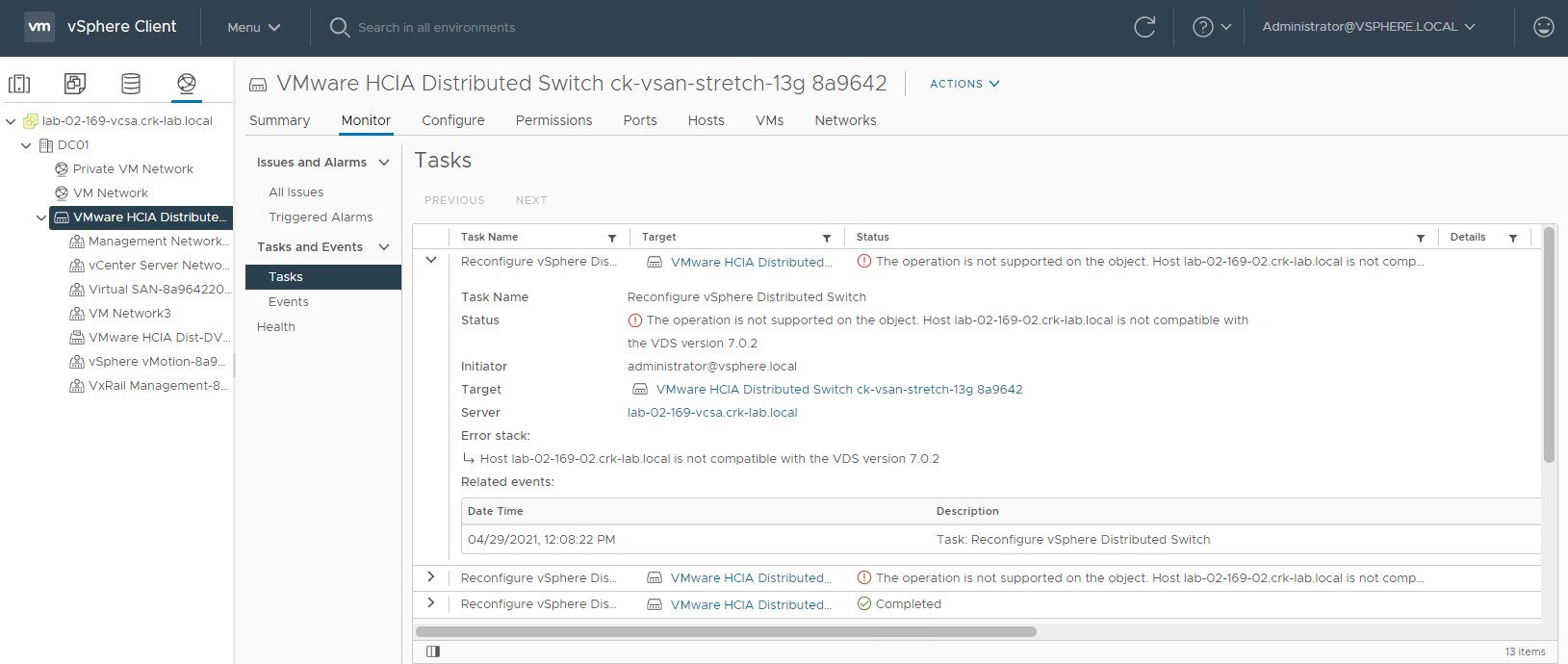
- VxRail Manager의 /Var/log/microservice_log/dayone.log 로그 파일에 다음과 유사한 오류가 표시될 수 있습니다.
2021-04-29-11:08:23 microservice.do-network "do_common.exceptions.OperationException: OperationException: {""message"": ""Add host lab-02-169-02.crk-lab.local to vds VMware HCIA Distributed Switch ck-vsan-stretch-13g 8a9642 did not complete successfully: (vmodl.fault.NotSupported) {\n dynamicType = ,\n dynamicProperty = (vmodl.DynamicProperty) [],\n msg = 'The operation is not supported on the object.',\n faultCause = ,\n faultMessage = (vmodl.LocalizableMessage) [\n (vmodl.LocalizableMessage) {\n dynamicType = ,\n dynamicProperty = (vmodl.DynamicProperty) [],\n key = 'com.vmware.vim.vpxd.dvs.notSupportedHostVersion.label',\n arg = (vmodl.KeyAnyValue) [\n (vmodl.KeyAnyValue) {\n dynamicType = ,\n dynamicProperty = (vmodl.DynamicProperty) [],\n key = 'host',\n value = 'xxxxxxx.xxxxx.local'\n },\n (vmodl.KeyAnyValue) {\n dynamicType = ,\n dynamicProperty = (vmodl.DynamicProperty) [],\n key = 'version',\n value = '7.0.2'\n }\n ],\n message = 'Host lab-02-169-02.crk-lab.local is not compatible with the VDS version 7.0.2'\n }\n ]\n}"", ""bundle"": """", ""prefix"": ""do_common.exceptions.OperationException"", ""key"": """", ""field"": """", ""error_code"": ""0"", ""exit_code"": ""-1"", ""params"": []}"
Cause
vCenter 7.0 업데이트 2에는 새로운 vDS 버전 7.0.2가 도입되었습니다.
ESXi 빌드는 다음과 함께 제공됩니다.
VxRail Manager의 VxRail 배포 마법사 초기 구성 중:
ESXi 빌드는 다음과 함께 제공됩니다.
- 최대 vDS 버전 6.6.0을 지원하는 VxRail 4.7.300~4.7.411
- 최대 vDS 버전 7.0.0을 지원하는 VxRail 7.0.000~7.0.101
VxRail Manager의 VxRail 배포 마법사 초기 구성 중:
- vDS 버전 7.0.2인 해당 vCenter 빌드에서 사용할 수 있는 최신 버전을 통해 새 vDS 생성
- VxRail 호스트를 새 vDS에 추가하거나 등록
- ESXi 빌드(최대 vDS 버전 또는 6.6.0 또는 7.0.0 지원)를 vDS 버전 7.0.2에 추가할 수 없으므로 이 단계가 실패합니다.
Resolution
이 문제는 VxRail 버전 4.7.510 및 7.0.130에서 해결되었습니다.
이 수정 사항은 초기 구성 시 생성된 vDS 버전이 VxRail 릴리스와 함께 제공되는 ESXi 빌드에 적합함을 보장합니다.
이 문제를 해결하려면 다음을 수행합니다.
이 수정 사항은 초기 구성 시 생성된 vDS 버전이 VxRail 릴리스와 함께 제공되는 ESXi 빌드에 적합함을 보장합니다.
- VxRail 4.7.510 이상의 경우 vDS 버전은 6.6.0입니다.
- VxRail 7.130 이상의 경우 vDS 버전은 7.0.0입니다.
해결 방법
VxRail 엔지니어링에서 이 문서에 첨부된 스크립트를 작성했습니다. 이 스크립트는 배포 중에 오류가 발생한 후 VxRail Manager에서 vDS 버전을 수정하는 데 사용할 수 있습니다.이 문제를 해결하려면 다음을 수행합니다.
- 위 스크린샷에 나타난 오류로 인해 배포가 실패하였으며 문제를 해결하기 위해 다른 시도를 수행하지 않았는지 확인합니다. 그렇지 않으면 스크립트로 인해 프로세스가 중단될 수 있습니다.
- 첨부된 Python 스크립트를 VxRail Manager에 업로드합니다.
- 다음과 같이 스크립트를 루트로 실행합니다.
python vds_redeploy_7_0_010.py -a "VCENTER-IP-OR-FQDN" -u "VCENTER-ADMIN-USER" -p VCENTER-ADMIN-USER-PASSWORD -n "VDS-SWITCH-NAME-FROM-VCENTER-UI" -v 7.0.0

Where:
-a = vCenter IP or FQDN
-u = vCenter administrator user
-p = Password
-u = vDS which is currently at version 7.0.2 that we are trying to add the hosts too, name will likely include spaces so enclose in double quotes
-v = vDS version to set the switch too, in this case we need to change it from a 7.0.2 vDS to a 7.0.0 vDS to allow us to add pre-7.0u2 hosts to it

Example:
python vds_redeploy_7_0_010.py -a "172.16.10.201" -u "administrator@vsphere.local" -p Password123! -n "VMware HCIA Distributed Switch ck-vsan-stretch-13g 8a9642" -v 7.0.0
Go back to initial configuration / deployment web UI and click "TRY AGAIN".
Affected Products
VxRail SoftwareProducts
VxRail, VxRail Appliance Family, VxRail Appliance SeriesArticle Properties
Article Number: 000185996
Article Type: Solution
Last Modified: 03 Jul 2025
Version: 13
Find answers to your questions from other Dell users
Support Services
Check if your device is covered by Support Services.