VxRail: Initiële configuratie met extern vCenter 7.0 Update 2 mislukt met fout: Kan geen host toevoegen aan VDS VMware HCIA gedistribueerde switch
Summary: In dit artikel wordt een probleem beschreven waarbij een eerste configuratie of eerste uitvoering van VxRail kan mislukken bij gebruik van een externe vCenter 7.0 update 2.
This article applies to
This article does not apply to
This article is not tied to any specific product.
Not all product versions are identified in this article.
Symptoms
Wanneer u een initiële configuratie (of eerste uitvoering) van VxRail versies 4.7.300 - 4.7.411 of 7.0.000 - 7.0.101 met External vCenter 7.0 Update 2 probeert, kan het volgende optreden:
- De gebruikersinterface van de Dell Technologies VxRail Deployment Wizard geeft het bericht "
VxRail Cluster Configured Failed"bij de stap "Host Add into VDS" - De volgende fout wordt weergegeven in de gebruikersinterface van de Dell EMC VxRail deployment wizard:
Failed to add host xxx to VDS VMware HCIA Distributed Switch yyy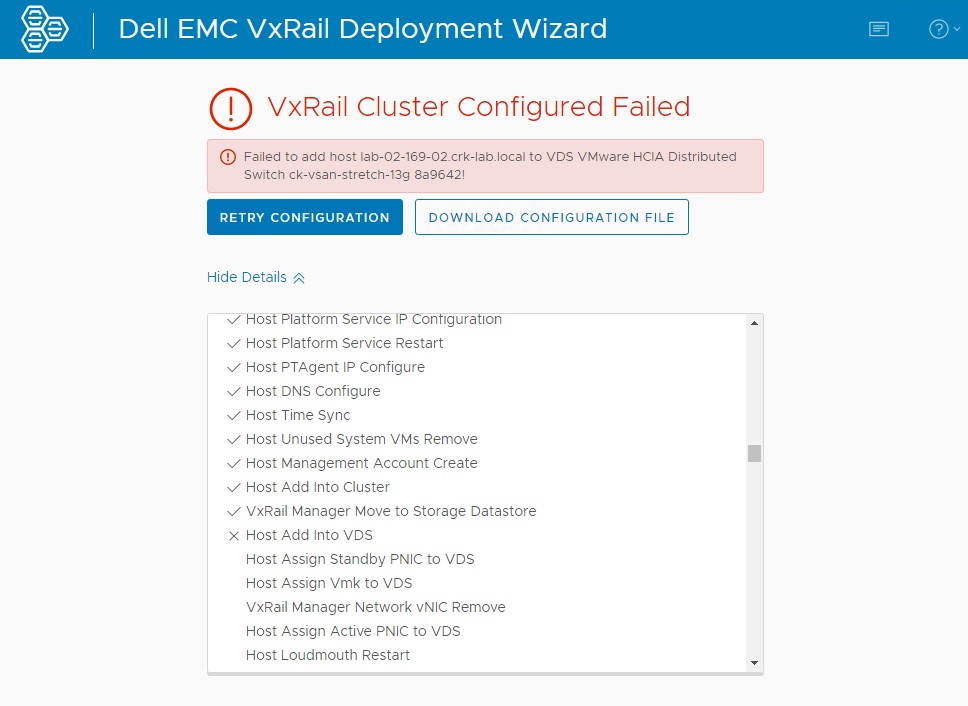
- vCenter UI geeft de volgende fout weer tijdens het uitvoeren van een 'Reconfigure vSphere Distributed Switch'-taak:
The operation is not supported on the object. Host xxx is not compatible with the VDS version 7.0.2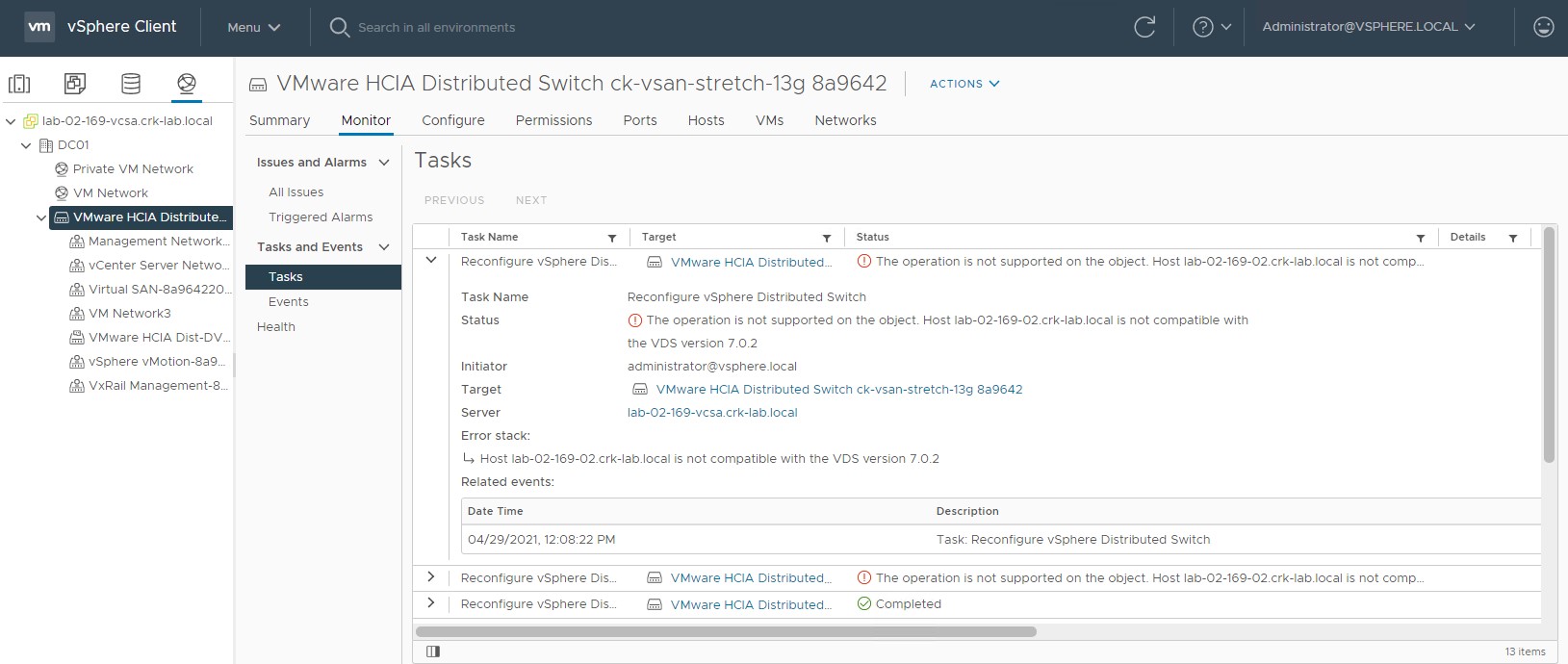
- In VxRail Manager in het logboekbestand /var/log/microservice_log/dayone.log ziet u mogelijk een fout die vergelijkbaar is met:
2021-04-29-11:08:23 microservice.do-network "do_common.exceptions.OperationException: OperationException: {""message"": ""Add host lab-02-169-02.crk-lab.local to vds VMware HCIA Distributed Switch ck-vsan-stretch-13g 8a9642 did not complete successfully: (vmodl.fault.NotSupported) {\n dynamicType = ,\n dynamicProperty = (vmodl.DynamicProperty) [],\n msg = 'The operation is not supported on the object.',\n faultCause = ,\n faultMessage = (vmodl.LocalizableMessage) [\n (vmodl.LocalizableMessage) {\n dynamicType = ,\n dynamicProperty = (vmodl.DynamicProperty) [],\n key = 'com.vmware.vim.vpxd.dvs.notSupportedHostVersion.label',\n arg = (vmodl.KeyAnyValue) [\n (vmodl.KeyAnyValue) {\n dynamicType = ,\n dynamicProperty = (vmodl.DynamicProperty) [],\n key = 'host',\n value = 'xxxxxxx.xxxxx.local'\n },\n (vmodl.KeyAnyValue) {\n dynamicType = ,\n dynamicProperty = (vmodl.DynamicProperty) [],\n key = 'version',\n value = '7.0.2'\n }\n ],\n message = 'Host lab-02-169-02.crk-lab.local is not compatible with the VDS version 7.0.2'\n }\n ]\n}"", ""bundle"": """", ""prefix"": ""do_common.exceptions.OperationException"", ""key"": """", ""field"": """", ""error_code"": ""0"", ""exit_code"": ""-1"", ""params"": []}"
Cause
vCenter 7.0 Update 2 introduceert een nieuwe vDS-versie 7.0.2.
De build van ESXi die wordt geleverd met:
Tijdens de initiële configuratie doet de VxRail Implementatiewizard in VxRail Manager het volgende:
De build van ESXi die wordt geleverd met:
- VxRail 4.7.300 - 4.7.411 ondersteunt een maximale vDS-versie van 6.6.0.
- VxRail 7.0.000 - 7.0.101 ondersteunt een maximale vDS-versie van 7.0.0.
Tijdens de initiële configuratie doet de VxRail Implementatiewizard in VxRail Manager het volgende:
- Maakt een nieuwe vDS met behulp van de nieuwste versie die beschikbaar is met die build van vCenter, vDS-versie 7.0.2
- Probeert de VxRail hosts toe te voegen aan of te registreren in de nieuwe vDS
- Deze stap mislukt omdat de builds van ESXi (die een maximale vDS-versie of 6.6.0 of 7.0.0 ondersteunen) niet kunnen worden toegevoegd aan een vDS-versie 7.0.2
Resolution
Dit probleem is opgelost in VxRail versies 4.7.510 en 7.0.130.
De oplossingen zorgen ervoor dat de vDS-versie die bij de initiële configuratie is gemaakt, geschikt is voor de build van ESXi die wordt geleverd met die VxRail release:
Om het probleem tijdelijk op te lossen:
De oplossingen zorgen ervoor dat de vDS-versie die bij de initiële configuratie is gemaakt, geschikt is voor de build van ESXi die wordt geleverd met die VxRail release:
- Voor VxRail 4.7.510 en hoger is de vDS-versie 6.6.0
- Voor VxRail 7.130 en hoger is de vDS-versie 7.0.0
Tijdelijke oplossing
VxRail Engineering heeft een script gemaakt dat is gekoppeld aan dit artikel, dat kan worden gebruikt in VxRail Manager om de vDS-versie te wijzigen nadat de fout is opgetreden tijdens de implementatie.Om het probleem tijdelijk op te lossen:
- Zorg ervoor dat u zich op het onderdeel bevindt waar de implementatie is mislukt met de fout in de bovenstaande schermafbeelding en dat er geen andere pogingen zijn gedaan om het probleem te verhelpen. Zo niet, dan kan het script het proces afbreken.
- Upload het bijgevoegde python-script naar VxRail Manager.
- Voer het script als root uit:
python vds_redeploy_7_0_010.py -a "VCENTER-IP-OR-FQDN" -u "VCENTER-ADMIN-USER" -p VCENTER-ADMIN-USER-PASSWORD -n "VDS-SWITCH-NAME-FROM-VCENTER-UI" -v 7.0.0

Where:
-a = vCenter IP or FQDN
-u = vCenter administrator user
-p = Password
-u = vDS which is currently at version 7.0.2 that we are trying to add the hosts too, name will likely include spaces so enclose in double quotes
-v = vDS version to set the switch too, in this case we need to change it from a 7.0.2 vDS to a 7.0.0 vDS to allow us to add pre-7.0u2 hosts to it

Example:
python vds_redeploy_7_0_010.py -a "172.16.10.201" -u "administrator@vsphere.local" -p Password123! -n "VMware HCIA Distributed Switch ck-vsan-stretch-13g 8a9642" -v 7.0.0
Go back to initial configuration / deployment web UI and click "TRY AGAIN".
Affected Products
VxRail SoftwareProducts
VxRail, VxRail Appliance Family, VxRail Appliance SeriesArticle Properties
Article Number: 000185996
Article Type: Solution
Last Modified: 03 Jul 2025
Version: 13
Find answers to your questions from other Dell users
Support Services
Check if your device is covered by Support Services.