IDPA:PowerProtect DP4400 初始网络配置工作流失败
Summary: IDPA:PowerProtect DP4400 网络配置工作流失败,并显示“Appliance network configuration failed”错误。
This article applies to
This article does not apply to
This article is not tied to any specific product.
Not all product versions are identified in this article.
Symptoms
ACM UI 显示以下错误消息:
诊断报告显示以下错误消息: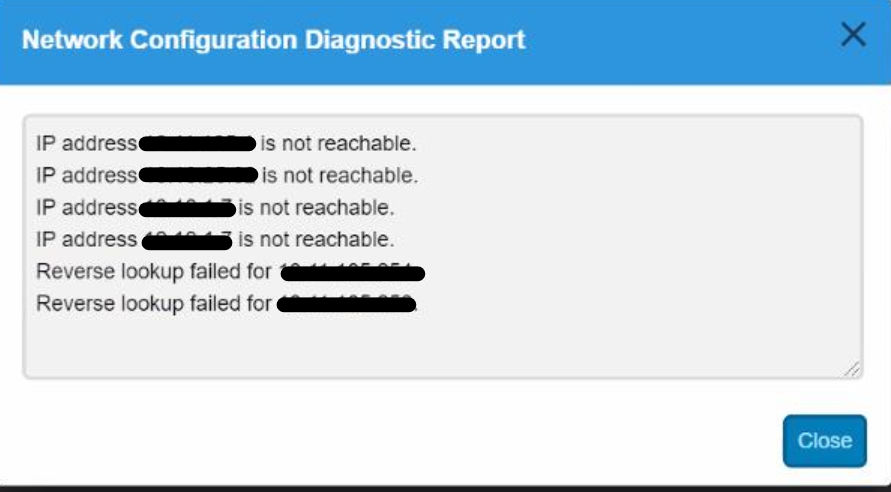
打开到 ACM 的 SSH 并以“root”用户身份登录。
对默认网关执行 Ping作并确认其正常工作。作可能会失败,这将确认交换机端存在布线或网络配置问题。
Cause
连接到 IDPA 的外部交换机上的布线问题和/或交换机端口配置问题。环境中不正确的交换机配置可能会导致此类网络问题。
Resolution
确保连接到 IDPA 的外部交换机上的端口配置允许使用单个 VLAN,并且外部交换机上的所有四个端口均设置为访问模式。(这些交换机由终端用户处理,因为这些交换机在 IDPA 外部)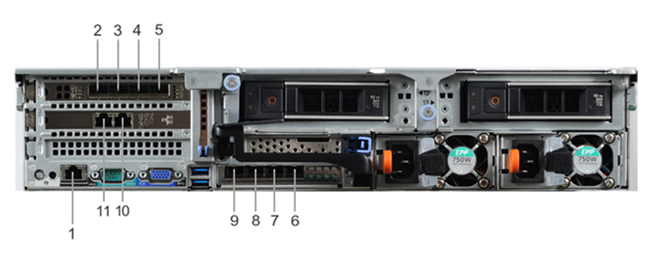
线缆连接(如果存在单个网络应用场景):
- 仅将端口 2、3、8 和 9 连接到管理网络 VLAN。允许使用单个 VLAN。
- 交换机上的所有端口都应处于“访问模式或未标记”
- 所有交换机端口都应处于活动状态,并且不应在 LACP 中配置
线缆连接(如果有单独的管理应用场景):
- 将端口 2 和 9 连接到管理网络 VLAN
- 将端口 3 和 8 连接到备份网络 VLAN
- 交换机上的所有端口都应处于“访问模式或未标记”
- 所有交换机端口都应处于活动状态,并且不应在 LACP 中配置
Affected Products
PowerProtect DP4400Products
PowerProtect Data Protection Appliance, PowerProtect Data Protection SoftwareArticle Properties
Article Number: 000187097
Article Type: Solution
Last Modified: 03 Feb 2025
Version: 5
Find answers to your questions from other Dell users
Support Services
Check if your device is covered by Support Services.