SRDF SRA: SRM UI에서 어레이 쌍을 추가하는 동안 오류가 발생했습니다. SRA 명령 'discoverDevices'가 실패했습니다. 디바이스를 찾을 수 없습니다.
Summary: SRA(SRDF Replication Adapter) 명령 'discoverDevices'가 실패했습니다. 디바이스를 찾을 수 없습니다. 오류에 대한 자세한 내용은 EmcSrdfSra 로그를 확인하십시오.
This article applies to
This article does not apply to
This article is not tied to any specific product.
Not all product versions are identified in this article.
Symptoms
SRM(Site Recovery Manager) UI(User Interface)에서 SRA를 사용하여 어레이 쌍을 추가하는 동안 다음 오류가 표시됩니다.
SRA Command ‘discoverDevices’ failed. No devices found. Please check the EmcSrdfSra logs for more information on the error.
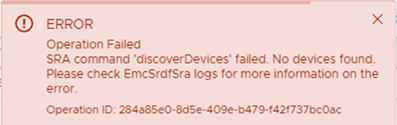
이 문제는 새로운 어레이 설정에서 나타납니다.
이 문제가 발생한 구성에 대한 추가 정보:
- vCenter 버전: 6.7
- SRM 버전: 8.1
- SRA 버전: 9.2.0
- SE(Solutions Enabler) 버전: SRM에 설치된 9.2.1 클라이언트
- SYMAPI 서버: SE 9.2.1의 내장형 매니지드 어레이
Cause
이러한 오류는 로컬 어레이와 원격 어레이 간에 SRDF 페어가 설정되지 않았기 때문에 나타납니다. 디바이스 페어가 없는 SRDF 그룹이 하나만 구성되었습니다. 이 때문에 어레이 검색이 실패합니다.
로컬 및 원격 어레이가 다음에 응답했습니다. symrdf ping에 관한 자세한 내용을 참조하십시오.
The 'symrdf list' command returned, "There are no RDF devices that are configured in this symmetrix."Resolution
로컬 어레이와 원격 어레이 간에 SRDF 페어를 생성하고 SRDF 세션을 설정합니다. SRM UI에서 추가된 페어를 다시 시도합니다. 그러면 디바이스 검색이 성공합니다.
Affected Products
SRDF Adapter for VMware Site Recovery ManagerArticle Properties
Article Number: 000190100
Article Type: Solution
Last Modified: 26 Aug 2025
Version: 3
Find answers to your questions from other Dell users
Support Services
Check if your device is covered by Support Services.