VxRail: Event VXR024009
Summary: Event VXR024009 SSL certificate is within 7 days of expiring.
This article applies to
This article does not apply to
This article is not tied to any specific product.
Not all product versions are identified in this article.
Symptoms
Event VXR024009 occurs and RED alarm 'VXR024009' present is in the vCenter portal.
Cause
SSL certificate is within 7 days of expiring.
Resolution
Follow the following procedure to resolve this:
- VxRail Manager TLS Certificate-Automated Renewal is disabled.
- Enable VxRail Manager (VXM) TLS Certificate-Automated Renewal or replace VXM certificates manually.
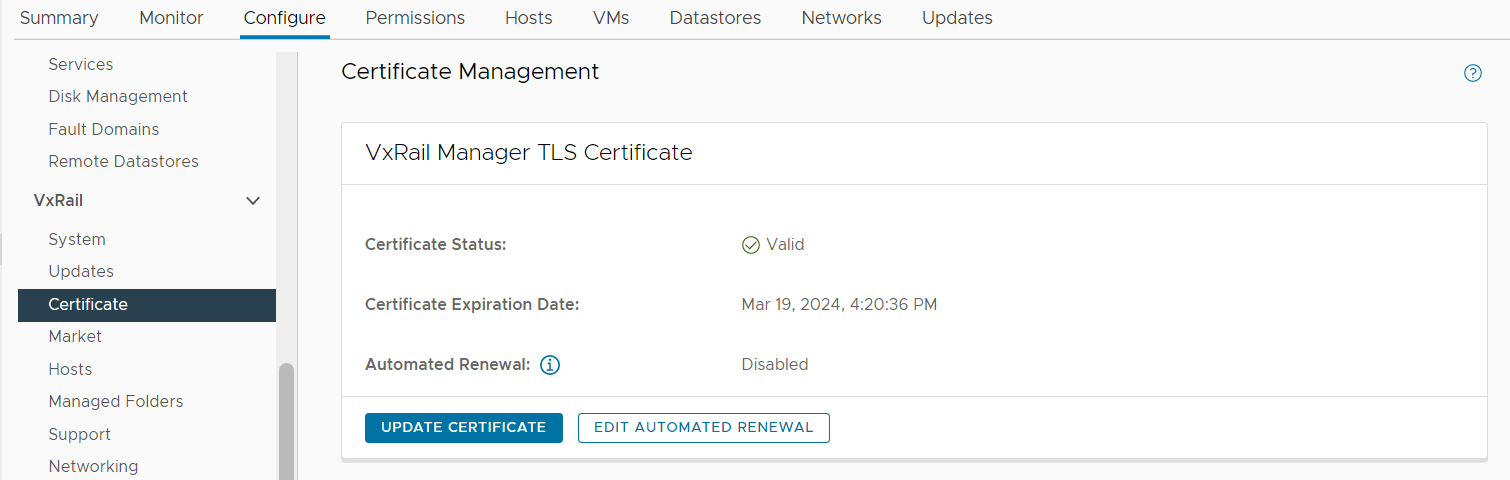
- If VxRail Manager TLS Certificate-Automated Renewal is enabled
- VXM certificates have not enrolled.
- Enroll VXM certificates.
- VxRail Manager TLS Certificate-Automated Renewal automated renewal failed.
- Contact Dell Technical Support or your Authorized Service Representative
- VXM certificates have not enrolled.
Affected Products
VxRailArticle Properties
Article Number: 000194213
Article Type: Solution
Last Modified: 04 Feb 2026
Version: 2
Find answers to your questions from other Dell users
Support Services
Check if your device is covered by Support Services.