PowerEdge: Intel X550 Option ROM initialization error during POST on the PowerEdge XE7440
Summary: This article provides information about the Intel X550 Option ROM initialization error during POST on the PowerEdge XE7440.
This article applies to
This article does not apply to
This article is not tied to any specific product.
Not all product versions are identified in this article.
Symptoms
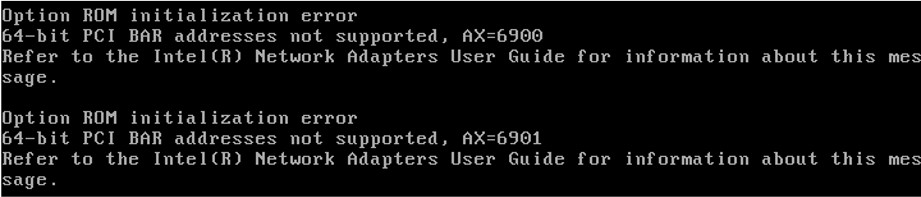
During POST, the PowerEdge XE7440 reports Intel X550 "Option ROM initialization error"
This issue only happens in BIOS mode, it does not happen in UEFI mode.
Example as below:
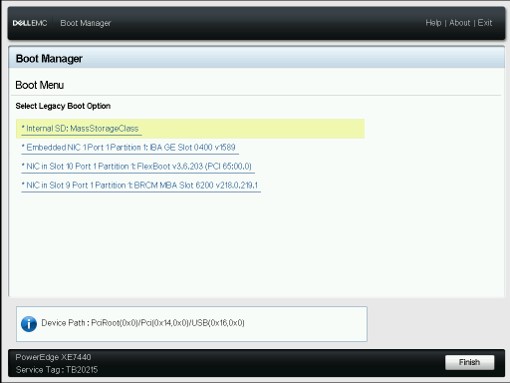
This also causes the X550 card to not be listed under the boot menu after enabling PXE on the card.
Example as below:
Cause
The issue is expected behavior.
Under legacy BIOS mode, with "Memory Mapped I/O Above 4 GB" enabled, the BIOS assigns PCI resources to 64-bit PCI BAR addresses. However, the Intel card does not support 64-bit PCI BAR addresses.
Resolution
Either option listed below is the workaround for this issue:
1. Change BIOS mode to UEFI mode
2. Disable the "Memory Mapped I/O Above 4 GB" under legacy BIOS mode. However, this may cause the other memory-intensive PCIe devices not work, for example, a GPU.
3. Run the Intel BootUtil with the -64d option. Get the tool through link as below:
https://www.intel.com/content/www/us/en/download/15755/intel-ethernet-connections-boot-utility-preboot-images-and-efi-drivers.html
Affected Products
Intel PRO Family of Adapters, PowerEdge XE7440Article Properties
Article Number: 000194292
Article Type: Solution
Last Modified: 12 May 2026
Version: 4
Find answers to your questions from other Dell users
Support Services
Check if your device is covered by Support Services.