Avamar: Client Manager reports an Unexpected Error "The request failed. Please see the server log or check the server status"
Summary: Within the Avamar Client Manager (ACM), after selecting 'Upgrade Clients' Icon and then choosing Action: 'Select Package' and immediately returns=> 'Unexpected Error' "The request failed. Please see the server log or check the server status" ...
This article applies to
This article does not apply to
This article is not tied to any specific product.
Not all product versions are identified in this article.
Symptoms
Within the Avamar Client Manager (ACM), after selecting the 'Upgrade Clients' icon and choosing Action: 'Select Package' it immediately returns: "Unexpected Error" and "The request failed. Please see the server log or check the server status":
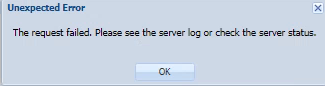
The /usr/local/avamar-tomcat/logs/ACMTrace.log contains the following:
2022-04-18 14:16:46,747 INFO  [ajp-nio-0:0:0:0:0:0:0:1-8509-exec-2]-sdk.ServiceConnection: Wait for task: STORAGE_INFO: Getting storage information
2022-04-18 14:16:47,748 INFO  [ajp-nio-0:0:0:0:0:0:0:1-8509-exec-2]-sdk.ServiceConnection: Task done: STORAGE_INFO
2022-04-18 14:17:06,211 INFO  [ajp-nio-0:0:0:0:0:0:0:1-8509-exec-5]-utils.AviServiceUtil: ===== making rest call: http://<ip_addr>:7580/avi/service/package/availableList/client content type: application/json
2022-04-18 14:17:06,465 ERROR [ajp-nio-0:0:0:0:0:0:0:1-8509-exec-5]-utils.AviServiceUtil: Can not get session ID from AVI service, wsUrl: https://<ip_addr>:9443/services/mcService
2022-04-18 14:17:06,470 ERROR [ajp-nio-0:0:0:0:0:0:0:1-8509-exec-5]-filters.AuthenticationFilter: Error.. :Throwable
javax.servlet.ServletException: com.emc.avamar.acm.core.APIException: java.io.IOException: Authentication error - session cookie not found: 401
	at com.opensymphony.webwork.dispatcher.DispatcherUtils.serviceAction(DispatcherUtils.java:284)
	at com.opensymphony.webwork.dispatcher.FilterDispatcher.doFilter(FilterDispatcher.java:202)
[..]
org.apache.tomcat.util.threads.ThreadPoolExecutor$Worker.run(ThreadPoolExecutor.java:659)
	at org.apache.tomcat.util.threads.TaskThread$WrappingRunnable.run(TaskThread.java:61)
	at java.lang.Thread.run(Unknown Source)
Caused by: com.emc.avamar.acm.core.APIException: java.io.IOException: Authentication error - session cookie not found: 401
	at com.emc.avamar.acm.core.finder.impl.UpgradePackageFinderImpl.getAllPackages(UpgradePackageFinderImpl.java:45)
[..]
	at com.opensymphony.xwork.DefaultActionInvocation.invoke(DefaultActionInvocation.java:190)
	at com.opensymphony.xwork.DefaultActionProxy.execute(DefaultActionProxy.java:116)
	at com.opensymphony.webwork.dispatcher.DispatcherUtils.serviceAction(DispatcherUtils.java:273)
	... 29 more
2022-04-18 14:17:06,473 ERROR [ajp-nio-0:0:0:0:0:0:0:1-8509-exec-5]-filters.AuthenticationFilter: Root cause:
com.emc.avamar.acm.core.APIException: java.io.IOException: Authentication error - session cookie not found: 401
The defining error being:
javax.servlet.ServletException: com.emc.avamar.acm.core.APIException: java.io.IOException: Authentication error - session cookie not found: 401
Cause
The mcssl certificate in the avi keystore cannot verify the server certificate.
Resolution
Note: If the "session cookie not found: 401" error in not seen in the ACMTrace.log, stop following this knowledge article.
1. Log in to the Avamar Utility Node as admin.
2. Switch to the root user and load the root keys. See Avamar: How to Log in to an Avamar Server and Load Various Keys.
3. Review the file /usr/local/avamar/etc/acm.properties:
cat /usr/local/avamar/etc/acm.properties |grep upgrade
4. Verify that the following two lines are contained in the file:
upgrade.avi.port=7580
upgrade.secure.avi.port=7580
If the lines are not present, continue from step 5.
If the lines are present, continue from step 6.
5. Update the file and restart tomcat:
a. Make a backup copy of /usr/local/avamar/etc/acm.properties:
cp -p /usr/local/avamar/etc/acm.properties /usr/local/avamar/etc/x-acm.properties-`date -I`
b. Verify that the backup file exists:
ls -al /usr/local/avamar/etc/x-acm.prop*
c. Using an edit such as vi, edit /usr/local/avamar/etc/acm.properties.
d. Add the two required lines.
e. Exit and save the file.
f. Restart tomcat:
dpnctl stop emt
dpnctl start emt
6. Remove the temporary axis2 files:
a. Stop the Avamar installer (avinstaller):
avinstaller.pl --stop
b. Remove the temporary files:
rm -rf /tmp/axis2-tmp-*
c. Restart avinstaller:
avinstaller.pl --start
7. Open the ACM webpage and attempt to select a package.
If no error is received, the issue is resolved and the package can be selected to upgrade clients.
If the same error is received, continue from step 8.
8. If the Avamar grid is running v19.3 or greater, retrieve the keystore passphrase:
avlockbox.sh -r keystore_passphrase
9. Save the current mcssl certificate from the avi keystore to a file:
keytool -exportcert -rfc -alias mcssl -file /tmp/mcssl_test.pem -keystore /usr/local/avamar/lib/avi/avi_keystore
When prompted, enter the password retrieved in step 8 above.
10. Use openssl to make a connection to the mcsdk with the mcssl certificate specified:
(Pay close attention to the return code to see if the server cert can be verified.)
echo | openssl s_client -tls1_2 -connect `hostname -i`:9443 -CAfile /tmp/mcssl_test.pem
The end of the output likely shows the following:
Verify return code: 18 (self signed certificate)
---
DONE
Note: Verify return code: 18 (self-signed certificate) means that the server certificate cannot be validated with the
mcssl certificate stored in the avi keystore.
11. Use openssl to save the current server certificate presented by mcsdk:
echo | openssl s_client -connect `hostname -i`:9443 2>/dev/null | openssl x509 > /tmp/my_mcssl.pem
12. Make a backup copy of the avi keystore:
cp -p /usr/local/avamar/lib/avi/avi_keystore /usr/local/avamar/lib/avi/x-avi_keystore-`date -I`
13. Verify that the file backup file exists:
ls -al /usr/local/avamar/lib/avi/x-avi_keystore-*
14. Stop the avinstaller:
avinstaller.pl --stop
15. Delete the current mcssl alias in the avi keystore:
keytool -delete -alias mcssl -keystore /usr/local/avamar/lib/avi/avi_keystore
When prompted, enter the password retrieved in step 8 above.
16. List the avi keystore contents:
keytool -list -keystore /usr/local/avamar/lib/avi/avi_keystore
When prompted, enter the password retrieved in step 8 above.
Note: Only the tomcat alias should be listed.
17. Import the saved server certificate (step 11) presented by mcsdk to the avi keystore:
keytool -noprompt -import -trustcacerts -alias mcssl -file /tmp/my_mcssl.pem -keystore /usr/local/avamar/lib/avi/avi_keystore
When prompted, enter the password retrieved in step 8 above.
18. List the avi keystore contents again to verify that the mcssl certificate was imported:
keytool -list -keystore /usr/local/avamar/lib/avi/avi_keystore
When prompted, enter the password retrieved in step 8 above.
Note: Both the tomcat and
mcssl aliases should now be listed.
19. Restart the avinstaller:
avinstaller.pl --start
20. Conduct the test again to see if the server certificate can be verified:
a. Save the updated mcssl certificate from the avi keystore to a different file:
keytool -exportcert -rfc -alias mcssl -file /tmp/mcssl_test_2.pem -keystore /usr/local/avamar/lib/avi/avi_keystore
b. Use openssl to make a connection to the mcsdk with the mcssl cert specified.
(Pay attention to the return code to see if the server certificate can be verified.)
echo | openssl s_client -tls1_2 -connect `hostname -i`:9443 -CAfile /tmp/mcssl_test_2.pem
The end of the output likely shows the following:
Verify return code: 0 (ok)
---
DONE
Note: Verify return code: 0 (ok) means that the server certificate can be validated with the
mcssl certificate stored in the avi keystore.
22. Open the ACM webpage and attempt to select a package.
If no error is received, the issue is resolved and the package can be selected to upgrade clients.
Affected Products
AvamarArticle Properties
Article Number: 000198741
Article Type: Solution
Last Modified: 24 Jul 2025
Version: 18
Find answers to your questions from other Dell users
Support Services
Check if your device is covered by Support Services.