IDPA: DD Virtual Edition muestra una configuración de hardware virtual no compatible para la memoria
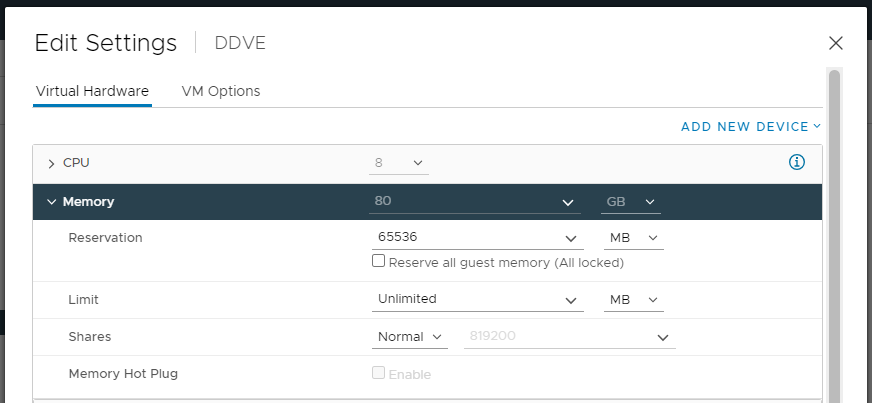
Summary: Después de implementar DP4400, Data Domain Virtual Edition (DDVE) muestra una configuración de hardware virtual no compatible para la memoria: "¡La reserva de memoria debe ser de 81 920 MB como mínimo!" ...
This article applies to
This article does not apply to
This article is not tied to any specific product.
Not all product versions are identified in this article.
Symptoms
Se observa una alerta activa para una configuración de hardware virtual no compatible en la CLI de Data Domain.
sysadmin@dd-4400# alerts show current-detailed

Alert Id                 p0-12
Post Time                Thu Jan 26 18:48:27 2023
Severity                 CRITICAL
Class                    Environment
Object                   Component=Memory
Message                  Unsupported virtual hardware configuration.
Additional Information   Cause=Memory reservation must be 81920 MB at least!
Event Id                 EVT-ENVIRONMENT-00040
Event Name               UnsupportedHardwareConfig
Description              Unsupported virtual machine hardware configuration was detected.
                         This configuration may cause unexpected behavior.
Action                   Fix the hardware configuration to resolve the problem.
                         If problem persists, restart the system.
En el vCenter de Integrated Data Protection Appliance, DDVE muestra la cantidad correcta de memoria configurada (80 GB).
Cause
El problema se produce durante la implementación de DDVE; la opción Reservar toda la memoria del huésped (todo bloqueado) no está seleccionado.
Resolution
Para abordar el problema, haga lo siguiente:
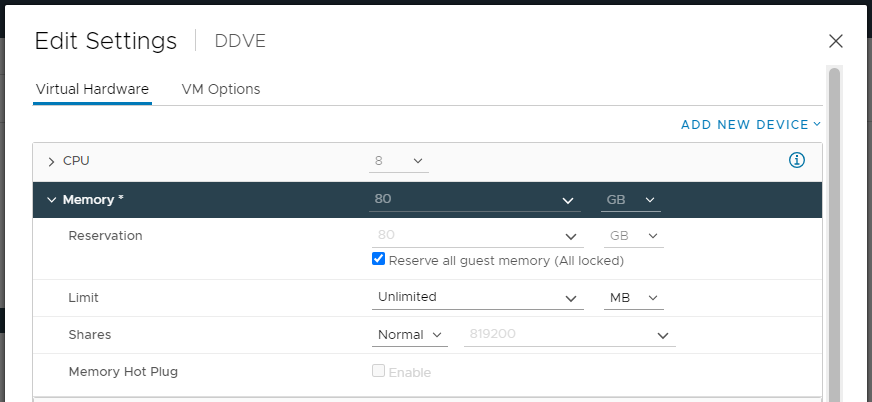
- Abra la interfaz de usuario de Integrated Data Protection Appliance vCenter, haga clic con el botón secundario en DDVE y seleccione Edit Settings.
- En Memory, seleccione la opción Reserve all guest memory (All locked) y guarde la configuración.
- Borre el evento de la CLI de Data Domain con el siguiente comando:
alerts clear alert-id p0-<id>.
Affected Products
Integrated Data Protection Appliance FamilyProducts
PowerProtect DP4400, Integrated Data Protection Appliance SoftwareArticle Properties
Article Number: 000207980
Article Type: Solution
Last Modified: 08 Aug 2025
Version: 6
Find answers to your questions from other Dell users
Support Services
Check if your device is covered by Support Services.