IDPA:DD Virtual Edition 顯示不支援的記憶體虛擬硬體組態
Summary: 部署 DP4400 後,Data Domain Virtual Edition (DDVE) 會顯示不支援的記憶體虛擬硬體組態「記憶體保留必須至少為 81,920 MB!」
This article applies to
This article does not apply to
This article is not tied to any specific product.
Not all product versions are identified in this article.
Symptoms
在 Data Domain CLI 中觀察到 針對不支援的虛擬硬體組態的作用中警示。
sysadmin@dd-4400# alerts show current-detailed

Alert Id                 p0-12
Post Time                Thu Jan 26 18:48:27 2023
Severity                 CRITICAL
Class                    Environment
Object                   Component=Memory
Message                  Unsupported virtual hardware configuration.
Additional Information   Cause=Memory reservation must be 81920 MB at least!
Event Id                 EVT-ENVIRONMENT-00040
Event Name               UnsupportedHardwareConfig
Description              Unsupported virtual machine hardware configuration was detected.
                         This configuration may cause unexpected behavior.
Action                   Fix the hardware configuration to resolve the problem.
                         If problem persists, restart the system.
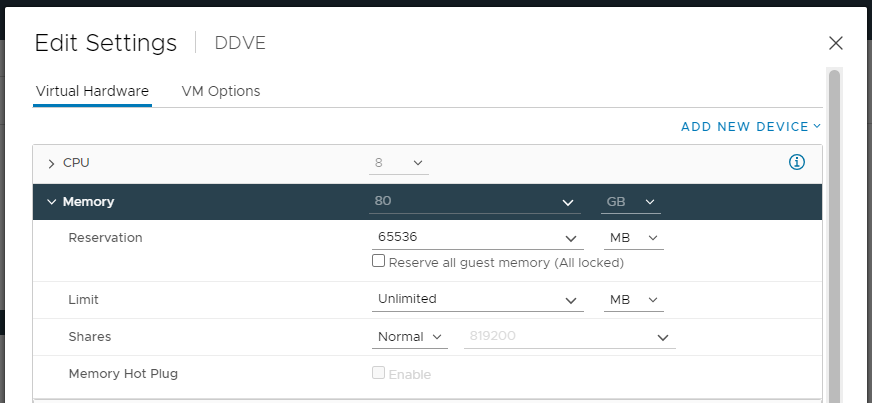
在 Integrated Data Protection Appliance vCenter 中,DDVE 會顯示設定的正確記憶體容量 (80 GB)。
Cause
此問題是在部署 DDVE 期間造成,未選取保留所有客體記憶體 (全部鎖定)。
Resolution
若要解決此問題:
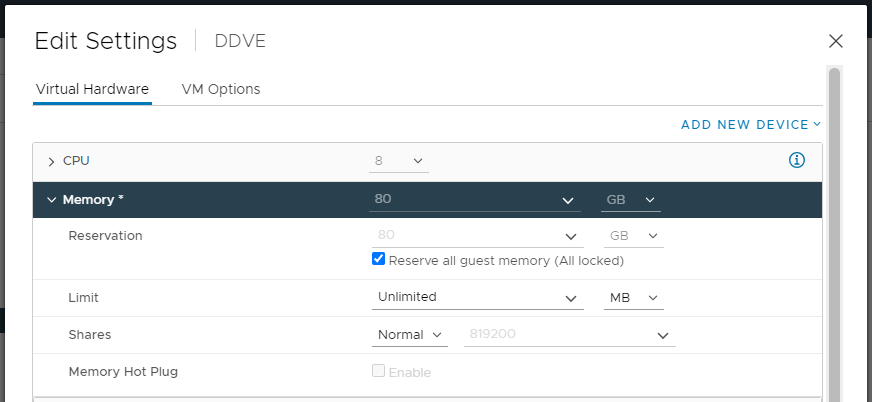
- 開啟 Integrated Data Protection Appliance vCenter UI,然後以滑鼠右鍵按一下 DDVE, 然後選取 編輯設定。
- 在 「記憶體」中,選取 「保留所有客體記憶體 (全部鎖定)」選項,然後 儲存 設定。
- 使用命令從 Data Domain CLI 中清除事件:
alerts clear alert-id p0-<id>.
Affected Products
Integrated Data Protection Appliance FamilyProducts
PowerProtect DP4400, Integrated Data Protection Appliance SoftwareArticle Properties
Article Number: 000207980
Article Type: Solution
Last Modified: 08 Aug 2025
Version: 6
Find answers to your questions from other Dell users
Support Services
Check if your device is covered by Support Services.