ІДПА: DD Virtual Edition показує непідтримувану конфігурацію віртуального обладнання для пам'яті
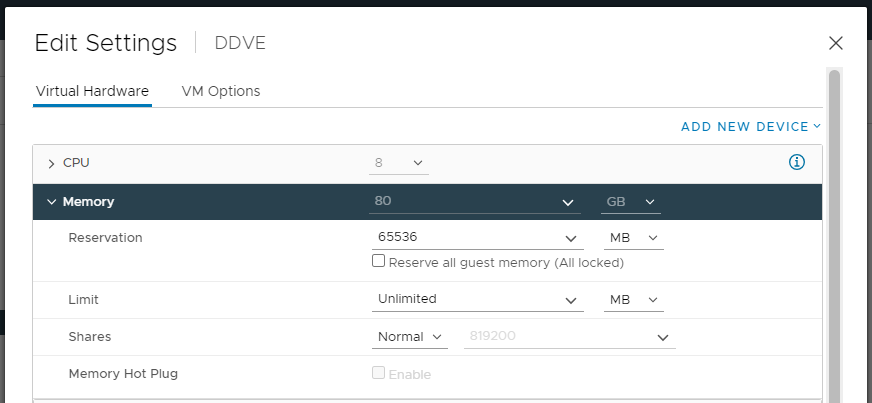
Summary: Після розгортання DP4400 Data Domain Virtual Edition (DDVE) показує непідтримувану конфігурацію віртуального обладнання для пам'яті «Резервування пам'яті має бути принаймні 81 920 МБ!»
This article applies to
This article does not apply to
This article is not tied to any specific product.
Not all product versions are identified in this article.
Symptoms
Активне попередження про непідтримувану конфігурацію віртуального обладнання спостерігається в командному рядку домену даних.
sysadmin@dd-4400# alerts show current-detailed

Alert Id                 p0-12
Post Time                Thu Jan 26 18:48:27 2023
Severity                 CRITICAL
Class                    Environment
Object                   Component=Memory
Message                  Unsupported virtual hardware configuration.
Additional Information   Cause=Memory reservation must be 81920 MB at least!
Event Id                 EVT-ENVIRONMENT-00040
Event Name               UnsupportedHardwareConfig
Description              Unsupported virtual machine hardware configuration was detected.
                         This configuration may cause unexpected behavior.
Action                   Fix the hardware configuration to resolve the problem.
                         If problem persists, restart the system.
За допомогою вбудованого пристрою захисту даних vCenter DDVE показує правильний обсяг пам'яті (80 ГБ).
Cause
Проблема виникає під час розгортання DDVE, не вибрано параметр Резервувати всю гостьову пам'ять (Усі заблоковано).
Resolution
Щоб вирішити проблему:
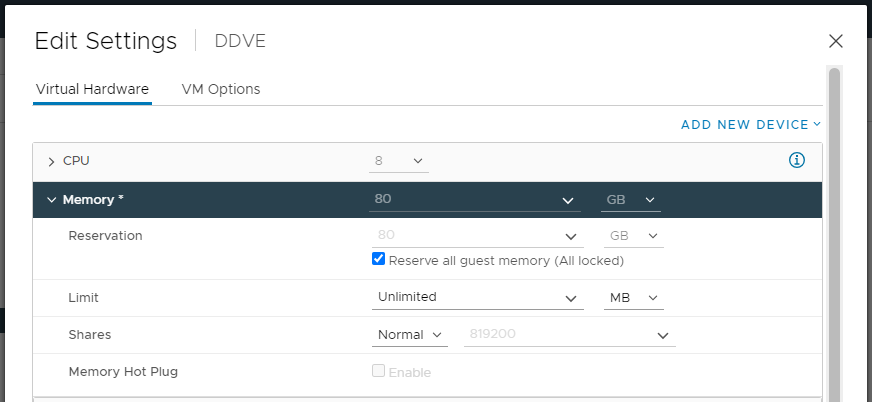
- Відкрийте Integrated Data Protection Appliance vCenter UI, потім клацніть правою кнопкою миші DDVE та виберіть Edit Settings (Редагувати налаштування).
- У розділі «Пам'ять» виберіть опцію Зарезервувати всю гостьову пам'ять (Усі заблоковані) та Зберегти налаштування.
- Очистіть подію від CLI Data Domain за допомогою команди:
alerts clear alert-id p0-<id>.
Affected Products
Integrated Data Protection Appliance FamilyProducts
PowerProtect DP4400, Integrated Data Protection Appliance SoftwareArticle Properties
Article Number: 000207980
Article Type: Solution
Last Modified: 08 Aug 2025
Version: 6
Find answers to your questions from other Dell users
Support Services
Check if your device is covered by Support Services.