PowerProtect: Search plug-in was unsuccessful. Error uploading metadata to the search node. No space left on the device
Summary: PowerProtect Data Manager backup completed with exception: Search plug-in was unsuccessful. Error uploading metadata to the search node. No space left on the device.
This article applies to
This article does not apply to
This article is not tied to any specific product.
Not all product versions are identified in this article.
Symptoms
A backup completes successfully but reports as Completed with Exceptions: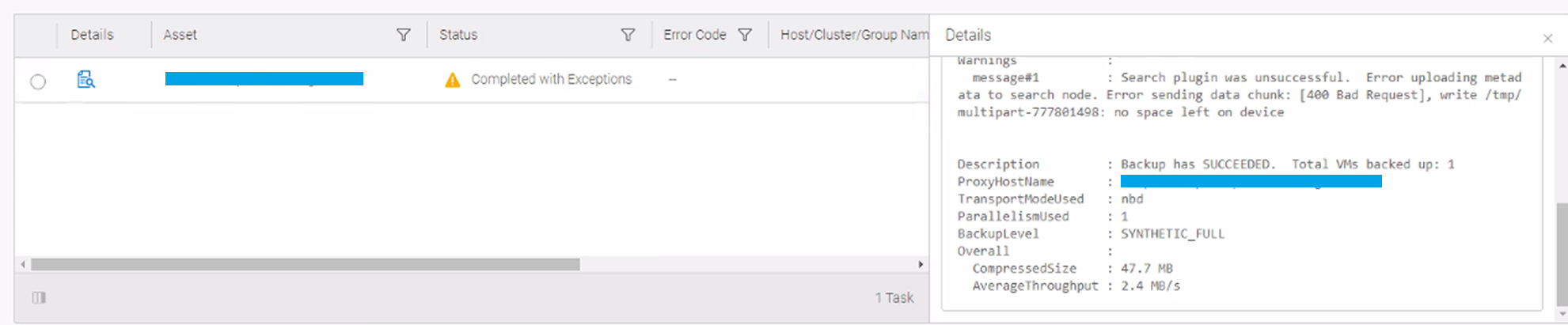
The log contains a similar message:
2023-01-18 03:08:56.89+1300 72 ERROR <Proxy_hostname> 22127 upload-utils.go(296) dellemc.com/search-client/common.Uploadfile Error sending data chunk: [400 Bad Request], write /tmp/multipart-777801498: no space left on device
On the Search node, the root partition runs out of space with large files called CurrentMetadata<XYZ>.csv under /tmp.
Cause
This is a known PowerProtect Data Manager issue.
Resolution
Upgrade to PowerProtect Data Manager v19.13 or later versions where this issue has been addressed.
Affected Products
PowerProtect Data ManagerArticle Properties
Article Number: 000209225
Article Type: Solution
Last Modified: 11 Dec 2025
Version: 4
Find answers to your questions from other Dell users
Support Services
Check if your device is covered by Support Services.