PowerEdge:使用 iDRAC 執行 NVIDIA HGX H100 基板更新時,可能會失敗
Summary: NVIDIA HGX H100 基板韌體 使用 iDRAC 執行韌體更新作業時,Dell Update Package (DUP) 更新可能會失敗。根據設計,當系統關閉電源時,GPU 基板資訊不會列在 iDRAC 詳細目錄畫面上。這會導致韌體 DUP 安裝無法通過清查。
This article applies to
This article does not apply to
This article is not tied to any specific product.
Not all product versions are identified in this article.
Symptoms
透過 iDRAC 執行韌體更新作業時,NVIDIA HGX H100 基板韌體 DUP 更新可能會失敗。根據設計,當系統關閉電源時,GPU 基板資訊不會列在 iDRAC 詳細目錄畫面上。這會導致韌體 DUP 安裝無法通過清查。
以下是系統已開啟電源並安裝 HGX H100 GPU 時的 iDRAC 韌體清查範例。
醒目提示的是成功安裝基板 DUP 時,HGX H100 韌體清查元件的外觀。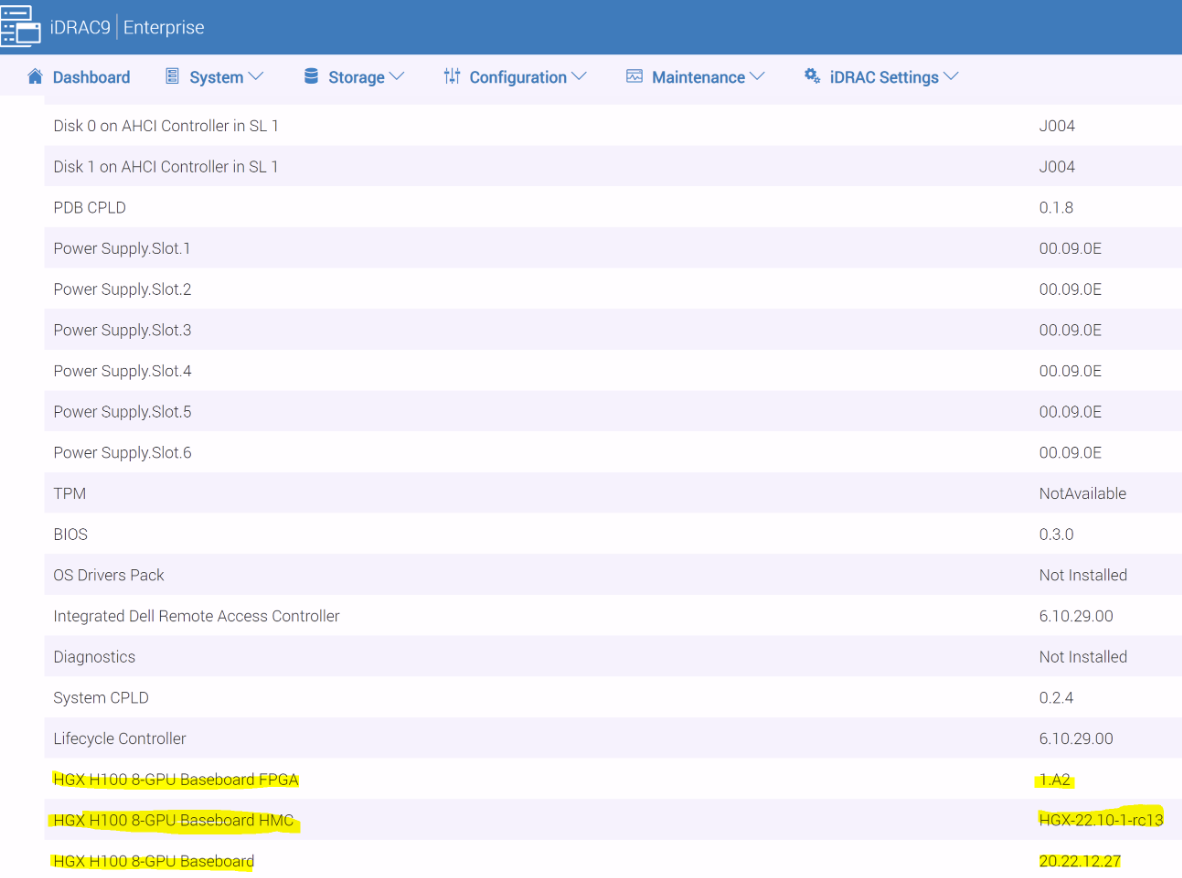
圖 1:iDRAC 韌體詳細目錄
Cause
根據設計,當系統關閉電源時,GPU 基板資訊不會列在 iDRAC 詳細目錄畫面上。
Resolution
根據設計,當系統關閉電源時,GPU 基板資訊不會列在 iDRAC 詳細目錄畫面上。
若要解決此問題,請開啟伺服器電源,然後使用 iDRAC 執行 GPU 基板韌體安裝。
Affected Products
iDRAC9, PowerEdge XE8640, PowerEdge XE9640, PowerEdge XE9680Article Properties
Article Number: 000209912
Article Type: Solution
Last Modified: 05 Mar 2025
Version: 2
Find answers to your questions from other Dell users
Support Services
Check if your device is covered by Support Services.