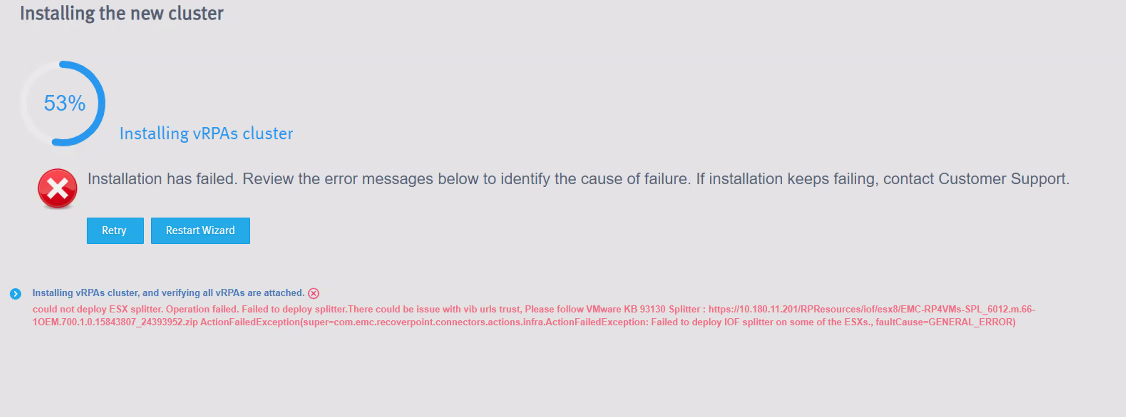
RecoverPoint for VMs 6.0: 53에서 설치가 실패하고 "ESXi 스플리터를 배포할 수 없습니다" 오류가 표시됨
Summary: "ESXi 스플리터를 배포할 수 없음" 오류 및 vCenter 작업 오류 "지정된 키, 이름 또는 식별자 vibUrl이 작업 콘솔에 이미 있습니다."로 인해 RecoverPoint for VMs 6.0 설치가 실패합니다.
This article applies to
This article does not apply to
This article is not tied to any specific product.
Not all product versions are identified in this article.
Symptoms
오류로 인해 RecoverPoint for VMs 6.0 설치 실패 "could not deploy ESXi splitter."
vCenter 작업을 살펴보면 다음과 같은 오류가 발생할 수 있습니다. "The specified key, name, or identifier vibUrl already exists in the task console."
Cause
이전 스플리터 설치 존재/실패로 인해 스플리터 배포가 실패합니다.
Resolution
해결 방법:
- vSphere Client 메뉴 >작업의 작업 콘솔에서 오류를 식별합니다.
- 오류 확인
"The specified key, name, or identifier vibUrl already exists" - RecoverPoint for VMs uninstaller.bat 툴을 사용하여 스플리터 및 JIRAF를 제거합니다. 자세한 내용은 RecoverPoint for VMs Splitter 및 JIRAF의 제거를 참조하십시오.
- 제거 후 RecoverPoint of VMs Deployer 마법사 페이지로 이동한 다음 Retry 를 클릭하여 vRPA 클러스터 설치를 다시 시작합니다.
참고: RecoverPoint for VMs 버전과 일치하는 최신 제거 프로그램을 사용합니다.
6.0 GA 릴리스의 경우 제거 프로그램 rp4vms_uninstaller_13.0.0-116
을 사용합니다. 제거 프로그램은 여기에서 다운로드할 수 있습니다 .
6.0 GA 릴리스의 경우 제거 프로그램 rp4vms_uninstaller_13.0.0-116
을 사용합니다. 제거 프로그램은 여기에서 다운로드할 수 있습니다 .
Additional Information
RecoverPoint for VMs 스플리터 및 JIRAF를 제거합니다.
uninstaller.bat 툴을 사용하여 RecoverPoint for VMs Splitter 및 JIRAF를 제거합니다.
단계:
- Windows 업그레이드를 실행하라는 프롬프트에 아래 내용이 표시될 때까지
iof_uninstall.
이 명령은 vCenter 및 ESXi 클러스터에서 Splitter 및 JIRAF I/O 필터를 완전히 제거합니다. - 다음과 같은 메시지가 표시됩니다. 계속하시겠습니까? (Y/N):
Splitter 및 JIRAF를 계속 제거하려면 Y 를 입력하고 제거를 중지하려면 N 을 입력합니다. - vCenter의 IP 주소를 입력합니다.
- vCenter의 TCP 포트 번호를 입력하거나 Enter 키를 눌러 기본 포트(443)를 사용합니다.
- vCenter 사용자 이름을 입력합니다.
- vCenter 암호를 입력합니다.
다음과 같은 메시지가 표시됨 vCenter 연결 확인 중 vCenter를 스캔할 준비가 되었습니다. 새 vCenter를 추가하시겠습니까? (Y/N) 또는 Q를 눌러 종료합니다. - I/O 필터를 제거하기 위해 다른 vCenter를 추가하지 않으려면 N 을 입력하고 원하는 경우 Y 를 입력합니다.
스캔 중 ESXi 클러스터:- <클러스터 이름> v
- All
- 쉼표로 구분된 ESXi 클러스터 번호(예: 1,2)/All을 입력해야 합니다.
다음과 같은 메시지가 표시됩니다. 선택한 vCenter 및 ESXi 클러스터에서 I/O 필터를 계속 제거하시겠습니까? (Y/N) - 제거를 완료하려면 Y 를 입력합니다.
Affected Products
RecoverPoint for Virtual MachinesProducts
RecoverPoint for Virtual MachinesArticle Properties
Article Number: 000213181
Article Type: Solution
Last Modified: 06 Mar 2025
Version: 7
Find answers to your questions from other Dell users
Support Services
Check if your device is covered by Support Services.