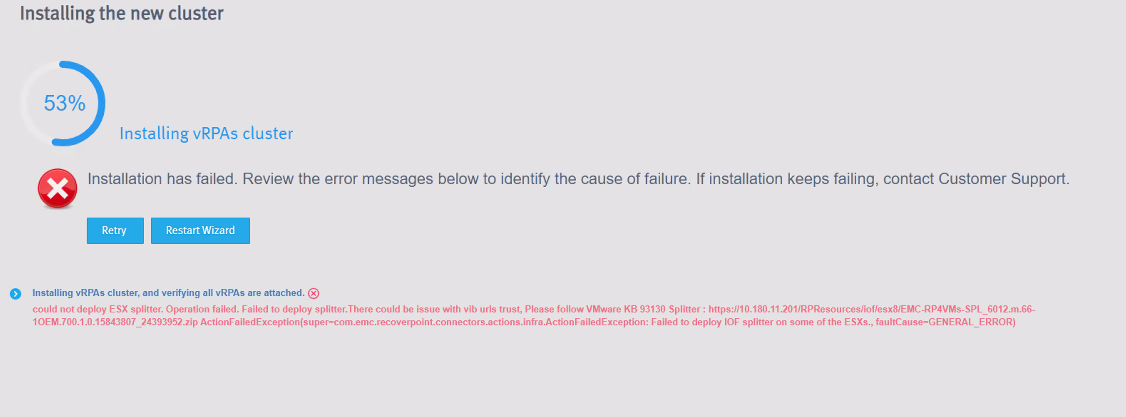
RecoverPoint for VMs 6.0:安装在 53 时失败,并显示错误“could not deploy ESXi splitter”
Summary: 由于错误“无法部署 ESXi 拆分器”和 vCenter 任务错误“任务控制台中已存在指定的键、名称或标识符 vibUrl”,导致 RecoverPoint for VMs 6.0 安装失败。
This article applies to
This article does not apply to
This article is not tied to any specific product.
Not all product versions are identified in this article.
Symptoms
由于错误导致 RecoverPoint for VMs 6.0 安装失败 "could not deploy ESXi splitter."
查看 vCenter 任务时,您可能会看到失败,例如 "The specified key, name, or identifier vibUrl already exists in the task console."
Cause
由于以前的拆分器安装存在/失败,拆分器部署失败。
Resolution
解决方案:
- 在 vSphere Client 菜单 >任务的任务控制台中识别错误。
- 检查错误
"The specified key, name, or identifier vibUrl already exists" - 使用 RecoverPoint for VMs uninstaller.bat 工具卸载拆分器和 JIRAF。有关更多信息,请参阅卸载 RecoverPoint for VMs 拆分器和 JIRAF。
- 卸载后,转至虚拟机部署程序向导页面的 RecoverPoint,然后单击 Retry 以再次启动 vRPA 群集安装。
提醒:使用与 RecoverPoint for VMs 版本匹配的最新卸载程序。
对于 6.0 GA 版本,请使用卸载程序 rp4vms_uninstaller_13.0.0-116
。可在此处下载卸载程序 。
对于 6.0 GA 版本,请使用卸载程序 rp4vms_uninstaller_13.0.0-116
。可在此处下载卸载程序 。
Additional Information
卸载 RecoverPoint for VMs 拆分器和 JIRAF。
使用 uninstaller.bat 工具卸载 RecoverPoint for VMs 拆分器和 JIRAF。
步骤:
- 在该节点上运行
iof_uninstall。
此命令会从 vCenter 和 ESXi 群集中完全删除拆分器和 JIRAF I/O 筛选器。 - 此时将显示一条消息:是否要继续?(是/否):
如果要继续卸载拆分器和 JIRAF,请键入 Y ,或者键入 N 以停止卸载。 - 输入 vCenter 的 IP 地址。
- 输入 vCenter 的 TCP 端口号,或按 Enter 选择 默认端口 (443)。
- 输入 vCenter 用户名。
- 输入 vCenter 密码。
将显示一条消息检查 vCenter 连接 vCenter 已准备好进行扫描,是否要添加新 vCenter?(是/否)或按 Q 退出: - 如果您不想添加其他 vCenter 来删除 I/O 筛选器,请键入 N ,如果需要,则键入 Y 。
正在扫描的 ESXi 群集:- <群集名称> v
- 全部
- 确保 输入逗号分隔的 ESXi 群集编号 (例如 1,2)/All:
此时将显示一条消息是否要继续在选定的 vCenter 和 ESXi 群集上卸载 I/O 筛选器?(是/否) - 键入 Y 以完成卸载。
Affected Products
RecoverPoint for Virtual MachinesProducts
RecoverPoint for Virtual MachinesArticle Properties
Article Number: 000213181
Article Type: Solution
Last Modified: 06 Mar 2025
Version: 7
Find answers to your questions from other Dell users
Support Services
Check if your device is covered by Support Services.