Aktivere innebygd kamera på Dell P3424WEB-, P2424HEB- og P2724DEB-skjermer
Summary: Kunder kan kontakte Dell fordi det integrerte kameraet ikke fungerer.
This article applies to
This article does not apply to
This article is not tied to any specific product.
Not all product versions are identified in this article.
Symptoms
Berørte produkter:
- Dell P3424WEB-skjerm
- Dell P2424HEB-skjerm
- Dell P2724DEB-skjerm
Cause
Hvis kameraet ikke aktiveres på riktig måte, kan dette problemet være årsaken.
Resolution
- Fjern klistremerket som er festet til kameraet.
- Vri kameramekanismen mot klokken for å åpne kameralukkeren.
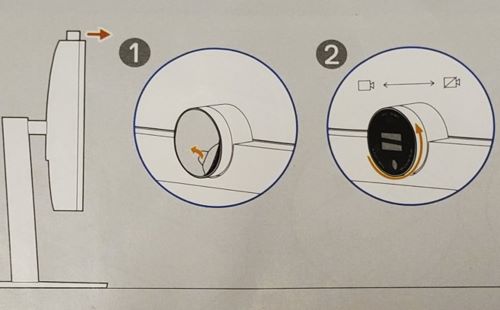
Affected Products
Dell P2424HEB, Dell P2724DEB, Dell P3424WEBArticle Properties
Article Number: 000218877
Article Type: Solution
Last Modified: 17 Apr 2025
Version: 5
Find answers to your questions from other Dell users
Support Services
Check if your device is covered by Support Services.