Aktivera inbyggd kamera på Dells P3424WEB-, P2424HEB- och P2724DEB skärmar
Summary: Kunder kan kontakta Dell eftersom den integrerade kameran inte fungerar.
This article applies to
This article does not apply to
This article is not tied to any specific product.
Not all product versions are identified in this article.
Symptoms
Berörda produkter:
- Bildskärmen Dell P3424WEB
- Dell P2424HEB skärm
- Dell P2724DEB skärm
Cause
Att kameran inte är korrekt aktiverad kan vara orsaken till detta problem.
Resolution
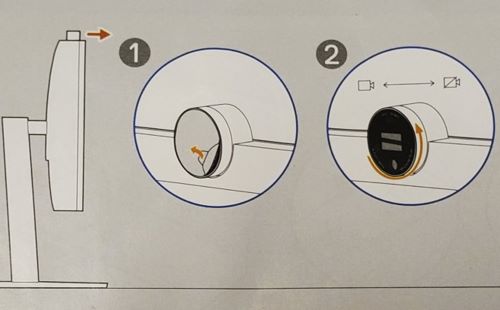
- Ta bort klistermärket som sitter på kameran.
- Vrid kameramekanismen moturs för att öppna kamerans slutare.
Affected Products
Dell P2424HEB, Dell P2724DEB, Dell P3424WEBArticle Properties
Article Number: 000218877
Article Type: Solution
Last Modified: 17 Apr 2025
Version: 5
Find answers to your questions from other Dell users
Support Services
Check if your device is covered by Support Services.