PowerFlex 4.X PFMP Add Existing Resource Group Wizard Fails With Error (400)
Summary: Attempts to add existing Resource Groups fail with "The device block-legacy-gateway could not be connected through SSH due to Could not retrieve credentials for MDM" error.
This article applies to
This article does not apply to
This article is not tied to any specific product.
Not all product versions are identified in this article.
Symptoms
Details about this example:
- All Resource Groups were removed.
- More than one Storage Only Resource Group. Each Resource Group contained one Protection Domain.
- All Metadata Managers (MDM) are in the Storage Only Resource Group of PD-01.
Error code of VXFM00455 may be observed.
A screenshot from the PFxM UI may show the following error:
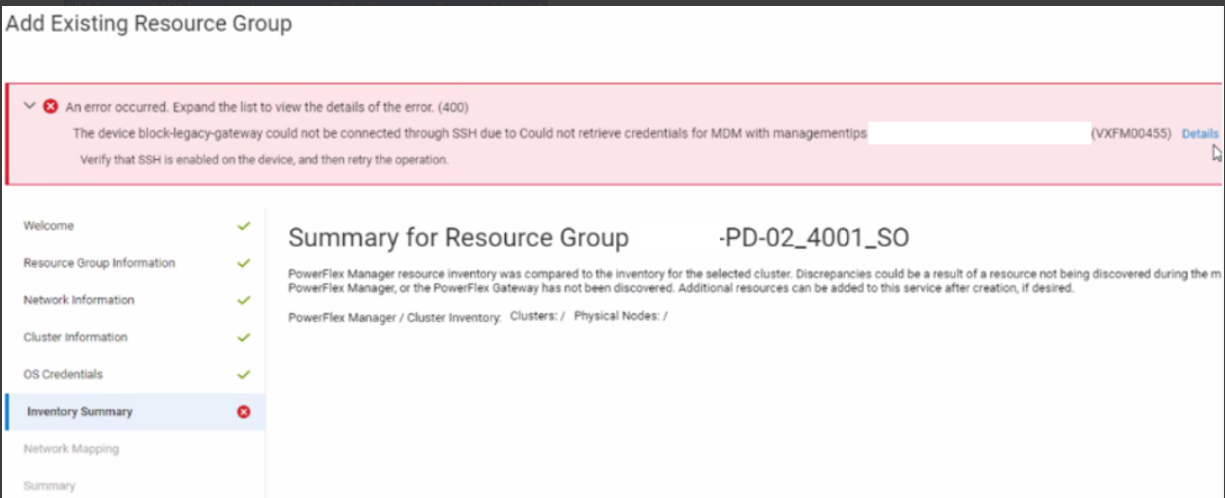
Impact: Unable to add an existing Resource Group.
Cause
When adding an existing Resource Group, it is essential that either the Primary MDM already exists within an existing Resource Group or is in the Resource Group being added. In this scenario, no Resource Groups have been added yet and the Resource Group PD-02 does not house the Primary MDM server. Therefore, specific essential query operations fail, resulting in an error within the user interface wizard.
Resolution
Workaround
The resource group that contains the Primary MDM server must be imported first.
Once the Primary MDM lives in an existing resource group, other resource groups can be imported.
Impacted Versions: PowerFlex Manager 4.x
Fixed In Version: N/A - Working as Designed
Affected Products
PowerFlex rack, VxFlex Ready Nodes, PowerFlex custom node, PowerFlex appliance connectivity, PowerFlex appliance R650, PowerFlex appliance R6525, PowerFlex appliance R660, PowerFlex appliance R6625, Powerflex appliance R750, PowerFlex appliance R760
, PowerFlex appliance R7625, PowerFlex appliance R640, PowerFlex appliance R740XD, PowerFlex appliance R7525, PowerFlex appliance R840
...
Article Properties
Article Number: 000219907
Article Type: Solution
Last Modified: 17 Jun 2025
Version: 5
Find answers to your questions from other Dell users
Support Services
Check if your device is covered by Support Services.